Introducing the R-centric Data Analysis Workflow
Shige
10/15/2013
What is workflow?
- Data acquisition and cleaning;
- Data analysis;
- Report result.
The goal of having a good workflow is to enable you to get your work done as efficiently as possible. More theoretical discussions can be found on this paper by Kieran Healy.
What is your workflow?
Please share …
What is the R-centric workflow?
- Statistical analysis using R;
- Report writing using LaTeX or Markdown;
- Embedding the computation into the report/paper;
- Rstudio.
What do you gain:
- No copy/paste necessary;
- Can drastically reduce errors;
- Save time.
What tools are needed?
- R (required)
- Knitr (required)
- Rstudio (required)
- R packages including Zelig, reshape2, ggplot2, texreg, stargazer, Gmisc, etc. (required)
- LaTeX (optional)
What is R?
R packages
- R without any packages is not very useful;
- A package is a collection of functions to carry out some tasks;
- It is sort of like “ado” files in Stata but much less limited;
- There are multiple ways to do the same thing, you need to figure out a combination that suites you best.
You may ask:
Not so long ago ...

With Rstudio ...
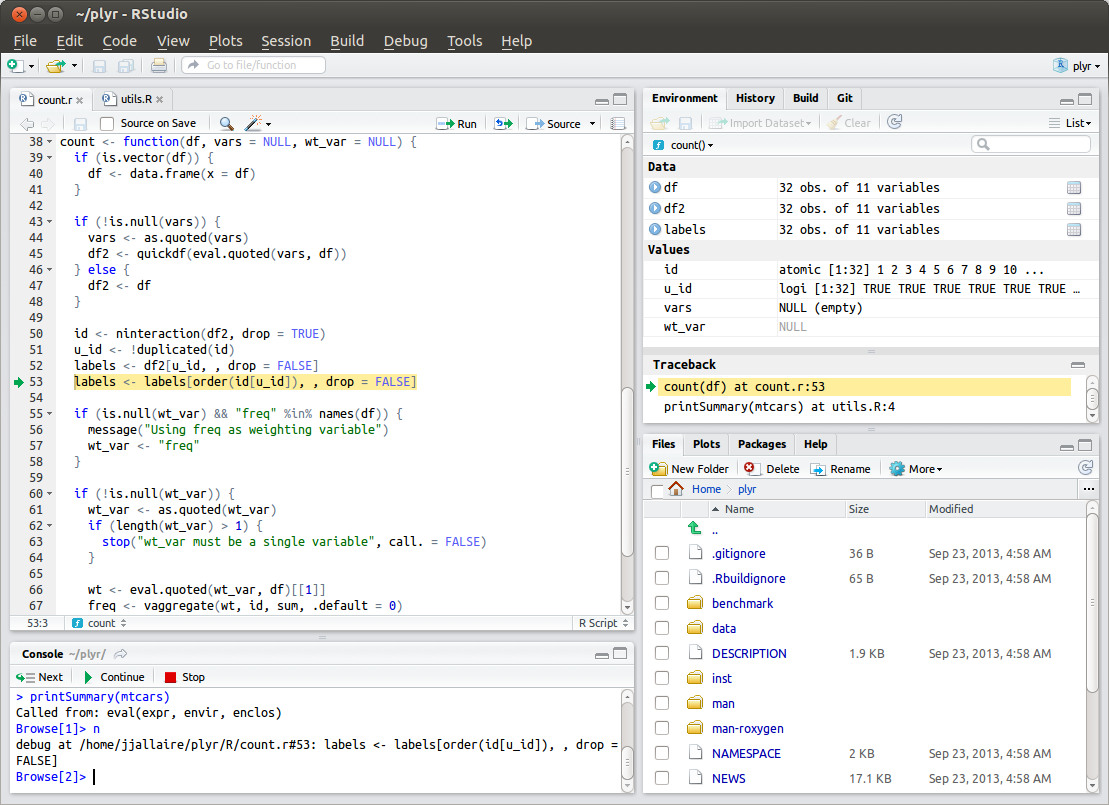
Commercial R

Install required packages
Let's pause and make sure you have installed all the packages we need by:
- Open Rstudio;
- Go the “Packages” tab;
- Click “Install packages”;
- Copy and paste the following into the “Packages” field: knitr, ggplot2, Zelig, ZeligChoice, ZeligMultilevel, texreg, stargazer, xtable, devtools, reshape2
- Make sure that “Install dependencies” option is ticked.
Using R
- Interactive use;
- Write R programs (.R);
- Embed R programs into reports (.Rmd).
Using R as a calculator
This is good for simple calculation and exploratory analysis.
- library(Zelig)
- data(turnout)
- summary(turnout)
We can go to the “Environment” tab to find more about this data set.
Writing R program
- In Stata, we call it “do file”;
- Let's try some simple stuff.
Run “demo1.R”
What have we just done?
- Zelig provides an unified syntax for statistical estimation of the following form:
zelig(depvar ~ indvars, data=dataname, model="modelname")- A complete list of models Zelig can estimate can be found here;
- Texreg provides the facilities to transform Zelig out to nicely formatted tables;
- texreg() generates LaTeX code;
- htmlreg() generates HTML code;
- screenreg() generates plain text;
texreg(list(model1, model2, model3))
Creating a "notebook" of what we just did.
A notebook is a report file that combines both R program code and the output generated by the code. With Rstudio, you don't need to do anything special. Just click “File/Compile Notebook”.
Embedding R program and results into reports
What are the main weaknesses of a notebook?
- Not a real report;
- Report too many details that most people do not care;
- Tables are not good-looking enough
- …
R Markdown: A language that is so simple ...
- File/New File/R Markdown
- Click the question mark on the upper left corner
That is the complete syntax!
An example
Let's create a simple R Markdown report of what just did together
- File\New File\R Markdown
- …
This presentation is an R Markdown document
library(Zelig)
library(texreg)
data(turnout)
v.model1 <- zelig(vote ~ race + age, data = turnout, model = "logit")
v.model2 <- zelig(vote ~ race + age + educate, data = turnout, model = "logit")
v.model3 <- zelig(vote ~ race + age + educate + income, data = turnout, model = "logit")
result <- htmlreg(list(v.model1, v.model2, v.model3))
Results
| Model 1 | Model 2 | Model 3 | |
|---|---|---|---|
| (Intercept) | 0.04 (0.18) | -3.05 (0.33)*** | -3.03 (0.33)*** |
| racewhite | 0.65 (0.13)*** | 0.38 (0.14)** | 0.25 (0.15) |
| age | 0.01 (0.00)*** | 0.03 (0.00)*** | 0.03 (0.00)*** |
| educate | 0.22 (0.02)*** | 0.18 (0.02)*** | |
| income | 0.18 (0.03)*** | ||
| AIC | 2234.82 | 2080.03 | 2033.98 |
| BIC | 2251.62 | 2102.43 | 2061.99 |
| Log Likelihood | -1114.41 | -1036.01 | -1011.99 |
| Deviance | 2228.82 | 2072.03 | 2023.98 |
| Num. obs. | 2000 | 2000 | 2000 |
| ***p < 0.001, **p < 0.01, *p < 0.05 | |||
Play with your own data
There are a number of ways to use your own data, which are likely to be in the format of Stata, SPSS, or SAS data set, including:
- Use Stat/transfer;
- Use the foreign package
Using the "foreign" package to import Stata data set from the web
library(foreign)
binreg <- read.dta("http://www.stata-press.com/data/r12/binreg.dta")
names(binreg)
[1] "cat" "d" "n" "alc" "smo" "soc"
library(Zelig)
z.out <- zelig(cbind(d, (n-d)) ~ alc + smo + soc, data=binreg, model="logit")
| Model 1 | |
|---|---|
| (Intercept) | -3.81 (0.44)*** |
| alc | 0.37 (0.13)** |
| smo | 0.56 (0.24)* |
| soc | 0.18 (0.14) |
| AIC | 77.44 |
| BIC | 81.00 |
| Log Likelihood | -34.72 |
| Deviance | 14.84 |
| Num. obs. | 18 |
| ***p < 0.001, **p < 0.01, *p < 0.05 | |
Same model in Stata
* webuse binreg
* glm n_lbw_babies alcohol smokes social, family(binomial n_women ) link(logit)
Access other people's Dropbox public folder
library(foreign)
dbox <- read.dta("https://dl.dropboxusercontent.com/u/211468568/class_survey.dta")
Let's try to run the code and see what's in that data.
In summary: I
Muenchen and Hilbe (2010) list eight reasons why Stata users should learn R:
- To augment Stata;
- To stay current with new analytic methods;
No need to give up Stata;Many interfaces for R;OOP;- Open source including the lowest level API;
- Better graphics (ggplot2);
- Free & free.
In summary: II
I would like to add the following:
- Complete literate programming solution;
- Superior spatial analysis facilities;
- Superior Bayesian analysis facilities;
- Enterprise DBMS integration;
- Big data solution integration.
When you go home ...
I want you to try the following:
- Import one of your data sets using the foreign package;
- Conduct simple analysis using the Zelig package;
- Create an R Markdown report;
- Upload your report to rpubs