Problem Set #2 - Introduction to Data Visualizations
Intro to Data Visualizations
M O
2022-09-19
Directions
In this chapter we discussed why well-designed data graphics are important and we described a taxonomy for understanding their composition.
The objective of this assignment is for you to understand what characteristics you can use to develop a great data graphic.
Each question is worth 5 points.
To submit this homework you will create the document in Rstudio, using the knitr package (button included in Rstudio) and then submit the document to your Rpubs account. Once uploaded you will submit the link to that document on Canvas. Please make sure that this link is hyper linked and that I can see the visualization and the code required to create it.
Question #1
Answer the following questions for this graphic Relationship between ages and psychosocial maturity

- Identify the visual cues, coordinate system, and scale(s)
- Visual cues: Direction, position, color and length
- coordinate system: Cartesian coordinate system
- Scales: Time
- How many variables are depicted in the graph? Explicitly link each variable to a visual cue that you listed above.
- Menarche and Psychosocial maturation depicted in terms of age and number of years ago
- 20,00 years ago: Color was used to indicate Menarche and Psychosocial maturation, length was also used as Psychosocial maturation appears longer than Menarche
- 2,000 years ago: Color and length visual cues used to indicate Menarche and Psychosocial maturation, with Menarche appearling longer than Psychosocial maturation
- 200 years ago: Color, direction, position
- Present: Color, direction, position
- Critique this data graphic using the taxonomy described in the lecture.
- The data graphic uses direction, position, color and length as visual cues to initially show a trend in Menarche and Psychosocial maturation over 20,000 years ago, which ends up showing a mismatch in Menarche and Psychosocial maturation in the present day. This can be interpreted to mean that Menarche can no longer be considered an indication of Psychosocial maturation in the present day. Certain factors have lead to a drop in the age of Menarche, which did not affect age of Psychosocial maturation in the present day. The Cartesian coordinate system is perfect for this illustration, however one could question the use of length as a visual cue.
Question #2
Answer the following questions for this graphic World’s top 10 best selling cigarette brands 2004-2007
- Identify the visual cues, coordinate system, and scale(s)
- Visual cues: Color and length
- coordinate system: Cartesian coordinate system
- Scales: Numeric - Linear
- How many variables are depicted in the graph? Explicitly link each
variable to a visual cue that you listed above. There are
Ten Variables in the graph
- Marlboro: Color and length
- Mild Seven: Color and length
- L&M: Color and length
- Winston: Color and length
- Camel: Color and length
- Cleopatra: Color and length
- Derby: Color and length
- Pall Mall: Color and length
- Kent: Color and length
- Wills Gold flake: Color and length
- Critique this data graphic using the taxonomy described in the
lecture.
- Visual cues Color and length was used for the data graphic. The color selection had a good variation with no one color standing out more than the rest.The length of Marlboro clearly distinguishes it as the Top selling cigarette brand between 2004-2007. The length also shows the sales (in billions) of the brands in comparison to each other. Context is provided by axis labels and a title
Question #3
Find two data graphics published in a newspaper on the internet in the last two years.
- Identify a graphical display that you find compelling. What aspects of the display work well, and how do these relate to the principles that we have just gone over in lecture. Include a screenshot of the display along with your solution (Hint:use the following in a code chunk: knitr::include_graphics(“your_graphic”).
Answer: The graphic below uses a combination of direction, position and color as visual cues to convey its message. The graphic which uses a Cartesian coordinate system, shows on a liner scale the United states attitude toward gun control, in Percentage. The graphic is easy to read, one can tell at first glance what the context of the graph is. The position of the “more strict” line shows at first glace that a higher percentage of Americans believe that laws covering gun control should be more strict, compared to the other two response; “Kept as now” and “less strict”.
Source: https://www.economist.com/graphic-detail/2022/05/17/fewer-americans-want-stricter-gun-control
knitr::include_graphics("Good graphic.png")
- Identify a graphical display that you find less compelling. What aspects of the display don’t work well? Are there ways that the display might be improved? Include a screenshot of the display along with your solution (Hint:use the following in a code chunk: knitr::include_graphics(“your_graphic”).
Answer: The graphical display contains a great deal of information. Just like the good graph above, the designer used color, position and direction as visual cues. However, the graphic contains too many data points which makes is extremely difficult to read. While there is a legend present, the colors are too close to create any real distinction, and the points are closely packed as well. The graphic which aims to show the weekly covid mortality rate could have been displaced better on a bar chart, but the mortality rates groups as monthly and not weekly, showing each year on a separate bar chart
knitr::include_graphics("bad graphic.jpeg")
Question #4
Briefly (one paragraph) critique the designer’s choices. Would you have made different choices? Why or why not? Note: Link contains a collection of many data graphics, and I don’t expect (or want) you to write a full report on each individual graphic. But each collection shares some common stylistic elements. You should comment on a few things that you notice about the design of the collection.
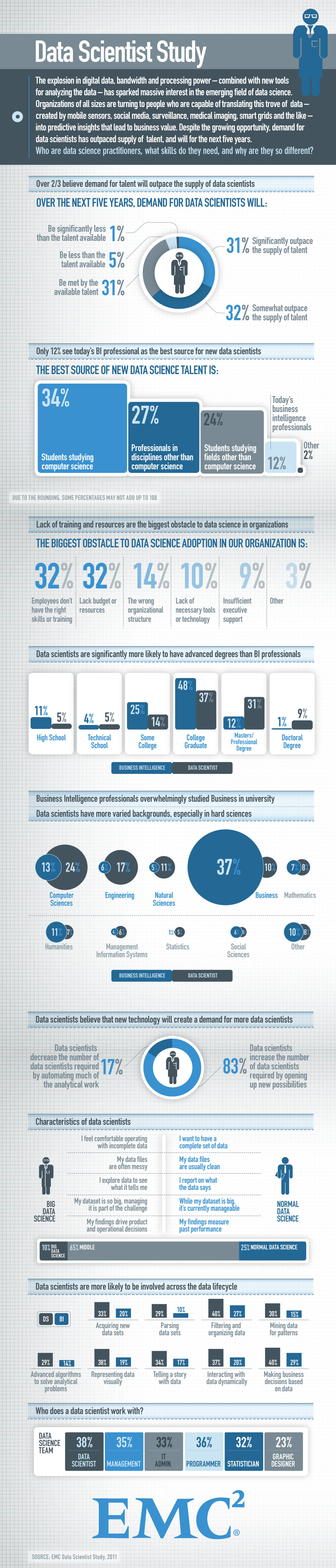
Answer: The designer used a number of different chart types, applying various visual cues on each data graphic, including; color, length, angle, shade, and area. The use of one color scheme made the presentation appear professional, and the color scheme used is equally professional as it is visually appealing. The designer creatively used a combination of color and other visual cues on each chart to ensure each chart is equally informative to any color blind audiences. Each chart also contained a great deal of information, which makes the presentation easy to comprehend, and the point of each chart is clear. However, the presentation appears to have too many charts, which could be perceived and too much information. This could lead to some of the points being overlooked. To fix this, I would divide the charts into 3-4 groups of charts which provide related information and answer the same question. Each group clearly separated by a title question.
Question #5
Briefly (one paragraph) critique the designer’s choices. Would you have made different choices? Why or why not? Note: Link contains a collection of many data graphics, and I don’t expect (or want) you to write a full report on each individual graphic. But each collection shares some common stylistic elements. You should comment on a few things that you notice about the design of the collection.
Charts that explain food in America
Answer: Again this designer provided a great deal of information. At first glance, one can tell the amount of work that went into creating all 40 charts and providing details for each chart. The designer used Geographic, radial, and Cartesian coordinate system to explain the American food industry. Some of the charts are easy to read and comprehend but some of the shades used to represent quantity is difficult to read. Regardless, to improve quality of the presentation, I would suggest using fewer data graphic visualization and having a center of interest.