Climate Spirals (Key). Ursinus College
Initiative for Inclusive Data Science and Innovative Research (IDSIRI)
Prof. Hugo Montesinos and Prof. Olga Nicoara
2022-09-12 (Week 3)
Climate Spirals.
This week we will create climate spirals and make them interactive. We will follow Code Club (episode 223) by the Riffomonas Project YouTube Channel and Pat Schloss (highly recommended!). They build upon climatologist Ed Hawkins from the University of Reading.
Introductory Key videos:
(1 Min) The original visualization from Ed Hawkins: A spiral of global
surface temperatures from 1880 to 2021 https://www.youtube.com/watch?v=46zcAt3vf_4
(30 Min) Replication by Pat Schloss (Riffomonas Project and
Code Club): Using R to make a 3D interactive figure showing
climate change with plotly (CC223)
https://www.youtube.com/watch?v=PytBiFU0rEc&t=605s
Introductory blogpost:
In this Riffomonas
blogpost, Pat Schloss shows and explains the code he uses for his
video. I cannot recommend this highly enough! Especially if you watch
any of his videos, watch the process he follows and the
critical thinking. Notice how he goes about learning new things such as
3D scatterplots.
Install and load key R packages
Install and load the the following R packages: tidyverse, plotly, readr, glue, and htmlwidgets.
Load climate data from NASA
Data come from NASA: https://data.giss.nasa.gov/gistemp/. We want to read the
data from the section: Tables of Global and Hemispheric Monthly
Means and Zonal Annual Means, subsection: Combined
Land-Surface Air and Sea-Surface Water Temperature Anomalies (Land-Ocean
Temperature Index, L-OTI). Specific data: Global-mean
monthly, seasonal, and annual means, 1880-present, updated
through most recent month: TXT, CSV.
If you right-click on the CSV file, you can copy the link which is the
URL we will use. Then do the following:
- Create a variable named url containing the link to
the data within double quotes.
- Read the data into R using the read.csv function. Hint: You need to skip one row.
- View the data and make it a tibble
#Get latest data from NASA
url <- "https://data.giss.nasa.gov/gistemp/tabledata_v4/GLB.Ts+dSST.csv"
data<-read.csv(url, skip=1, na="***")
head(data)
## Year Jan Feb Mar Apr May Jun Jul Aug Sep Oct Nov Dec
## 1 1880 -0.18 -0.24 -0.09 -0.16 -0.10 -0.21 -0.18 -0.09 -0.14 -0.23 -0.21 -0.17
## 2 1881 -0.19 -0.14 0.04 0.05 0.07 -0.18 0.01 -0.03 -0.15 -0.22 -0.18 -0.07
## 3 1882 0.16 0.14 0.05 -0.16 -0.13 -0.22 -0.16 -0.07 -0.14 -0.23 -0.17 -0.36
## 4 1883 -0.29 -0.37 -0.12 -0.19 -0.18 -0.07 -0.07 -0.14 -0.22 -0.11 -0.24 -0.11
## 5 1884 -0.13 -0.08 -0.37 -0.40 -0.34 -0.35 -0.31 -0.28 -0.27 -0.25 -0.33 -0.31
## 6 1885 -0.58 -0.33 -0.26 -0.42 -0.45 -0.44 -0.34 -0.31 -0.29 -0.24 -0.24 -0.10
## J.D D.N DJF MAM JJA SON
## 1 -0.17 NA NA -0.12 -0.16 -0.19
## 2 -0.08 -0.09 -0.17 0.05 -0.07 -0.18
## 3 -0.11 -0.08 0.08 -0.08 -0.15 -0.18
## 4 -0.18 -0.20 -0.34 -0.16 -0.09 -0.19
## 5 -0.28 -0.27 -0.11 -0.37 -0.31 -0.28
## 6 -0.33 -0.35 -0.41 -0.38 -0.36 -0.25data<-tibble(data)Convert the data from wide to long (tidy).
The data are in wide format (each year is a column). We want to make
it into long format, where year is a single-column variable
containing all the years from 1880 to the present. Do the
following:
- Select the columns corresponding to the 12 months (i.e. omit aggregates such as J.D D.N DJF MAM JJA SON).
- Reshape the data to long format. Assign the values to the new variable t_diff.You can give your variable any name, but these data show temperature differences (or deviations) with respect to the benchmark years 1951-1980.
- Practice back and forth reshaping your data from wide to long and viceversa.
# Convert the data from wide to long (tidy).
data_wide<-data %>%
  select(year = Year, all_of(month.abb))

data_long<- data_wide %>%
  pivot_longer(-year,
               names_to = "month",
               values_to = "t_diff") %>%
  drop_na() %>%
  mutate(month = factor(month, levels=month.abb)) %>%
  arrange(year, month)

data_long
## # A tibble: 1,711 × 3
## year month t_diff
## <int> <fct> <dbl>
## 1 1880 Jan -0.18
## 2 1880 Feb -0.24
## 3 1880 Mar -0.09
## 4 1880 Apr -0.16
## 5 1880 May -0.1
## 6 1880 Jun -0.21
## 7 1880 Jul -0.18
## 8 1880 Aug -0.09
## 9 1880 Sep -0.14
## 10 1880 Oct -0.23
## # … with 1,701 more rowsTransform data to Polar Coordinates.
To visualize the data in a circular fashion (necessary for the
climate spiral) we need to use polar coordinates:
1. Convert the data to Polar Coordinates. 2. Inspect the data.
# Transform data to Polar Coordinates.
t_data <- data_long %>%
  mutate(month_number = as.numeric(month),
         radius = t_diff + 1.5,
         theta = 2*pi*(month_number - 1)/12,
         x = radius * cos(theta),
         y = radius * sin(theta),
         z = year,
         label = glue("{month} {year}\n {t_diff} \u00B0C"))
head(t_data)
## # A tibble: 6 × 10
## year month t_diff month_number radius theta x y z label
## <int> <fct> <dbl> <dbl> <dbl> <dbl> <dbl> <dbl> <int> <glue>
## 1 1880 Jan -0.18 1 1.32 0 1.32e+ 0 0 1880 Jan 1880
## -0…
## 2 1880 Feb -0.24 2 1.26 0.524 1.09e+ 0 0.63 1880 Feb 1880
## -0…
## 3 1880 Mar -0.09 3 1.41 1.05 7.05e- 1 1.22 1880 Mar 1880
## -0…
## 4 1880 Apr -0.16 4 1.34 1.57 8.20e-17 1.34 1880 Apr 1880
## -0…
## 5 1880 May -0.1 5 1.4 2.09 -7.00e- 1 1.21 1880 May 1880
## -0…
## 6 1880 Jun -0.21 6 1.29 2.62 -1.12e+ 0 0.645 1880 Jun 1880
## -0…Simple visualization
Produce a simple visual of the data in polar coordinates.
# Simple visualization
t_data %>% ggplot(aes(x = x, y = y, color = year ))+
geom_path() # Interactive Climate Spiral (Version 1.0)
- Make the visual above interactive using plot_ly:
# Interactive Climate Spiral (Version 1.0)
p<-plot_ly(t_data,
        x = ~x, y = ~y, z = ~z,
        type = 'scatter3d',
        mode = 'lines',
        line = list(width = 4, color = ~t_diff,
                    cmid = 0,
                    colorscale = list(c(0,'blue'),
                                    c(0.5,'white'),
                                    c(1,'red'))))

p
saveWidget(p, "climate_spiral_plotly1.html")Interactive Climate Spiral (Version 2.0)
- Add a hover text with labels *Month, Year, [Temperature difference value] °C.
- Remove gridlinesand axis titles for x and y.
# Interactive Climate Spiral (Version 2.0)
axx <- list(title = "", showgrid = FALSE, zeroline = FALSE, showticklabels = FALSE)
axy <- list(title = "", showgrid = FALSE, zeroline = FALSE, showticklabels = FALSE)
axz <- list(title = "")

p<-plot_ly(t_data,
        x = ~x, y = ~y, z = ~z, text=~label,
        hoverinfo = "text",
        type = 'scatter3d',
        mode = 'lines',
        line = list(width = 4, color = ~t_diff,
                    cmid = 0,
                    colorscale = list(c(0,'blue'),
                                    c(0.5,'white'),
                                    c(1,'red'))))

p<- p %>%  layout(scene = list(xaxis=axx,yaxis=axy,zaxis=axz))
p
saveWidget(p, "climate_spiral_plotly2.html")Show the same data using base R
# Interactive Climate Spiral (Version 2.0)
t_data <- t_data %>%  mutate(year2=year+month_number/12)
p2<-plot(t_data$t_diff~t_data$year2, type="l", col="blue",
     xlab="Year", ylab="Temperature Deviation (°C)",
     main = "Global Temperature Anomalies Relative to 1951-1980")
abline(h=-0.5, lty=2); abline(h=+0.5, lty=2); abline(h=+1, lty=2, col="red")
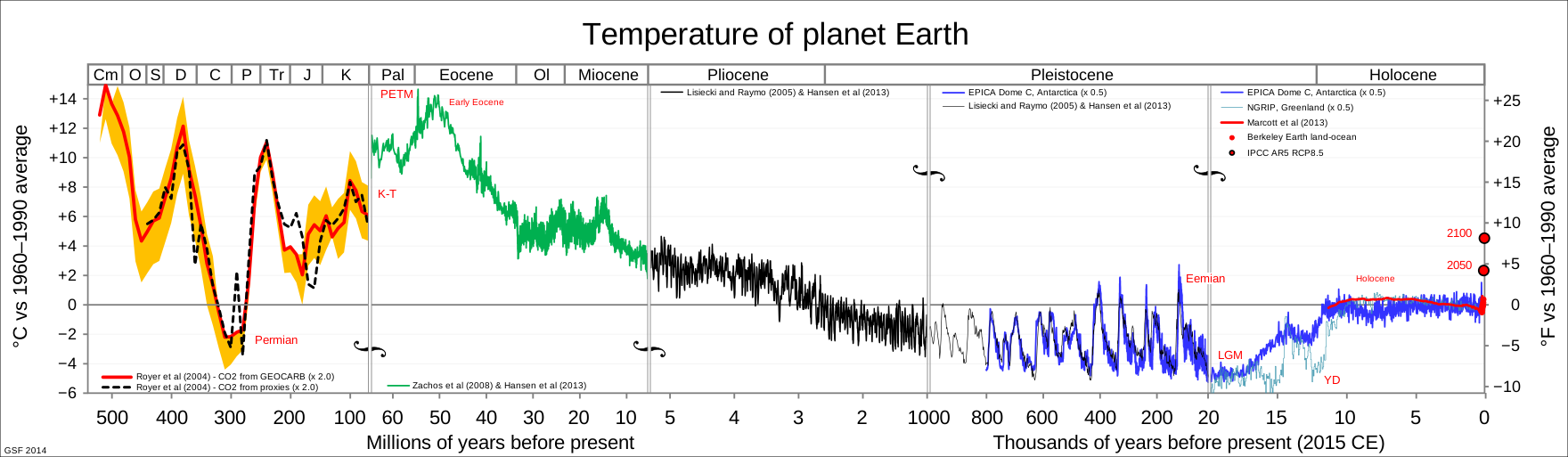
p2## NULLThis is alarming, especially if we use these data alone to forecast future global temperatures (say in the next 100 years). Doing so, however, would be a mistake. Why? We need to understand the fundamental drivers and mechanisms of the global temperature rise and these data don’t tell us that. Is it man-made or is it not? And to what degree? In addition, it is convenient to see the temperature anomalies on a larger time frame (say, thousands of years). While the data are less precise the further back we go in time, there are some projects attempting to measure that accurately. For example, see this amazing 800 Thousand Years Graph from the European Project for Ice Coring in Antartica (EPICA): Read more about it at Wikipedia. Also, see this another wonderful graph showing Multiple Models spanning up to 500 Years. Read more about it in Wikipedia