class: center, inverse <br><br> # Becoming an AnimatoR ## Applications in `ggplot`, `gganimate`, and more! <br><br> ### Brady Rippon ### WCM Biostatistics Computing Club ### August 02, 2022 <a href="https://wcm-computing-club.github.io/"> <img style="position: absolute; top: 75px; right: 50px; width: 250px; height: 58px; border: 0;" src="https://weillcornell.org/sites/all/themes/weillcornell/logo.png" alt="Fork me on GitHub"></a> <a href="https://gganimate.com/"> <img style="position: absolute; top: 25px; left: 50px; width: 150px; height: 174px; border: 0;" src="https://gganimate.com/reference/figures/logo.png" alt="Fork me on GitHub"></a> --- class: inverse, center, middle # Grammar of Graphics --- background-image: url(https://raw.githubusercontent.com/bradyrippon/Images_WCM/main/drake.png) background-size: 550px background-position: 50% 70% # Using `ggplot` v. base R? --- # Using `ggplot` v. base R? .pull-left2[ - Customize your **themes** for any style you like! <br> <code class ='r hljs remark-code'>ggplot(<span style='color:#d1d5d8'>iris</span>, <span style='color:#eb6b56'>aes</span>(x = Sepal.Length, <br> y = Sepal.Width)) +<br> <span style='color:#54acd2'>geom_jitter</span>(alpha = 0.6) +<br> <span style='color:#fba026'>facet_grid</span>(. ~ Species) +<br> <span style='color:#61bd6d'>stat_smooth</span>(method = "lm", <br> se = F, col = "red") + <br> <span style='color:#f7da64'>scale_y_continuous</span>("Sepal Width (cm)",<br> limits = c(2, 5),<br> expand = c(0, 0)) +<br> <span style='color:#f7da64'>scale_x_continuous</span>("Sepal Length (cm)",<br> limits = c(4, 8),<br> expand = c(0, 0)) +<br> <span style='color:#f7da64'>coord_equal</span>() +<br> <span style='color:#9365b8'>theme</span>()</code> <img src="gganimate_files/figure-html/unnamed-chunk-50-1.png" width="504" /> ] .pull-right2[ 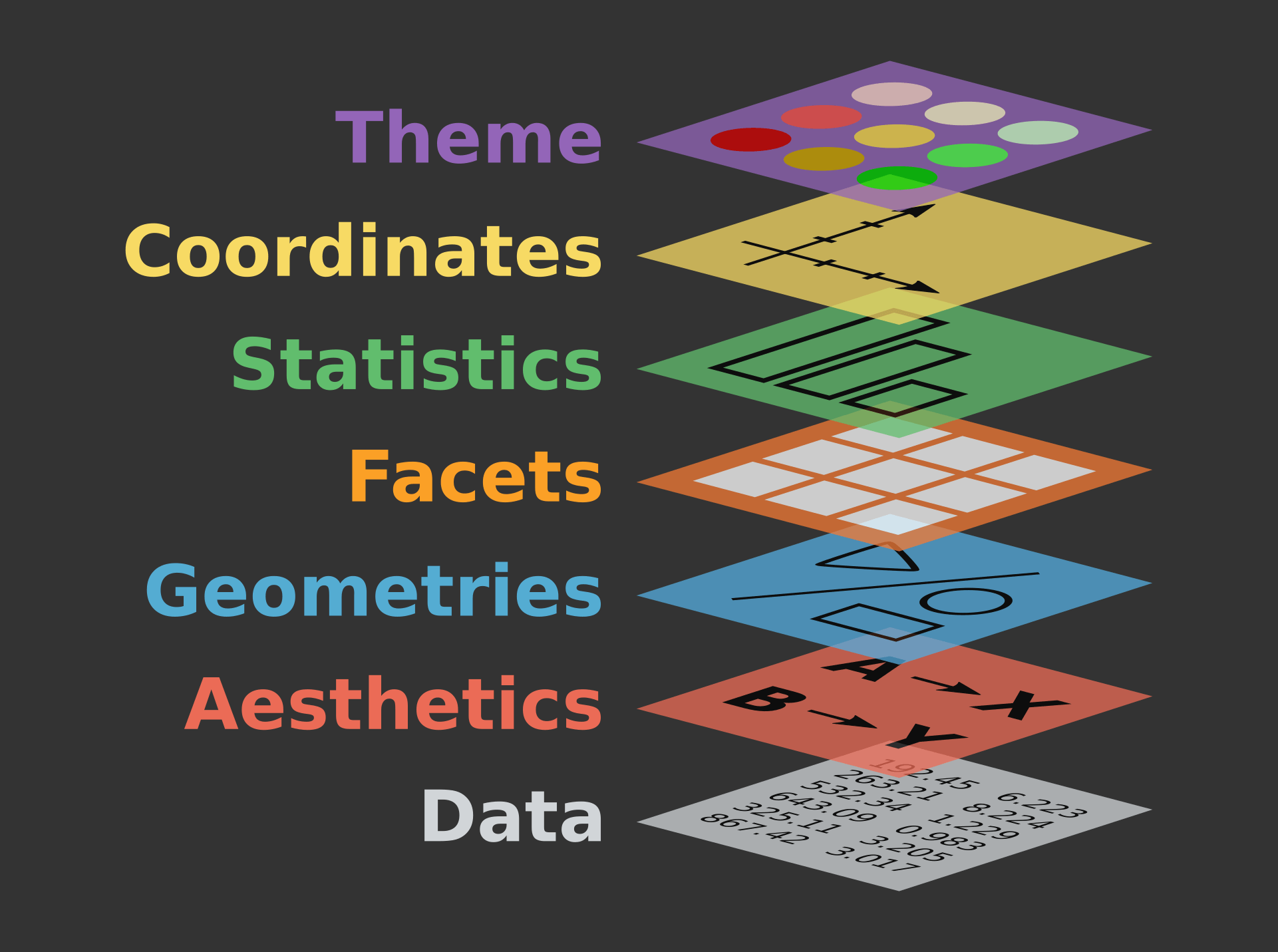 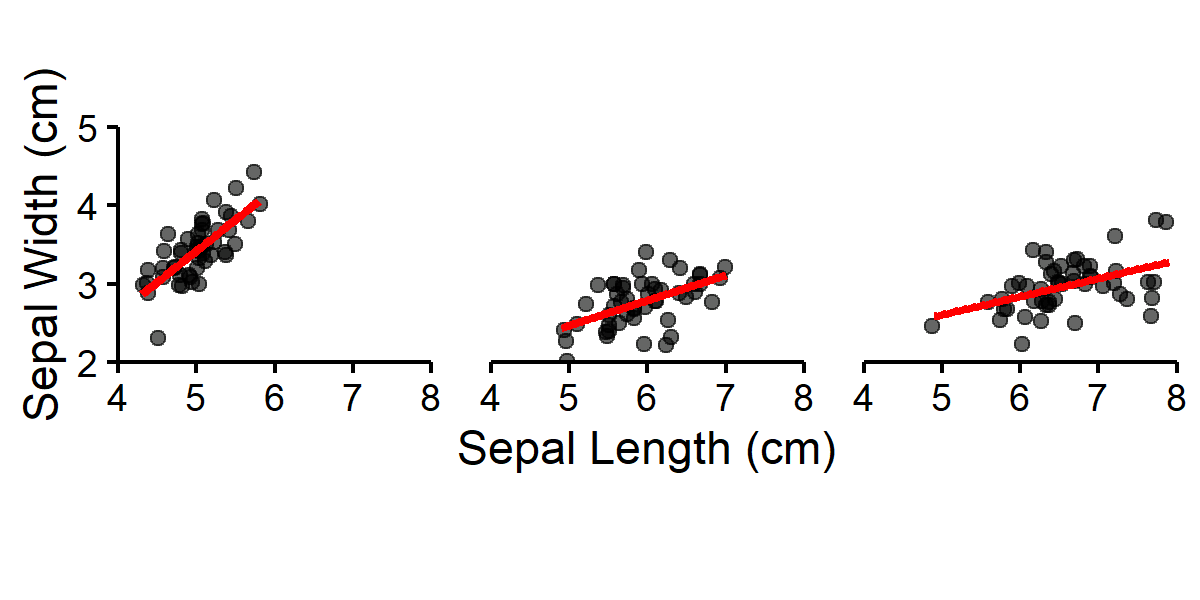 ] --- # Explore different `ggplot` extensions! ```r library(ggridges) plot_a <- ggplot(iris) + * geom_density_ridges(aes(fill = Species)) + # custom geometric layer (...) # additional layers library(ggalt) iris_setosa <- iris %>% filter(Species == "setosa") plot_b <- ggplot(iris) + * geom_encircle(data = iris_setosa) + # custom geometric layer (...) # additional layers library(ggforce) plot_c <- ggplot(iris) + * facet_zoom(x = Species == "versicolor") + # custom facet layer (...) # additional layers library(ggpubr) # also includes many plotting extensions ggarrange(plot_a, plot_b, plot_c, ncol = 3, nrow = 1, common.legend = TRUE, legend = "bottom", labels = "AUTO") ``` --- # Explore different `ggplot` extensions!  --- background-image: url(https://raw.githubusercontent.com/bradyrippon/Images_WCM/main/passionCat.png) background-size: 500px background-position: 80% 85% <a href="https://ggplot2.tidyverse.org/reference/ggplot.html"> <img style="position: absolute; top: 25px; right: 50px; width: 200px; height: 232px; border: 0;" src="https://ggplot2.tidyverse.org/logo.png" alt="Fork me on GitHub"></a> # `ggplot` Resources Public materials and tutorials: - Package documentation from [tidyverse website](https://ggplot2.tidyverse.org/) - Browse the [R graph gallery](https://r-graph-gallery.com/) for more extensions and figure examples <br> WCM Computing Club materials: - [The Beauty of `ggplot2`](https://wcm-computing-club.github.io/file_resources/Lee_R_ggplot2.html) by Dr. Jihui Lee - [Visualization in R](https://wcm-computing-club.github.io/file_slides/2019/201904_Cooley_Visualization_in_R.html#introduction) by Vicky Cooley --- class: inverse, center, middle # The Animation Layer --- <a href="https://gganimate.com/"> <img style="position: absolute; top: 25px; right: 50px; width: 200px; height: 232px; border: 0;" src="https://gganimate.com/reference/figures/logo.png" alt="Fork me on GitHub"></a> # Add a custom animation layer <br> The **gganimate** package provides a new range of grammar classes <br> which can be added to the `ggplot` plot object <br> - **transition*_()** defines how long the data should be spread out and how long it relates to itself across time .secondary[ - **view*_()** defines how the position scales should change along the animation - **shadow*_()** defines how the data from other points in time should be presented in the given point in time - **enter*_()** / **exit*_()** defines how new data should appear and how old data should disappear during the course of the animation - **ease_aes()** defines how different aesthetics should be eased during transitions ] --- # The **transition*_()** function This function could take the following form: - **transition_states()**: Transition between several distinct stages of the data .secondary[ - **transition_time()**: Transition through distinct states in time - **transition_reveal()**: Reveal data along a given dimension - **transition_events()**: Transition individual events in and out - **transition_filter()**: Transition between different filters - **transition_layers()**: Build up a plot, layer by layer - **transition_components()**: Transition individual components through their own lifecycle - **transition_manual()**: Create an animation by specifying the frame membership directly - **transition_null()**: Keep all data constant across the animation ] --- # Example: **transition_states()**: ```r ggplot(iris, aes(Sepal.Width, Petal.Width)) + geom_point() + * transition_states(Species, transition_length = 3, state_length = 1) ``` .center[ <img src="https://raw.githubusercontent.com/bradyrippon/Images_WCM/main/t_s.gif" width="500px" /> ] --- # The **transition*_()** function This function could take the following form: .secondary[ - **transition_states()**: Transition between several distinct stages of the data ] - **transition_time()**: Transition through distinct states in time .secondary[ - **transition_reveal()**: Reveal data along a given dimension - **transition_events()**: Transition individual events in and out - **transition_filter()**: Transition between different filters - **transition_layers()**: Build up a plot, layer by layer - **transition_components()**: Transition individual components through their own lifecycle - **transition_manual()**: Create an animation by specifying the frame membership directly - **transition_null()**: Keep all data constant across the animation ] --- # Example: **transition_time()**: ```r ggplot(airquality, aes(Day, Temp)) + geom_point(aes(colour = factor(Month))) + * transition_time(Day) # coerces raw values into the closest frame ``` .center[ <img src="https://raw.githubusercontent.com/bradyrippon/Images_WCM/main/t_t.gif" width="800px" /> ] --- # The **transition*_()** function This function could take the following form: .secondary[ - **transition_states()**: Transition between several distinct stages of the data - **transition_time()**: Transition through distinct states in time ] - **transition_reveal()**: Reveal data along a given dimension .secondary[ - **transition_events()**: Transition individual events in and out - **transition_filter()**: Transition between different filters - **transition_layers()**: Build up a plot, layer by layer - **transition_components()**: Transition individual components through their own lifecycle - **transition_manual()**: Create an animation by specifying the frame membership directly - **transition_null()**: Keep all data constant across the animation ] --- # Example: **transition_reveal()**: ```r ggplot(airquality, aes(Day, Temp, group = Month)) + geom_line(aes(colour = factor(Month))) + * transition_reveal(Day) # calculates intermediary values at exact positions ``` .center[ <img src="https://raw.githubusercontent.com/bradyrippon/Images_WCM/main/t_r.gif" width="800px" /> ] --- # The **transition*_()** function This function could take the following form: .secondary[ - **transition_states()**: Transition between several distinct stages of the data - **transition_time()**: Transition through distinct states in time - **transition_reveal()**: Reveal data along a given dimension ] - **transition_events()**: Transition individual events in and out .secondary[ - **transition_filter()**: Transition between different filters - **transition_layers()**: Build up a plot, layer by layer - **transition_components()**: Transition individual components through their own lifecycle - **transition_manual()**: Create an animation by specifying the frame membership directly - **transition_null()**: Keep all data constant across the animation ] --- # Example: **transition_events()**: .pull-left[ ```r # create sample data set.seed(1) data <- data.frame( x = 1:10, y = runif(10), begin = runif(10, 1, 100), length = runif(10, 5, 20), enter = runif(10, 5, 10), exit = runif(10, 5, 10) ) ggplot(data, aes(x, y)) + geom_col() + * transition_events(start = begin, * end = begin + length, * enter_length = enter, * exit_length = exit) ``` ] .pull-right[ .center[ <img src="https://raw.githubusercontent.com/bradyrippon/Images_WCM/main/t_e.gif" width="500px" /> ] ] --- # The **transition*_()** function This function could take the following form: .secondary[ - **transition_states()**: Transition between several distinct stages of the data - **transition_time()**: Transition through distinct states in time - **transition_reveal()**: Reveal data along a given dimension - **transition_events()**: Transition individual events in and out ] - **transition_filter()**: Transition between different filters .secondary[ - **transition_layers()**: Build up a plot, layer by layer - **transition_components()**: Transition individual components through their own lifecycle - **transition_manual()**: Create an animation by specifying the frame membership directly - **transition_null()**: Keep all data constant across the animation ] --- # Example: **transition_filter()**: .pull-left[ ```r ggplot(iris, aes(Petal.Width, Petal.Length, colour = Species)) + geom_point() + * transition_filter( * transition_length = 3, * filter_length = 1, * Setosa = Species == 'setosa', * Long = Petal.Length > 4, * Wide = Petal.Width > 2 * ) + theme(legend.position = "bottom") # transition_filter(keep = T) # Will keep previous data # Can also control # enter() / exit() parameters ``` ] .pull-right[ .center[ <img src="https://raw.githubusercontent.com/bradyrippon/Images_WCM/main/t_f.gif" width="500px" /> ] ] --- # The **transition*_()** function This function could take the following form: .secondary[ - **transition_states()**: Transition between several distinct stages of the data - **transition_time()**: Transition through distinct states in time - **transition_reveal()**: Reveal data along a given dimension - **transition_events()**: Transition individual events in and out - **transition_filter()**: Transition between different filters ] - **transition_layers()**: Build up a plot, layer by layer .secondary[ - **transition_components()**: Transition individual components through their own lifecycle - **transition_manual()**: Create an animation by specifying the frame membership directly - **transition_null()**: Keep all data constant across the animation ] --- # Example: **transition_layers()**: .pull-left[ ```r ggplot(mtcars, aes(mpg, disp)) + geom_point() + geom_smooth(colour = 'grey', se = FALSE) + geom_smooth(aes(colour = factor(gear))) + * transition_layers(layer_length = 1, * transition_length = 2, * from_blank = FALSE, * keep_layers = c(Inf, 0, 0)) + theme(legend.position = "bottom") # Treats each plotting layer # like a "state" ``` ] .pull-right[ .center[ <img src="https://raw.githubusercontent.com/bradyrippon/Images_WCM/main/t_l.gif" width="500px" /> ] ] --- # The **transition*_()** function This function could take the following form: .secondary[ - **transition_states()**: Transition between several distinct stages of the data - **transition_time()**: Transition through distinct states in time - **transition_reveal()**: Reveal data along a given dimension - **transition_events()**: Transition individual events in and out - **transition_filter()**: Transition between different filters - **transition_layers()**: Build up a plot, layer by layer ] - **transition_components()**: Transition individual components through their own lifecycle .secondary[ - **transition_manual()**: Create an animation by specifying the frame membership directly - **transition_null()**: Keep all data constant across the animation ] --- # Example: **transition_components()**: .pull-left[ ```r # create sample data set.seed(1) data <- data.frame( x = runif(10), y = runif(10), size = sample(1:3, 10, TRUE), time = c(1, 4, 6, 7, 9, 6, 7, 8, 9, 10), id = rep(1:2, each = 5) ) ggplot(data, aes(x, y, group = id, size = size)) + geom_point() + * transition_components(time, * range = c(4, 8)) + theme(legend.position = "bottom") # No common "state" and "transition" ``` ] .pull-right[ .center[ <img src="https://raw.githubusercontent.com/bradyrippon/Images_WCM/main/t_c.gif" width="500px" /> ] ] --- # The **transition*_()** function This function could take the following form: .secondary[ - **transition_states()**: Transition between several distinct stages of the data - **transition_time()**: Transition through distinct states in time - **transition_reveal()**: Reveal data along a given dimension - **transition_events()**: Transition individual events in and out - **transition_filter()**: Transition between different filters - **transition_layers()**: Build up a plot, layer by layer - **transition_components()**: Transition individual components through their own lifecycle ] - **transition_manual()**: Create an animation by specifying the frame membership directly .secondary[ - **transition_null()**: Keep all data constant across the animation ] --- # Example: **transition_manual()**: - Use with caution! Can often have rendering issues with frame count. The plot below is generated with **transition_states()** ```r ggplot(mtcars, aes(gear, mpg)) + geom_boxplot() + * transition_manual(gear) # no "tweening"; creates a 3-frame animation ``` .center[ <img src="https://raw.githubusercontent.com/bradyrippon/Images_WCM/main/t_m.gif" width="500px" /> ] --- # The **transition*_()** function This function could take the following form: .secondary[ - **transition_states()**: Transition between several distinct stages of the data - **transition_time()**: Transition through distinct states in time - **transition_reveal()**: Reveal data along a given dimension - **transition_events()**: Transition individual events in and out - **transition_filter()**: Transition between different filters - **transition_layers()**: Build up a plot, layer by layer - **transition_components()**: Transition individual components through their own lifecycle - **transition_manual()**: Create an animation by specifying the frame membership directly ] - **transition_null()**: Keep all data constant across the animation --- <a href="https://gganimate.com/"> <img style="position: absolute; top: 25px; right: 50px; width: 200px; height: 232px; border: 0;" src="https://gganimate.com/reference/figures/logo.png" alt="Fork me on GitHub"></a> # Add a custom animation layer <br> The **gganimate** package provides a new range of grammar classes <br> which can be added to the `ggplot` plot object <br> .secondary[ - **transition*_()** defines how long the data should be spread out and how long it relates to itself across time ] - **view*_()** defines how the position scales should change along the animation .secondary[ - **shadow*_()** defines how the data from other points in time should be presented in the given point in time - **enter*_()** / **exit*_()** defines how new data should appear and how old data should disappear during the course of the animation - **ease_aes()** defines how different aesthetics should be eased during transitions ] --- # **view*_(): view_follow()** ```r transition_states_plot + * view_follow(fixed_x = TRUE) # OR: view_follow(fixed_x = c(4, NA), y(...)) ``` .pull-left[ .center[ <img src="https://raw.githubusercontent.com/bradyrippon/Images_WCM/main/t_s2.gif" width="400px" /> ] ] .pull-right[ .center[ <img src="https://raw.githubusercontent.com/bradyrippon/Images_WCM/main/v_f.gif" width="400px" /> ] ] --- # **view*_(): view_step()** - Also explore **view_step_manual()**! ```r transition_states_plot + * view_step(pause_length = 3, step_length = 1, * nsteps = 3) # view_follow() with less static elements ``` .pull-left[ .center[ <img src="https://raw.githubusercontent.com/bradyrippon/Images_WCM/main/t_s2.gif" width="400px" /> ] ] .pull-right[ .center[ <img src="https://raw.githubusercontent.com/bradyrippon/Images_WCM/main/v_s.gif" width="400px" /> ] ] --- # **view*_(): view_zoom()** - Also explore **view_zoom_manual()**! ```r transition_states_plot + * view_zoom(pause_length = 1, step_length = 2, * nsteps = 3, pan_zoom = -2) # view_step() with smooth zoom and pan ``` .pull-left[ .center[ <img src="https://raw.githubusercontent.com/bradyrippon/Images_WCM/main/t_s2.gif" width="400px" /> ] ] .pull-right[ .center[ <img src="https://raw.githubusercontent.com/bradyrippon/Images_WCM/main/v_z.gif" width="400px" /> ] ] --- <a href="https://gganimate.com/"> <img style="position: absolute; top: 25px; right: 50px; width: 200px; height: 232px; border: 0;" src="https://gganimate.com/reference/figures/logo.png" alt="Fork me on GitHub"></a> # Add a custom animation layer <br> The **gganimate** package provides a new range of grammar classes <br> which can be added to the `ggplot` plot object <br> .secondary[ - **transition*_()** defines how long the data should be spread out and how long it relates to itself across time - **view*_()** defines how the position scales should change along the animation ] - **shadow*_()** defines how the data from other points in time should be presented in the given point in time .secondary[ - **enter*_()** / **exit*_()** defines how new data should appear and how old data should disappear during the course of the animation - **ease_aes()** defines how different aesthetics should be eased during transitions ] --- # **shadow*_(): shadow_wake()** ```r transition_states_plot + * shadow_wake(wake_length = 0.05, colour = 'grey90') # (... size, alpha, etc.) ``` .pull-left[ .center[ <img src="https://raw.githubusercontent.com/bradyrippon/Images_WCM/main/t_s2.gif" width="400px" /> ] ] .pull-right[ .center[ <img src="https://raw.githubusercontent.com/bradyrippon/Images_WCM/main/s_w.gif" width="400px" /> ] ] --- # **shadow*_(): shadow_trail()** ```r transition_time_plot + * shadow_trail(0.02) # will keep every n-th frame, (... max_frames = N) ``` .pull-left[ .center[ <img src="https://raw.githubusercontent.com/bradyrippon/Images_WCM/main/t_t2.gif" width="400px" /> ] ] .pull-right[ .center[ <img src="https://raw.githubusercontent.com/bradyrippon/Images_WCM/main/s_t.gif" width="400px" /> ] ] --- # **shadow*_(): shadow_mark()** ```r ggplot(airquality, aes(Day, Temp)) + geom_line() + transition_time(Month) + * shadow_mark(color = "grey", size = 0.75) # (... past = T, future = F) ``` .pull-left[ .center[ <img src="https://raw.githubusercontent.com/bradyrippon/Images_WCM/main/s_m1.gif" width="400px" /> ] ] .pull-right[ .center[ <img src="https://raw.githubusercontent.com/bradyrippon/Images_WCM/main/s_m2.gif" width="400px" /> ] ] --- <a href="https://gganimate.com/"> <img style="position: absolute; top: 25px; right: 50px; width: 200px; height: 232px; border: 0;" src="https://gganimate.com/reference/figures/logo.png" alt="Fork me on GitHub"></a> # Add a custom animation layer <br> The **gganimate** package provides a new range of grammar classes <br> which can be added to the `ggplot` plot object <br> .secondary[ - **transition*_()** defines how long the data should be spread out and how long it relates to itself across time - **view*_()** defines how the position scales should change along the animation - **shadow*_()** defines how the data from other points in time should be presented in the given point in time ] - **enter*_()** / **exit*_()** defines how new data should appear and how old data should disappear during the course of the animation .secondary[ - **ease_aes()** defines how different aesthetics should be eased during transitions ] --- # **enter() / exit()** ```r transition_manual_plot + * enter_fade() + exit_fly(x_loc = 7, y_loc = 40) ``` .pull-left[ .center[ <img src="https://raw.githubusercontent.com/bradyrippon/Images_WCM/main/t_m2.gif" width="400px" /> ] ] .pull-right[ .center[ <img src="https://raw.githubusercontent.com/bradyrippon/Images_WCM/main/t_m2_ee.gif" width="400px" /> ] ] --- <a href="https://gganimate.com/"> <img style="position: absolute; top: 25px; right: 50px; width: 200px; height: 232px; border: 0;" src="https://gganimate.com/reference/figures/logo.png" alt="Fork me on GitHub"></a> # Add a custom animation layer <br> The **gganimate** package provides a new range of grammar classes <br> which can be added to the `ggplot` plot object <br> .secondary[ - **transition*_()** defines how long the data should be spread out and how long it relates to itself across time - **view*_()** defines how the position scales should change along the animation - **shadow*_()** defines how the data from other points in time should be presented in the given point in time - **enter*_()** / **exit*_()** defines how new data should appear and how old data should disappear during the course of the animation ] - **ease_aes()** defines how different aesthetics should be eased during transitions --- # ease_aes() ```r enter_exit_plot + * ease_aes("cubic-in-out") # many other smoothing functions available! ``` .pull-left[ .center[ <img src="https://raw.githubusercontent.com/bradyrippon/Images_WCM/main/t_m2_ee.gif" width="400px" /> ] ] .pull-right[ .center[ <img src="https://raw.githubusercontent.com/bradyrippon/Images_WCM/main/t_m2_ee2.gif" width="400px" /> ] ] --- class: inverse, center, middle # Tips and Tricks --- # Smarter labelling - Use **label variables** for string literal interpretation (Similar syntax to the `glue` package) ```r ggplot(iris, aes(Petal.Width, Petal.Length, colour = Species)) + geom_point() + scale_color_manual(values = c("#00AFBB", "#E7B800", "#FC4E07"), labels = c("Sestota", "Versicolor", "Virginica")) + labs(y = "", x = "Sepal Length (cm)") + theme_bw() + transition_filter( transition_length = 2, filter_length = 1, Setosa = Species == 'setosa', Long = Petal.Length > 4, Wide = Petal.Width > 2 ) + enter_fade() + exit_fade() + ggtitle( * 'Filter Type: {closest_filter}', # will add filter type to header * subtitle = '{closest_expression}' # will add filter condition to subheader ) ``` --- # Smarter labelling .center[ <img src="https://raw.githubusercontent.com/bradyrippon/Images_WCM/main/label.gif" width="600px" /> ] --- # Saving and Rendering - You can save your plots locally with a syntax similar to `ggsave` ```r start.time <- Sys.time() # # # gif <- ggplot(iris, aes(Petal.Width, Petal.Length)) + geom_point(...) + transition_states(Species, transition_length = 2, state_length = 1) + shadow_wake(wake_length = 0.1, colour = 'grey90') + theme(...) anim <- animate(gif, width = 4, height = 4, nframes = 100, fps = 10, # be mindful of computing power! units = "in", res = 200, renderer = magick_renderer()) # av_renderer() anim_save(here("gifs", "iris_states.gif"), anim) # # # end.time <- Sys.time() ``` --- # Saving and Rendering .pull-left[ .center[ <img src="https://raw.githubusercontent.com/bradyrippon/Images_WCM/main/states10.gif" width="500px" /> ] ] .pull-right[ .center[ <img src="https://raw.githubusercontent.com/bradyrippon/Images_WCM/main/states25.gif" width="500px" /> ] ] --- # Stitching Animations Together ```r # Start with two animation objects: [gif_a] & [gif_b] for(i in 1:500){ combined_gif <- image_append(c(gif_a[i], gif_b[i]), stack = T) # stacking animations will combine vertically, not horizontally if(i == 1) {final_gif <- combined_gif} if(i > 1) {final_gif <- c(final_gif, combined_gif)} print(paste0("Image Index: ", i)) # print the index as the loop passes through } # combined animation is still an animation object, save as normal anim_save(here("gifs", "two_panels.gif"), final_gif) ``` --- # Stitching Animations Together .center[ <img src="https://raw.githubusercontent.com/bradyrippon/Images_WCM/main/roc_jitter.gif" width="550px" /> ] --- # Motivation .center[ <img src="https://raw.githubusercontent.com/bradyrippon/Images_WCM/main/tdist.gif" width="750px" /> ] --- # Resources: [the `gganimate` gallery!](https://r-graph-gallery.com/animation.html) .center[ <img src="https://raw.githubusercontent.com/bradyrippon/Images_WCM/main/gallery1.gif" width="600px" /> ] --- background-image: url(https://raw.githubusercontent.com/BradyRippon/Images_WCM/main/help.png) background-size: 400px background-position: 92% 15% # Additional Resources <br> <br> - [The `gganimate` reference page](https://gganimate.com/reference/) (all label variables listed here) <br> - Package developer: [Thomas Lin Pederson](https://www.data-imaginist.com/) <br> - [GGANIMATE: How to create plots with beautiful animation in R](https://www.datanovia.com/en/blog/gganimate-how-to-create-plots-with-beautiful-animation-in-r/) by DataNovia <br> - Alternatives: the [`magick`](https://cran.r-project.org/web/packages/magick/vignettes/intro.html) package for image processing --- class: inverse, center, middle # Thanks! <a href="https://github.com/bradyrippon" class="github-corner" aria-label="View source on Github"><svg width="80" height="80" viewBox="0 0 250 250" style="fill:#fff; color:#b31b1b; position: absolute; top: 0; border: 0; right: 0;" aria-hidden="true"><path d="M0,0 L115,115 L130,115 L142,142 L250,250 L250,0 Z"></path><path d="M128.3,109.0 C113.8,99.7 119.0,89.6 119.0,89.6 C122.0,82.7 120.5,78.6 120.5,78.6 C119.2,72.0 123.4,76.3 123.4,76.3 C127.3,80.9 125.5,87.3 125.5,87.3 C122.9,97.6 130.6,101.9 134.4,103.2" fill="currentColor" style="transform-origin: 130px 106px;" class="octo-arm"></path><path d="M115.0,115.0 C114.9,115.1 118.7,116.5 119.8,115.4 L133.7,101.6 C136.9,99.2 139.9,98.4 142.2,98.6 C133.8,88.0 127.5,74.4 143.8,58.0 C148.5,53.4 154.0,51.2 159.7,51.0 C160.3,49.4 163.2,43.6 171.4,40.1 C171.4,40.1 176.1,42.5 178.8,56.2 C183.1,58.6 187.2,61.8 190.9,65.4 C194.5,69.0 197.7,73.2 200.1,77.6 C213.8,80.2 216.3,84.9 216.3,84.9 C212.7,93.1 206.9,96.0 205.4,96.6 C205.1,102.4 203.0,107.8 198.3,112.5 C181.9,128.9 168.3,122.5 157.7,114.1 C157.9,116.9 156.7,120.9 152.7,124.9 L141.0,136.5 C139.8,137.7 141.6,141.9 141.8,141.8 Z" fill="currentColor" class="octo-body"></path></svg></a><style>.github-corner:hover .octo-arm{animation:octocat-wave 560ms ease-in-out}@keyframes octocat-wave{0%,100%{transform:rotate(0)}20%,60%{transform:rotate(-25deg)}40%,80%{transform:rotate(10deg)}}@media (max-width:500px){.github-corner:hover .octo-arm{animation:none}.github-corner .octo-arm{animation:octocat-wave 560ms ease-in-out}}</style> Slides created via the R package [**xaringan**](https://github.com/yihui/xaringan). **Email**: brr7014@med.cornel.edu **Twitter**: @bradyrippon <a href="https://wcm-computing-club.github.io/"> <img style="position: absolute; top: 75px; right: 50px; width: 250px; height: 58px; border: 0;" src="https://weillcornell.org/sites/all/themes/weillcornell/logo.png" alt="Fork me on GitHub"></a> <a href="https://gganimate.com/"> <img style="position: absolute; top: 25px; left: 50px; width: 150px; height: 174px; border: 0;" src="https://gganimate.com/reference/figures/logo.png" alt="Fork me on GitHub"></a> .footer[These slides available at <https://wcm-computing-club.github.io/>]