- Introductions
- Class overview
- Getting R up and running

[Photo by Belinda Fewings on Unsplash]
[Photo by Belinda Fewings on Unsplash]
Alex Edwards (he/him)
Adjunct Instructor, Department of Biostatistics and Bioinformatics, RSPH
PhD candidate in Spatial Epidemiology, University of Lincoln, UK
Email: jedwa25@emory.edu
R is a language and environment for statistical computing and graphics developed in 1991
R is the open source implementation of the S language, which was developed by Bell laboratories in the 70s.
The aim of the S language, as expressed by John Chambers, is “to turn ideas into software, quickly and faithfully”

[source: http://www.r-project.org/, https://en.wikipedia.org/wiki/S_(programming_language), https://en.wikipedia.org/wiki/Bell_Labs)]
Ross Ihaka and Robert Gentleman at the University of Auckland, New Zealand developed R
R is both open source and open development

[source: http://www.r-project.org/, https://en.wikipedia.org/wiki/R_(programming_language)]
Free (open source)
High level language designed for statistical computing
Powerful and flexible - especially for data wrangling and visualization
Extensive add-on software (packages)
Strong community
 [source: https://rladies-baltimore.github.io/]
Little centralized support, relies on online community and package developers
Annoying to update
Slower, and more memory intensive, than the more traditional programming languages (C, Perl, Python)

[source -School vector created by nizovatina - www.freepik.com]
What do you hope to get out of the class?
Why do you want to use R?
 [Photo by Nick Fewings on Unsplash]
Materials are uploaded for your perusal. We are constantly trying to improve content!

RStudio is an integrated development environment (IDE) that makes it easier to work with R.
R jargon: https://link.springer.com/content/pdf/bbm%3A978-1-4419-1318-0%2F1.pdf
Package - a package in R is a bundle or “package” of code (and or possibly data) that can be loaded together for easy repeated use or for sharing with others.
Packages are sort of analogous to a software application like Microsoft Word on your computer. Your operating system allows you to use it, just like having R installed (and other required packages) allows you to use packages.

Function - a function is a particular piece of code that allows you to do something in R. You can write your own, use functions that come directly from installing R, or use functions from additional packages.
A function might help you add numbers together, create a plot, or organize your data. More on that soon!
sum(1, 20234)
[1] 20235
Argument - what you pass to a function
sum(1, 20234)
[1] 20235
digitsround(0.627, digits = 2)
[1] 0.63
round(0.627, digits = 1)
[1] 0.6
Object - an object is something that can be worked with in R - can be lots of different things!
… many more
examples: temperature, length, count, color, category
examples: people, houses, viruses etc.
head(iris)
Sepal.Length Sepal.Width Petal.Length Petal.Width Species 1 5.1 3.5 1.4 0.2 setosa 2 4.9 3.0 1.4 0.2 setosa 3 4.7 3.2 1.3 0.2 setosa 4 4.6 3.1 1.5 0.2 setosa 5 5.0 3.6 1.4 0.2 setosa 6 5.4 3.9 1.7 0.4 setosa
 [source]
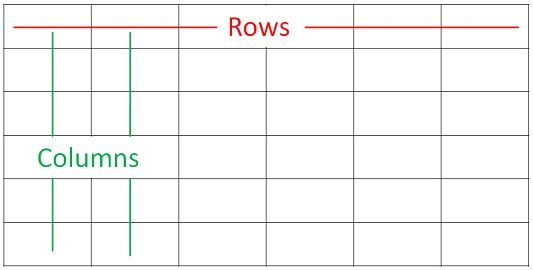
Sample = Row
Variable = Column
Data objects that looks like this is often called a data frame.
Fancier versions from the tidyverse are called tibbles (more on that soon!).
 (source: https://twitter.com/hadleywickham)
We will mostly show you how to use tidyverse packages and functions.
This is a newer set of packages designed for data science that can make your code more intuitive as compared to the original older Base R.
Tidyverse advantages:
- consistent structure - making it easier to learn how to use different packages
- particularly good for wrangling (manipulating, cleaning, joining) data
- more flexible for visualizing data
Packages for the tidyverse are managed by a team of respected data scientists at RStudio.

See this article for more info.
We have an R package called jhur that will make sure all the packages are installed.
You can just copy and paste the below code into your console - we’ll explain what it all means in the next day or two
install.packages("remotes")
remotes::install_github("muschellij2/jhur")
Note it may take ~5-10 minutes to run.
Tidyverse Skills for Data Science Book: https://jhudatascience.org/tidyversecourse/ (more about the tidyverse, some modeling, and machine learning)
Tidyverse Skills for Data Science Course: https://www.coursera.org/specializations/tidyverse-data-science-r
(same content with quizzes, can get certificate with $)
R for Data Science: http://r4ds.had.co.nz/
(great general information)
R basics by Rafael A. Irizarry: https://rafalab.github.io/dsbook/r-basics.html (great general information)
Open Case Studies: https://www.opencasestudies.org/
(resource for specific public health cases with statistical implementation and interpretation)
Dataquest: https://www.dataquest.io/
(general interactive resource)
Need help?
Various “Cheat Sheets”: https://www.rstudio.com/resources/cheatsheets/
R reference card: http://cran.r-project.org/doc/contrib/Short-refcard.pdf
R jargon: https://link.springer.com/content/pdf/bbm%3A978-1-4419-1318-0%2F1.pdf
R vs Stata: https://link.springer.com/content/pdf/bbm%3A978-1-4419-1318-0%2F1.pdf
R terminology: https://cran.r-project.org/doc/manuals/r-release/R-lang.pdf
tidyverse, which helps make R more intuitive.