- Supervised Learning: Text classification
- k-nearest neighbor (KNN)
- Support vector machine (SVM)
- Unsupervised Learning: Text clustering
- K-means
- Hierarchical clustering
Text Classification and Clustering
Data for this lab session
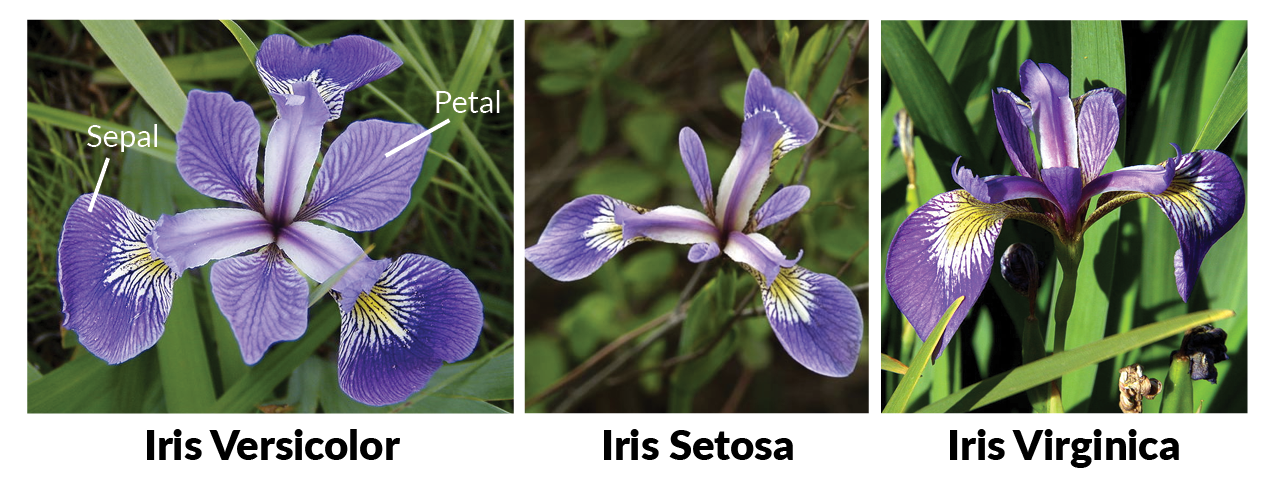
We will use the iris data set for this lab. To load the data into R:
data(iris)  # type ?iris to see the help document
str(iris)
## 'data.frame':    150 obs. of  5 variables:
##  $ Sepal.Length: num  5.1 4.9 4.7 4.6 5 5.4 4.6 5 4.4 4.9 ...
##  $ Sepal.Width : num  3.5 3 3.2 3.1 3.6 3.9 3.4 3.4 2.9 3.1 ...
##  $ Petal.Length: num  1.4 1.4 1.3 1.5 1.4 1.7 1.4 1.5 1.4 1.5 ...
##  $ Petal.Width : num  0.2 0.2 0.2 0.2 0.2 0.4 0.3 0.2 0.2 0.1 ...
##  $ Species     : Factor w/ 3 levels "setosa","versicolor",..: 1 1 1 1 1 1 1 1 1 1 ...
plot(iris$Petal.Length,
     iris$Petal.Width,
     pch=21, bg=c("red","green3","blue")[unclass(iris$Species)],
     xlab="Petal Length",
     ylab="Petal Width")
legend(1, 2.5, unique(iris$Species), pch = 21,
       pt.bg = c("red","green3","blue"))

Supervised Classification: K-Nearest Neighbor (KNN)
- Normalize the Predictors We will use sepal length, sepal width, petal length and petal width to predict the species of Flower.
 ## the normalization function is created
 nor <-function(x) { (x -min(x))/(max(x)-min(x))   }

 ## Run normalization on first 4 columns of dataset
 ## because they are the predictors
 iris_norm <- as.data.frame(lapply(iris[,c(1,2,3,4)], nor))
Separate Training and Testing Datasets
##Generate a random number that is 70% of the total number of rows in dataset.
 ran <- sample(1:nrow(iris), 0.7 * nrow(iris))
##extract training set
iris_train <- iris_norm[ran,]
##extract testing set
iris_test <- iris_norm[-ran,]
- Extract Outcome Variable (because this is supervised learning)
##extract 5th column of train dataset
##because it will be used as 'cl' argument in knn function.
 iris_target_category <- iris[ran,5]
 ##extract 5th column if test dataset to measure the accuracy
 iris_test_category <- iris[-ran,5]
Build and Evaluate KNN Model
##load the package class
 library(class)
 ##run knn function
 pr <- knn(iris_train,iris_test,cl=iris_target_category,k=5)
- Evaluate the KNN Model
 ## create confusion matrix
 tab <- table(pr,iris_test_category)

 ## this function divides the correct predictions
 ## by total number of predictions
 ## which us how accurate the model is.

 accuracy <- function(x){sum(diag(x)/(sum(rowSums(x)))) * 100}
 accuracy(tab)
## [1] 95.55556
tab
##             iris_test_category
## pr           setosa versicolor virginica
##   setosa         12          0         0
##   versicolor      0         12         0
##   virginica       0          2        19
Supervised Classification: Support Vector Machine (SVM)
- Install and Load required Packages
## Loading required package: ggplot2
## Registered S3 method overwritten by 'GGally':
##   method from
##   +.gg   ggplot2
Splitting data into training and testing data
split = sample.split(iris$Species, SplitRatio = .8)
training_set = subset(iris, split == TRUE)
test_set = subset(iris, split == FALSE)

nrow(training_set)
## [1] 120
nrow(test_set)
## [1] 30
We now have 120 data points on which we will train our model and then we will use 30 data points to test the model on.
Exploratory Visualization
 We can clearly see from the Histograms of Petal.length and Petal.width that we can clearly seperate out Setosa species with very high confidence.
However, Versicolor and Virginica Species are overlapped. If we look at the scatterplot of Sepal.Length vs Petal.Length and Petal.Width vs Petal.Length, we can distintly see a seperator that can be draw between the groups of Species.
Feature Scaling and Model Fitting
Predictor normalization also called feature scaling.
training_set[,1:4] = scale(training_set[,1:4])
test_set[,1:4] = scale(test_set[,1:4])
We will build two classifiers, one contains all parameter and second contain just Petal.Width and Petal.Length as parameter and compare their individual performances.
classifier1 = svm(formula = Species~., data = training_set,
                  type = 'C-classification', kernel = 'radial')

classifier2 = svm(formula = Species~ Petal.Width + Petal.Length, data = training_set,
                  type = 'C-classification', kernel = 'radial')
Prediction and Evaluaton
test_pred1 = predict(classifier1, type = 'response', newdata = test_set[-5])
test_pred2 = predict(classifier2, type = 'response', newdata = test_set[-5])

# Making Confusion Matrix
cm1 = table(test_set[,5], test_pred1)
cm2 = table(test_set[,5], test_pred2)
cm1 # Confusion Matrix for all parameters
##             test_pred1
##              setosa versicolor virginica
##   setosa         10          0         0
##   versicolor      0         10         0
##   virginica       0          0        10
cm2 # Confusion Matrix for parameters being Petal Length and Petal Width
##             test_pred2
##              setosa versicolor virginica
##   setosa         10          0         0
##   versicolor      0         10         0
##   virginica       0          1         9
Unsupervised Clustering: K-means
K-means Clustering is used with unlabeled data, but in this case, we have a labeled dataset so we have to use the iris data without the Species column. In this way, algorithm will cluster the data and we will be able to compare the predicted results with the original results, getting the accuracy of the model.
library(ggplot2)
Exploratory Visualization
ggplot(iris, aes(Petal.Length, Petal.Width)) + geom_point(aes(col=Species), size=4)

Build K-Means Model
In the kmeans function, it is necessary to set center, which is the number of groups we want to cluster to. In this case, we know this value will be 3.
set.seed(101)
irisCluster <- kmeans(iris[,1:4], center=3, nstart=20)
irisCluster
## K-means clustering with 3 clusters of sizes 38, 62, 50
##
## Cluster means:
##   Sepal.Length Sepal.Width Petal.Length Petal.Width
## 1     6.850000    3.073684     5.742105    2.071053
## 2     5.901613    2.748387     4.393548    1.433871
## 3     5.006000    3.428000     1.462000    0.246000
##
## Clustering vector:
##   [1] 3 3 3 3 3 3 3 3 3 3 3 3 3 3 3 3 3 3 3 3 3 3 3 3 3 3 3 3 3 3 3 3 3 3 3 3 3
##  [38] 3 3 3 3 3 3 3 3 3 3 3 3 3 2 2 1 2 2 2 2 2 2 2 2 2 2 2 2 2 2 2 2 2 2 2 2 2
##  [75] 2 2 2 1 2 2 2 2 2 2 2 2 2 2 2 2 2 2 2 2 2 2 2 2 2 2 1 2 1 1 1 1 2 1 1 1 1
## [112] 1 1 2 2 1 1 1 1 2 1 2 1 2 1 1 2 2 1 1 1 1 1 2 1 1 1 1 2 1 1 1 2 1 1 1 2 1
## [149] 1 2
##
## Within cluster sum of squares by cluster:
## [1] 23.87947 39.82097 15.15100
##  (between_SS / total_SS =  88.4 %)
##
## Available components:
##
## [1] "cluster"      "centers"      "totss"        "withinss"     "tot.withinss"
## [6] "betweenss"    "size"         "iter"         "ifault"
Model Evaluation
We can compare the predicted clusters with the original data.
table(irisCluster$cluster, iris$Species)
##
##     setosa versicolor virginica
##   1      0          2        36
##   2      0         48        14
##   3     50          0         0
We can plot out these clusters.
library(cluster)
clusplot(iris, irisCluster$cluster, color=T, shade=T, labels=0, lines=0)

Elbow Method
We will not always have the labeled data. If we want to know the exactly number of centers, we would have built the elbow method.
tot.withinss <- vector(mode="character", length=10)
for (i in 1:10){
  irisCluster <- kmeans(iris[,1:4], center=i, nstart=20)
  tot.withinss[i] <- irisCluster$tot.withinss
}

plot(1:10, tot.withinss, type="b", pch=19)

Unsupervised Learning: Hierarchical clustering
Clustering is an unsupervised technique, therefore we do not require labels in our dataset.
iris2 <- iris[,-5]
d_iris <- dist(iris2) # method="man" # is a bit better
hc_iris <- hclust(d_iris, method = "complete")
iris_species <- rev(levels(iris[,5]))
hc_iris
##
## Call:
## hclust(d = d_iris, method = "complete")
##
## Cluster method   : complete
## Distance         : euclidean
## Number of objects: 150
Visualize the clustering with a Tree Structure
The default hierarchical clustering method in hclust is “complete”. We can visualize the result of running it by turning the object to a dendrogram and making several adjustments to the object, such as: changing the labels, coloring the labels based on the real species category, and coloring the branches based on cutting the tree into three clusters
##
## ---------------------
## Welcome to dendextend version 1.15.2
## Type citation('dendextend') for how to cite the package.
##
## Type browseVignettes(package = 'dendextend') for the package vignette.
## The github page is: https://github.com/talgalili/dendextend/
##
## Suggestions and bug-reports can be submitted at: https://github.com/talgalili/dendextend/issues
## You may ask questions at stackoverflow, use the r and dendextend tags:
##   https://stackoverflow.com/questions/tagged/dendextend
##
##  To suppress this message use:  suppressPackageStartupMessages(library(dendextend))
## ---------------------
##
## Attaching package: 'dendextend'
## The following object is masked from 'package:stats':
##
##     cutree
# And plot:
par(mar = c(3,3,3,7))
plot(dend,
     main = "Clustered Iris data set
     (the labels give the true flower species)",
     horiz =  TRUE,  nodePar = list(cex = .007))
legend("topleft", legend = iris_species, fill = rainbow_hcl(3))
