The tidyverse

  • The tidyverse is a collection of R packages designed for data science.
  • Install the complete tidyverse with:
install.packages("tidyverse")
  • Load the tidyverse into the R environment
library(tidyverse)
## -- Attaching packages --------------------------------------- tidyverse 1.3.1 --
## v ggplot2 3.3.5     v purrr   0.3.4
## v tibble  3.1.6     v dplyr   1.0.7
## v tidyr   1.1.4     v stringr 1.4.0
## v readr   2.1.1     v forcats 0.5.1
## -- Conflicts ------------------------------------------ tidyverse_conflicts() --
## x dplyr::filter() masks stats::filter()
## x dplyr::lag()    masks stats::lag()

Core tidyverse

  • ggplot2: ggplot2 is a system for declaratively creating graphics, based on The Grammar of Graphics.
  • tibble: tibble is a modern re-imagining of the data frame, keeping what time has proven to be effective, and throwing out what it has not.
  • tidyr: tidyr provides a set of functions that help you get to tidy data.
  • readr: readr provides a fast and friendly way to read rectangular data (like csv).
  • purrr: purrr provides a complete and consistent set of tools for working with functions and vectors.
  • dplyr: dplyr provides a grammar of data manipulation

read.csv() vs. read_csv()

First, let’s use the usual way to read csv data into R (make sure that you are using the right working directory).

df_original <- read.csv(file="HousePrices.csv", 
                        header=TRUE, stringsAsFactors=FALSE)
class(df_original) # this is a data frame
## [1] "data.frame"

We can also use read_csv() from the readr package in the tidyverse to read the same csv file:

df <- read_csv(file="HousePrices.csv")
class(df) # this is a tibble (tbl_df)
## [1] "spec_tbl_df" "tbl_df"      "tbl"         "data.frame"

Your turn

If you haven’t done this already (from lab-3), download HousePrices.csv and put it into your working directory.

Run the following code:

install.packages("tidyverse")
library(tidyverse)
df_original <- read.csv(file="HousePrices.csv", 
                        header=TRUE, stringsAsFactors=FALSE)
df <- read_csv(file="HousePrices.csv")

And then print these two data sets by entering their names to the console. What are your observations?

df_original
df

Package dplyr

dplyr provides the following verbs for data manipulation.

  1. select
  2. filter
  3. arrange
  4. mutate
  5. summarise & group_by
  6. joining (merging) data frames / tables

We will be using HousePrices.csv throughout this lab. Please download and put the file in your working directory. (Use getwd and setwd to make sure you have a correct working directory.)

select(): Pick columns by name

select(df, c(price, lot_size)) 
## # A tibble: 1,728 x 2
##     price lot_size
##     <dbl>    <dbl>
##  1 132500     0.09
##  2 181115     0.92
##  3 109000     0.19
##  4 155000     0.41
##  5  86060     0.11
##  6 120000     0.68
##  7 153000     0.4 
##  8 170000     1.21
##  9  90000     0.83
## 10 122900     1.94
## # ... with 1,718 more rows
# equivalent to df[, c("price", "lotsize")]

Chaining/Pipelining

Pipe operator %>% makes the code much readable. Essentially, you send the data through a set of operations and the operations are connected by a pipe.

Note: You must have a space before and after %>%

# in tidyverse, we use dot/period to represent 
# whatever comes from the previous stage
df %>% select(., c(price, lot_size)) # notice that df is outside
## # A tibble: 1,728 x 2
##     price lot_size
##     <dbl>    <dbl>
##  1 132500     0.09
##  2 181115     0.92
##  3 109000     0.19
##  4 155000     0.41
##  5  86060     0.11
##  6 120000     0.68
##  7 153000     0.4 
##  8 170000     1.21
##  9  90000     0.83
## 10 122900     1.94
## # ... with 1,718 more rows

# if the first argument is a dot/period, you may omit it in your code
# the packages in the tidyverse will automatically fill it in for you
df %>% select(c(price, lot_size))
## # A tibble: 1,728 x 2
##     price lot_size
##     <dbl>    <dbl>
##  1 132500     0.09
##  2 181115     0.92
##  3 109000     0.19
##  4 155000     0.41
##  5  86060     0.11
##  6 120000     0.68
##  7 153000     0.4 
##  8 170000     1.21
##  9  90000     0.83
## 10 122900     1.94
## # ... with 1,718 more rows

df %>% select(price:heat) # all columns between price and fuel
## # A tibble: 1,728 x 9
##     price lot_size waterfront   age land_value construction air_cond fuel  heat 
##     <dbl>    <dbl> <chr>      <dbl>      <dbl> <chr>        <chr>    <chr> <chr>
##  1 132500     0.09 No            42      50000 No           No       Elec~ Elec~
##  2 181115     0.92 No             0      22300 No           No       Gas   Hot ~
##  3 109000     0.19 No           133       7300 No           No       Gas   Hot ~
##  4 155000     0.41 No            13      18700 No           No       Gas   Hot ~
##  5  86060     0.11 No             0      15000 Yes          Yes      Gas   Hot ~
##  6 120000     0.68 No            31      14000 No           No       Gas   Hot ~
##  7 153000     0.4  No            33      23300 No           No       Oil   Hot ~
##  8 170000     1.21 No            23      14600 No           No       Oil   Hot ~
##  9  90000     0.83 No            36      22200 No           No       Elec~ Elec~
## 10 122900     1.94 No             4      21200 No           No       Gas   Hot ~
## # ... with 1,718 more rows

# select columns that contain "room" in their column name
df %>% select(contains("room")) 
## # A tibble: 1,728 x 2
##    bathrooms rooms
##        <dbl> <dbl>
##  1       1       5
##  2       2.5     6
##  3       1       8
##  4       1.5     5
##  5       1       3
##  6       1       8
##  7       1.5     8
##  8       1.5     9
##  9       1.5     8
## 10       1.5     6
## # ... with 1,718 more rows

Your turn

Select columns age and land_value from df

  • (Hint: refer to page 9)

filter(): Keep rows that match criteria

df %>% filter(price < 200000, fuel == "Electric")
## # A tibble: 246 x 15
##     ...1  price lot_size waterfront   age land_value construction air_cond fuel 
##    <dbl>  <dbl>    <dbl> <chr>      <dbl>      <dbl> <chr>        <chr>    <chr>
##  1     1 132500     0.09 No            42      50000 No           No       Elec~
##  2     9  90000     0.83 No            36      22200 No           No       Elec~
##  3    13  85860     8.97 No            13       4800 No           No       Elec~
##  4    21 112000     1    No            12       8600 No           No       Elec~
##  5    22 104900     0.43 No            21       5600 No           No       Elec~
##  6    25  90400     0.36 No            16       5200 No           No       Elec~
##  7    60 175000     0.47 No            15      27200 No           No       Elec~
##  8    65 171000     3.16 No            15      24100 No           No       Elec~
##  9    69 182000     1    No            16      26600 No           No       Elec~
## 10    81 114000     0.06 No            14       1600 No           No       Elec~
## # ... with 236 more rows, and 6 more variables: heat <chr>, sewer <chr>,
## #   living_area <dbl>, fireplaces <dbl>, bathrooms <dbl>, rooms <dbl>

Chaining multiple operations

df %>% 
  filter(price < 200000, fuel == "Electric") %>%
  select(price, fuel, air_cond)
## # A tibble: 246 x 3
##     price fuel     air_cond
##     <dbl> <chr>    <chr>   
##  1 132500 Electric No      
##  2  90000 Electric No      
##  3  85860 Electric No      
##  4 112000 Electric No      
##  5 104900 Electric No      
##  6  90400 Electric No      
##  7 175000 Electric No      
##  8 171000 Electric No      
##  9 182000 Electric No      
## 10 114000 Electric No      
## # ... with 236 more rows

Note: In the interest of readability, put different operations in separate lines.

After the operations, you may want to save the result as a new data frame. You can then use the new data frame for other analyses.

new_df <- df %>% 
  filter(price < 200000, fuel == "Electric") %>%
  select(price, fuel, air_cond)

nrow(new_df)
## [1] 246

arrange(): Reorder rows

df %>%
  select(price, air_cond, rooms) %>%
  arrange(price)
## # A tibble: 1,728 x 3
##    price air_cond rooms
##    <dbl> <chr>    <dbl>
##  1  5000 Yes          6
##  2 10300 No           4
##  3 10300 No           6
##  4 20000 No           4
##  5 25000 No           6
##  6 45000 No           4
##  7 49387 No           5
##  8 58500 No           5
##  9 60000 No           6
## 10 60000 No           7
## # ... with 1,718 more rows

use desc() for a descending order

df %>%
  select(price, air_cond, rooms) %>%
  arrange(desc(price))
## # A tibble: 1,728 x 3
##     price air_cond rooms
##     <dbl> <chr>    <dbl>
##  1 775000 Yes          9
##  2 775000 Yes         12
##  3 760000 Yes         12
##  4 725000 Yes         10
##  5 670000 No           8
##  6 658300 Yes         11
##  7 655000 No           6
##  8 650000 Yes         10
##  9 650000 Yes         12
## 10 649000 Yes         12
## # ... with 1,718 more rows

Your turn

1. Select houses with Private sewer

2. Order the results in a descending order of lot_size

  • (Hint: refer to p.14 & p.17)

mutate(): Add new variables

Create new variables that are functions of existing variables

df %>%
  mutate(bedrooms = rooms - bathrooms) %>%
  filter(bedrooms>3) %>%
  select(bedrooms, bathrooms, rooms)
## # A tibble: 1,381 x 3
##    bedrooms bathrooms rooms
##       <dbl>     <dbl> <dbl>
##  1      4         1       5
##  2      3.5       2.5     6
##  3      7         1       8
##  4      3.5       1.5     5
##  5      7         1       8
##  6      6.5       1.5     8
##  7      7.5       1.5     9
##  8      6.5       1.5     8
##  9      4.5       1.5     6
## 10     11         1      12
## # ... with 1,371 more rows

Your turn

Use pipe %>% to chain the following operations

  • Use mutate to create a new column, expensive_house, which equals “yes” if the house price is greater than 150000 and “no” otherwise.
    • Hint: Recall the ifelse() function
      • ifelse(condition, output_if_true, output_if_false)
      • Lab-03 p.40
  • After that, select the price and expensive_house columns and arrange the rows in the descending order of price.
## # A tibble: 1,728 x 2
##     price expensive_house
##     <dbl> <chr>          
##  1 775000 yes            
##  2 775000 yes            
##  3 760000 yes            
##  4 725000 yes            
##  5 670000 yes            
##  6 658300 yes            
##  7 655000 yes            
##  8 650000 yes            
##  9 650000 yes            
## 10 649000 yes            
## # ... with 1,718 more rows

summarise(): Reduce variables to values

  • group_by() creates the groups that will be operated on
  • summarise() uses the provided aggregation function to summarise each group
df %>%
  group_by(air_cond) %>%
  summarise(avg_price = mean(price))
## # A tibble: 2 x 2
##   air_cond avg_price
##   <chr>        <dbl>
## 1 No         187022.
## 2 Yes        254904.

You can have multiple summary/aggregate statistics:

df %>%
  group_by(air_cond) %>%
  summarise(n_house = n(), # n() gives the number of rows in each group
            avg_price = mean(price))  
## # A tibble: 2 x 3
##   air_cond n_house avg_price
##   <chr>      <int>     <dbl>
## 1 No          1093   187022.
## 2 Yes          635   254904.

Your turn

Some houses have a driveway (construction), some don’t. Use group_by and summarise to obtain the following:

  • (Hint: refer to the previous page, p.22)
## # A tibble: 2 x 4
##   construction n_house min_lotsize max_lotsize
##   <chr>          <int>       <dbl>       <dbl>
## 1 No              1647        0          12.2 
## 2 Yes               81        0.01        3.47

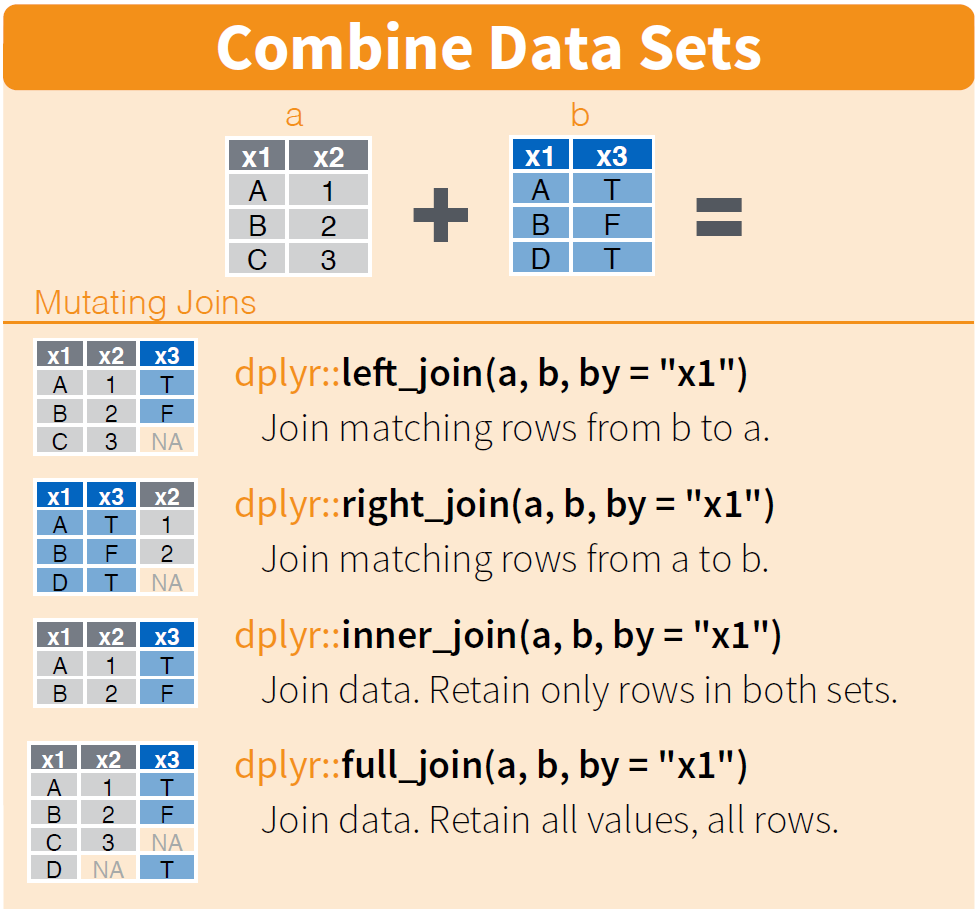
Joining two data frames (or tables)

dplyr join

Note: left_join(a, b, by="x1") is equivalent to a %>% left_join(b, by="x1")

Lab assignment

This lab assignment involves 2 tasks (see the following slides). Once you finish the following tasks, please put everything in one single R file with the file name assignment2.R (.R is the file extension) and upload it to iCollege (Lab Assignment 2).


Caution:

  • You will lose 50% of the points if you use a different file name or put your code in multiple files.
  • You will lose 10% of the points if your code can not be run as a whole script (see lab 1 slide p.14).


In addition, lab assignments will be graded based on:

  • Accuracy: whether the R script achieves the objectives
  • Readability: whether the R script is clean, well-formatted, and easily readable
    • You risk losing 10% points if your code has no proper indentation or has more than 80 characters in a line.

Lab Assignment 1/2

Please write the proper R codes to solve the followings using the same HousePrices.csv file we used in the lab session.

1.1. (10 points) Show price, air_cond, heat, fireplaces for houses that have no fireplaces

1.2. (10 points) Create a new variable price_per_bedroom which is price divided by the number of bedrooms. Use bedrooms variable we created in page 19. Show only price, bedrooms, and price_per_bedroom columns and arrange the rows in the descending order of price_per_bedroom

1.3. (10 points) Create a new variable has_4_or_more_bedrooms which is TRUE if the house has 4 or more bedrooms and FALSE otherwise. Use this variable and group_by and summarise() to find how many houses have 4 or more bedrooms and how many don’t

Lab Assignment 2/2

2.1. (10 points) Define and write a function called is_even which takes one number as input and detects whether the number is even. Return TRUE if it is even, and FALSE otherwise. You need to first detect if the input is an integer; if not, return NA.

  • Note 1: TRUE and FALSE are logical values, not strings!
  • Note 2: Test your function using the following input: 1, 2, 1.5, and "gsu".
  • See the next slide for some additional notes and requirements.
  • Hint: What is the definition of even numbers? In R, you can get the remainder after division using the %% operator (a.k.a. the modulus operator). Example:
5 %% 3 # get the remainder after dividing 5 by 3
## [1] 2

2.2. (10 points) Write a for loop to get the sum of all the even numbers from -50 to 50. Make sure to use the function you wrote for task 2.1 above.

(Hint for 2.1) Test your is_even() function with the following inputs: 1, 2, and "gsu".

is_even(1)
## [1] FALSE
is_even(2)
## [1] TRUE
is_even("gsu")
## [1] NA

(Hint for 2.2) The result of your for loop should print 0. Change the range to -50 to 52 and confirm you get 52.