
Ryan Clement, Data Services Librarian: go/ryan/

Wendy Shook, Science Data Librarian: go/wshook/
7/20/2021, 1:00 - 3:30 PM EDT
Ryan Clement, Data Services Librarian: go/ryan/
Wendy Shook, Science Data Librarian: go/wshook/

NOTE: We’ll have a break about halfway through!
unnest_tokens() functiontext_df %>% unnest_tokens(word, text)
unnest_tokens() converts the tokens to lowercase, which makes them easier to compare or combine with other datasets (Use the to_lower = FALSE argument to turn off this behavior)
Use what we’ve just learned to a create a bar chart of the 15 least used words that are used over 100 times in the Jane Austen corpus.
Hint: the tail() function might be quite useful here.
When you’re done, please give a :thumbs-up: or a :green-check: in the Zoom reactions.
Modify the code we used before for the most used words in the Jane Austen corpus so that we can see a separate graph of the most used words in each of the books in the corpus.
Hint: the facet_grid() function is important here.
When you’re done, please give a :thumbs-up: or a :green-check: in the Zoom reactions.
gutenbergr packageinstall.packages('gutenbergr')
library(gutenbergr)
gutenberg_metadata
View(gutenberg_metadata)
gutenberg_download() function to download works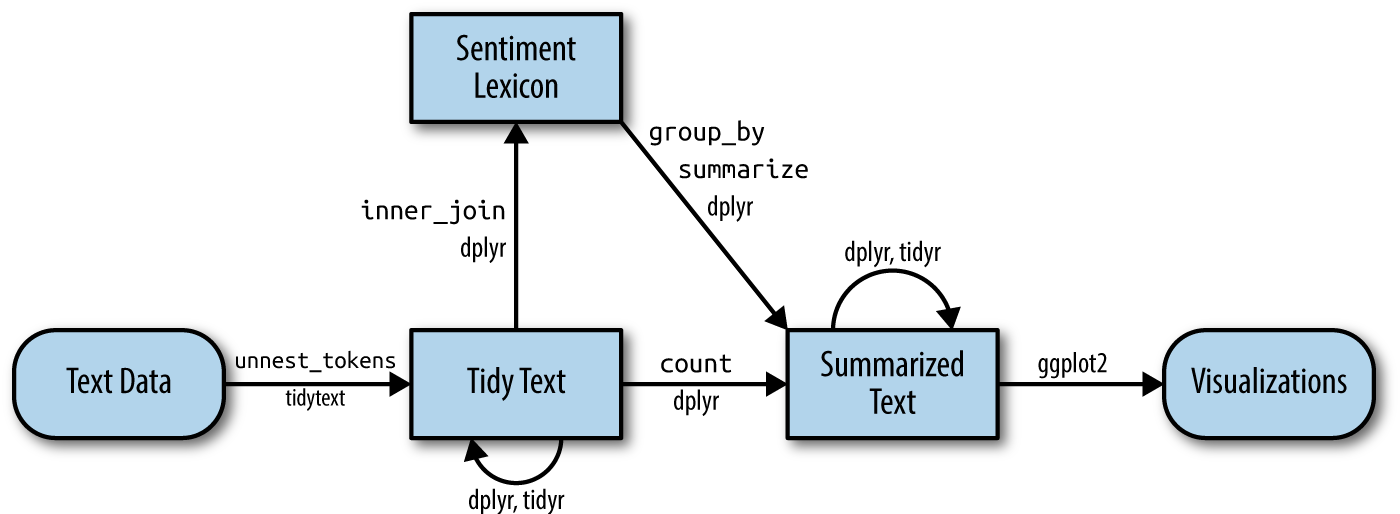
get_sentiments() datasetsAFINN from Finn Årup Nielsenbing from Bing Liu and collaboratorsnrc from Saif Mohammad and Peter TurneyNOTE: These lexicons are available under different licenses, so be sure that the license for the lexicon you want to use is appropriate for your project. You may be asked to agree to a license before downloading data.
library(tidytext)
get_sentiments("afinn")
Use the get_sentiments() function to download each of the 3 datasets (AFINN, bing, and nrc). Make sure to read each license before you accept it.
When you’re done, please give a :thumbs-up: or a :green-check: in the Zoom reactions.
“How were these sentiment lexicons put together and validated? They were constructed via either crowdsourcing (using, for example, Amazon Mechanical Turk) or by the labor of one of the authors, and were validated using some combination of crowdsourcing again, restaurant or movie reviews, or Twitter data. Given this information, we may hesitate to apply these sentiment lexicons to styles of text dramatically different from what they were validated on, such as narrative fiction from 200 years ago. While it is true that using these sentiment lexicons with, for example, Jane Austen’s novels may give us less accurate results than with tweets sent by a contemporary writer, we still can measure the sentiment content for words that are shared across the lexicon and the text.”
dplyr joinsinner_join(): return all rows from x where there are matching values in y, and all columns from x and y. If there are multiple matches between x and y, all combination of the matches are returned.anti_join(): return all rows from x where there are not matching values in y, keeping just columns from x.Other info on these and other types of joins can be found on the documentation page.
The %/% operator does integer division (x %/% y is equivalent to floor(x/y)) so the index keeps track of which 80-line section of text we are counting up negative and positive sentiments in.

Write some code that will add the word “miss” to our stop_words tibble. Call the lexicon “custom.”
HINT: the bind_rows() function will be helpful here.
When you’re done, please give a :thumbs-up: or a :green-check: in the Zoom reactions.
\[idf(\text{term}) = \ln{\left(\frac{n_{\text{documents}}}{n_{\text{documents containing term}}}\right)}\]
NOTE: the statistic tf-idf is a rule-of-thumb quantity; while it is very useful (and widely used) in text mining, its theoretical foundations are regularly questioned by information experts.

bind_tf_idf() functionThe bind_tf_idf() function in the tidytext package takes a tidy text dataset as input with one row per token (term), per document. One column (word for us) contains the terms/tokens, one column contains the documents (book in our case), and the last necessary column contains the counts, how many times each document contains each term (n in our example).
We can add two arguments (token = "ngrams" and n = n) to our unnest_tokens() function in order to capture n-grams (instead of single words, or unigrams).
austen_bigrams <- austen_books() %>%
  unnest_tokens(bigram, text, token = "ngrams", n = 2)
To sign up for more sessions: go/summer-data-workshops/
Assessment survey: go/summer-data-assessment/
Ryan’s contact info: go/ryan/