class: center, middle, inverse, title-slide # .titles[Using the Apache <strong>Arrow</strong> C++ Library in R] ## Efficient workflow with large, multi-file datasets ### .hunter_green2[Devin Bunch] ### .hunter_green2[University of Oregon] ### .hunter_green2[2021-05-26] --- name: overview page class: inverse, center, middle # The .pretty[`arrow`] package --- name: arrow package introduction, the forms of data in arrow # The .pretty[`arrow`] package ### .hunter_green3[**Objects**] `arrow` returns two data structures with the same, .hunter_green2[**columnary format**]: .pull-left[ 1. .hunter_green3[**Table:**] a tabular, column-oriented data structure capable of storing and processing large amounts of data more efficiently than R’s built-in data.frame within databases 2. .hunter_green3[**Dataset:**] a data structure with the capability to work on larger-than-memory data partitioned across multiple files ] .pull-right[ 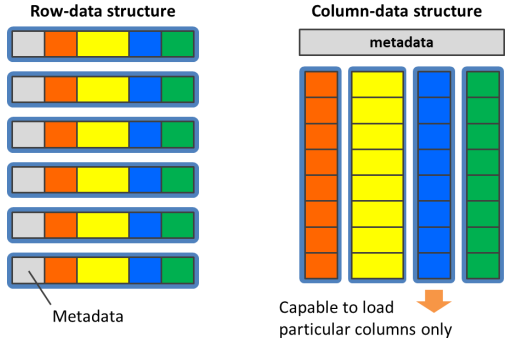 ] --- name: parquet background-image: url(https://arrow.apache.org/img/simd.png) background-size: 60% 60% background-position: bottom # The .pretty[`arrow`] package ### **.hunter_green3[Benefits of Parquet files]** 1. <svg aria-hidden="true" role="img" viewBox="0 0 512 512" style="height:1em;width:1em;vertical-align:-0.125em;margin-left:auto;margin-right:auto;font-size:inherit;fill:#91bcab;overflow:visible;position:relative;"><path d="M464,128H272L208,64H48A48,48,0,0,0,0,112V400a48,48,0,0,0,48,48H464a48,48,0,0,0,48-48V176A48,48,0,0,0,464,128ZM359.5,296a16,16,0,0,1-16,16h-64v64a16,16,0,0,1-16,16h-16a16,16,0,0,1-16-16V312h-64a16,16,0,0,1-16-16V280a16,16,0,0,1,16-16h64V200a16,16,0,0,1,16-16h16a16,16,0,0,1,16,16v64h64a16,16,0,0,1,16,16Z"/></svg> Now we can **read parquet files** into R 2. <svg aria-hidden="true" role="img" viewBox="0 0 512 512" style="height:1em;width:1em;vertical-align:-0.125em;margin-left:auto;margin-right:auto;font-size:inherit;fill:#91bcab;overflow:visible;position:relative;"><path d="M464 32H48C21.49 32 0 53.49 0 80v352c0 26.51 21.49 48 48 48h416c26.51 0 48-21.49 48-48V80c0-26.51-21.49-48-48-48zM224 416H64V160h160v256zm224 0H288V160h160v256z"/></svg> Apache Parquet is **column-oriented**, meaning the values of each table column are stored next to each other, rather than all in the same row like `.csv` files 3. <svg aria-hidden="true" role="img" viewBox="0 0 320 512" style="height:1em;width:0.62em;vertical-align:-0.125em;margin-left:auto;margin-right:auto;font-size:inherit;fill:#91bcab;overflow:visible;position:relative;"><path d="M296 160H180.6l42.6-129.8C227.2 15 215.7 0 200 0H56C44 0 33.8 8.9 32.2 20.8l-32 240C-1.7 275.2 9.5 288 24 288h118.7L96.6 482.5c-3.6 15.2 8 29.5 23.3 29.5 8.4 0 16.4-4.4 20.8-12l176-304c9.3-15.9-2.2-36-20.7-36z"/></svg> `arrow` provides major **R speedup** with functions for reading and writing large data files 4. <svg aria-hidden="true" role="img" viewBox="0 0 640 512" style="height:1em;width:1.25em;vertical-align:-0.125em;margin-left:auto;margin-right:auto;font-size:inherit;fill:#91bcab;overflow:visible;position:relative;"><path d="M96 224c35.3 0 64-28.7 64-64s-28.7-64-64-64-64 28.7-64 64 28.7 64 64 64zm448 0c35.3 0 64-28.7 64-64s-28.7-64-64-64-64 28.7-64 64 28.7 64 64 64zm32 32h-64c-17.6 0-33.5 7.1-45.1 18.6 40.3 22.1 68.9 62 75.1 109.4h66c17.7 0 32-14.3 32-32v-32c0-35.3-28.7-64-64-64zm-256 0c61.9 0 112-50.1 112-112S381.9 32 320 32 208 82.1 208 144s50.1 112 112 112zm76.8 32h-8.3c-20.8 10-43.9 16-68.5 16s-47.6-6-68.5-16h-8.3C179.6 288 128 339.6 128 403.2V432c0 26.5 21.5 48 48 48h288c26.5 0 48-21.5 48-48v-28.8c0-63.6-51.6-115.2-115.2-115.2zm-223.7-13.4C161.5 263.1 145.6 256 128 256H64c-35.3 0-64 28.7-64 64v32c0 17.7 14.3 32 32 32h65.9c6.3-47.4 34.9-87.3 75.2-109.4z"/></svg> We can apply the **same** familiar, user friendly **`dplyr`** verbs on **Arrow Table** objects .pull-left[ .footnote[ .devin[Columnar Structure Configuration]] ] --- name: dplyr connection coverpage class: inverse, middle # Using .pretty[`dplyr`] Syntax within .pretty[`arrow`] --- name: dplyr connection # Using .pretty[`dplyr`] Syntax within .pretty[`arrow`] ### .hunter_green3[**Reading and Writing Files**] - The `arrow` package provides functions that return an R data.frame as defualt .muave2[†] - .pretty[**`read_parquet()`**] : read a Parquet file in columnary format - .pretty[**`read_csv_arrow()`**] : read a comma-separated values (CSV) file in row format - .hunter_green3[**Functions**] in `arrow` can be used with .hunter_green2[**R data.frame**] and .hunter_green2[**Arrow Table**] objects alike - Inside `dplyr` verbs, `arrow` offers support for common functions to get mapped to their base R and tidyverse equivalents if none exist .footnote[.muave2[†] To return an Arrow Table, set argument .hunter_green3[as_data_frame = FALSE]] --- name: NY Taxi Cab big data Example background-image: url(https://jooinn.com/images/nyc-taxi-2.jpg) background-size: cover # .bore[NYC Taxi Data Example] --- name: storage error # .bore[NYC Taxi Data Example] Why can't we just download the file locally? -- ### This metadata is **37** gigabytes in size . . <svg aria-hidden="true" role="img" viewBox="0 0 496 512" style="height:1em;width:0.97em;vertical-align:-0.125em;margin-left:auto;margin-right:auto;font-size:inherit;fill:#91bcab;overflow:visible;position:relative;"><path d="M248 8C111 8 0 119 0 256s111 248 248 248 248-111 248-248S385 8 248 8zm-96 206.6l-28.7 28.7c-14.8 14.8-37.8-7.5-22.6-22.6l28.7-28.7-28.7-28.7c-15-15 7.7-37.6 22.6-22.6l28.7 28.7 28.7-28.7c15-15 37.6 7.7 22.6 22.6L174.6 192l28.7 28.7c15.2 15.2-7.9 37.4-22.6 22.6L152 214.6zM248 416c-35.3 0-64-28.7-64-64s28.7-64 64-64 64 28.7 64 64-28.7 64-64 64zm147.3-195.3c15.2 15.2-7.9 37.4-22.6 22.6L344 214.6l-28.7 28.7c-14.8 14.8-37.8-7.5-22.6-22.6l28.7-28.7-28.7-28.7c-15-15 7.7-37.6 22.6-22.6l28.7 28.7 28.7-28.7c15-15 37.6 7.7 22.6 22.6L366.6 192l28.7 28.7z"/></svg> My .hunter_green2[storage error] message:  --- name: C++ library # Apache Arrow C++ Library Installation ### .hunter_green3[Steps:] ### [ _ ] **1. Install New Package** `arrow` ```r ## Load/install packages if necessary if (!require("arrow")) install.packages("arrow") library(arrow) ``` --- name: C++ library # Apache Arrow C++ Library Installation ### .hunter_green3[Steps:] ###[<svg aria-hidden="true" role="img" viewBox="0 0 512 512" style="height:1em;width:1em;vertical-align:-0.125em;margin-left:auto;margin-right:auto;font-size:inherit;fill:green;overflow:visible;position:relative;"><path d="M504 256c0 136.967-111.033 248-248 248S8 392.967 8 256 119.033 8 256 8s248 111.033 248 248zM227.314 387.314l184-184c6.248-6.248 6.248-16.379 0-22.627l-22.627-22.627c-6.248-6.249-16.379-6.249-22.628 0L216 308.118l-70.059-70.059c-6.248-6.248-16.379-6.248-22.628 0l-22.627 22.627c-6.248 6.248-6.248 16.379 0 22.627l104 104c6.249 6.249 16.379 6.249 22.628.001z"/></svg>] **1. Install New Package** `arrow` ```r ## Load/install packages if necessary if (!require("arrow")) install.packages("arrow") library(arrow) ``` -- The `arrow` package takes care of all our .hunter_green2[**dependencies**] needed for working with the .hunter_green2[**Apache Arrow C ++ Library**] .pull-right[.footnote[ . . . and that's all we have to do!]] --- name: big dataset example # NYC taxi data ### .hunter_green3[**Metadata**] We can use .pretty[`arrow`] to load in subsets of the full data ### .hunter_green3[**Requirements**] To see if your arrow installation has S3 support, run ```r # arrow::arrow_with_s3() ## Mine does! ``` ### .hunter_green3[**Sync a local connection to the source of the file, externally**] ```r arrow::copy_files("s3://ursa-labs-taxi-data", "nyc-taxi") # dir.exists("nyc-taxi") ## check to make sure it exists! ``` --- name: big dataset example # NYC taxi data Load these explicit libraries in having acquired our knowledge, ```r library(arrow, warn.conflicts = FALSE) library(dplyr, warn.conflicts = FALSE) ``` Now that we are synced, we can Create our Arrow Dataset object in R ```r ds <- open_dataset("nyc-taxi", partitioning = c("year", "month")) ``` --- name: big dataset example #NY taxi data - Up to this point, we haven’t loaded any data: we have walked directories to find files, we’ve parsed file paths to identify partition - arrow supports the dplyr verbs mutate(), transmute(), select(), rename(), relocate(), filter(), and arrange(). - .hunter_green3[GOAL]: pull the selected subset of the data into an in-memory R data frame .hunter_green2[**Let’s find the median tip percentage for rides with fares greater than $100 in 2015, broken down by the number of passengers:**] ```r system.time(ds %>% filter(total_amount > 100, year == 2015) %>% select(tip_amount, total_amount, passenger_count) %>% mutate(tip_pct = 100 * tip_amount / total_amount) %>% group_by(passenger_count) %>% collect() %>% summarise( median_tip_pct = median(tip_pct), n = n() ) %>% print()) ``` --- #Results  We just selected a subset out of a dataset with around **2 billion rows, computed a new column, and aggregated on it in under 2 seconds** on our laptops! --- name: extra resources for those interested # Applications are endless . . . - Parquet is an open source file format available to any project in the [Hadoop ecosystem FOUND HERE](https://www.geeksforgeeks.org/hadoop-ecosystem/) - The Arrow Datasets library provides functionality to efficiently work with tabular, potentially larger than memory, and multi-file datasets. - Link to learn more about the C ++ library languages: https://www.tutorialspoint.com/c_standard_library/index.htm - Other applications of arrow are described in the following vignettes: vignette("python", package = "arrow"): use arrow and reticulate to pass data between R and Python vignette("flight", package = "arrow"): connect to Arrow Flight RPC servers to send and receive data vignette("arrow", package = "arrow"): access and manipulate Arrow objects through low-level bindings to the C++ library