Introduction
Integrating body diagrams when reporting data from athletes is a common practice. For example, body diagrams are frequently used in body soreness questionaires. Some technologies also use such visualizations such as this one or this one.
Given that open source reporting platforms such as R Shiny are gaining momentum in Sport Science, I thought it would be a good idea to highlight a few minimal examples on how to embed this type of visualizations within Shiny apps or markdown reports as well as what data we will need to do this.
Getting the data
Body diagrams are made of 2D shapes that represent different body areas. These shapes are built with polygons. Therefore, the first thing we will need is the x,y coordinates for each of the polygons in the figure we will be using.
There are a few options to do this,
- do it manually, which is likely going to be really hard,
- get the coordinates from a known source, for example a few years ago I created an avatar for powerBI. It is available here. Go to
gallery > body areasto open it and see the coordinates. - The final option is to get the data polygons x,y points programmatically. This is the option I'd like to discuss.
The body diagrams I'd like to use is actually uploaded on this site. Since it is a .svg file, I can scrape the website to find the coordinates for each polygon programmatically using {rvest}. This is also a good option as we may want to use different avatars in the future.
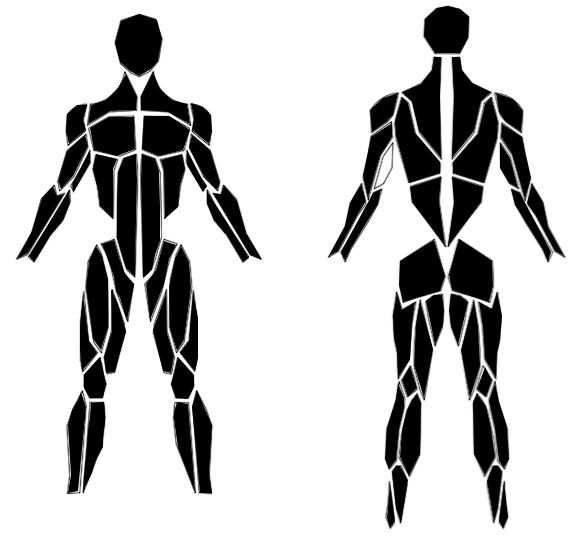
The process to scrape the x,y coordinates is shown below:
#get the website with the svg file
web <- paste0("http://svgur.com/i/7bP.svg")
#find the points
points <- xml2::read_html(web) %>%
rvest::html_nodes(xpath = "//polygon") %>% #find the node with the polygons
rvest::html_attr('points') #get the coordinates for each polygon
#repeat to get ids (names) of the polygons
id <- xml2::read_html(web) %>%
rvest::html_nodes(xpath = "//polygon") %>% #find the node with the polygons
rvest::html_attr("id") #get the ids
#jong id + points into one dataset
svg <- dplyr::tibble(id, points) %>%
mutate(points = gsub("\\,", " ", points)) %>%
separate(points, into = c("x1", "y1", "x2", "y2", "x3", "y3", "x4", "y4", "x5", "y5", "x6", "y6", "x7", "y7", "x8", "y8", "x9", "y9", "x10", "y10")) %>%
pivot_longer(!id, names_to = "coord", values_to = "values")
str(svg)## tibble [1,360 x 3] (S3: tbl_df/tbl/data.frame)
## $ id : chr [1:1360] "Left_Pec_Mayoris" "Left_Pec_Mayoris" "Left_Pec_Mayoris" "Left_Pec_Mayoris" ...
## $ coord : chr [1:1360] "x1" "y1" "x2" "y2" ...
## $ values: chr [1:1360] "144" "116" "142" "149" ...
That returns a data frame with the id or muscle names plus the x and y coordinates. There is still a little bit of data cleaning involved after that which I've done manually as it is just one off document. But the same could be done programmatically.
The next chunk provides the final dataset with the clean coordinates for each polygon and also adds a few other variables that will be useful to interact with the data later such as muscle group, side of the body, etc.
map <- read.csv("https://raw.githubusercontent.com/josedv82/body_avatars_in_R/main/svggmap.csv")
mapa <- map %>%
mutate(coord = gsub('[0-9]+', '', coord)) %>%
na.omit() %>%
group_by(Id) %>%
mutate(y = lead(values)) %>%
filter(coord != "y") %>%
select(Id, View, Part, Group, Muscle, Side, x = values, y)
str(map)## 'data.frame': 1360 obs. of 8 variables:
## $ Id : int 1 1 1 1 1 1 1 1 1 1 ...
## $ View : Factor w/ 2 levels "Anterior","Posterior": 1 1 1 1 1 1 1 1 1 1 ...
## $ Part : Factor w/ 2 levels "Lower_Body","Upper_Body": 1 1 1 1 1 1 1 1 1 1 ...
## $ Group : Factor w/ 14 levels "Abdominals","Arm",..: 7 7 7 7 7 7 7 7 7 7 ...
## $ Muscle: Factor w/ 34 levels "Adductor_Longus",..: 1 1 1 1 1 1 1 1 1 1 ...
## $ Side : Factor w/ 3 levels "Left","None",..: 1 1 1 1 1 1 1 1 1 1 ...
## $ coord : Factor w/ 20 levels "x1","x10","x2",..: 1 11 3 13 4 14 5 15 6 16 ...
## $ values: int 146 284 150 320 164 284 169 259 176 245 ...
Alternatively, I created an R package called {bdgramR} which provides pre-built data for 9 different types of diagrams as well as some plotting options.
Static Body Diagrams
After that we can start plotting the bodygrams. Below is a basic example of what our bodygram looks like.
mapa %>%
ggplot(aes(x = x, y = y, group = Id)) +
geom_polygon(color = "black", fill = "white") +
xlim(min(mapa$x), max(mapa$x)) +
scale_y_reverse(limits=c(max(mapa$y), min(mapa$y)), expand=c(0.01,0.01)) +
theme_void() +
theme(legend.position = "none")
Since we added a few more variables, we can easily filter the data in various ways, for example, to show only muscles from the lower body.
mapa %>%
filter(Part == "Lower_Body") %>%
ggplot(aes(x = x, y = y, group = Id, fill = Group)) +
geom_polygon(color = "black") +
xlim(min(mapa$x), max(mapa$x)) +
scale_y_reverse(limits=c(max(mapa$y), min(mapa$y)), expand=c(0.01,0.01)) +
theme_void()
Adding the data from athletes
Obviously the usefulness comes from using this chart to visualize athlete's data from different assessments. To do this, I am going to create a dummy dataset. We could image this is muscle pain data for example.
Group = c("Groin", "Groin",
"Arm", "Arm",
"Arm", "Arm",
"Hamstrings", "Hamstrings",
"Forearm", "Forearm",
"Arm", "Arm",
"Arm", "Arm",
"Back", "Back",
"Forearm", "Forearm",
"Forearm", "Forearm",
"Forearm", "Forearm",
"Calves", "Calves",
"Calves", "Calves",
"Gluteus", "Gluteus",
"Knee", "Knee",
"Knee", "Knee",
"Back", "Back",
"Neck", "Neck",
"Abdominals", "Abdominals",
"Pectoralis", "Pectoralis",
"Lower Leg", "Lower Leg",
"Abdominals", "Abdominals",
"Quadriceps", "Quadriceps",
"Hamstrings", "Hamstrings",
"Lower Leg", "Lower Leg",
"Calves", "Calves",
"Lower Leg", "Lower Leg",
"Back", "Back",
"Arm", "Arm",
"Arm", "Arm",
"Quadriceps", "Quadriceps",
"Quadriceps", "Quadriceps")
Muscle = c("Adductor_Longus", "Adductor_Longus",
"Biceps_Brachii_Long_Head", "Biceps_Brachii_Long_Head",
"Biceps_Brachii_Short_Head", "Biceps_Brachii_Short_Head",
"Biceps_Femoris", "Biceps_Femoris",
"Brachioradialis", "Brachioradialis",
"Deltoids_Back", "Deltoids_Back",
"Deltoids_Front", "Deltoids_Front",
"Erector_Spinae", "Erector_Spinae",
"Extensor_Digitorum", "Extensor_Digitorum",
"Flexor_Carpi", "Flexor_Carpi",
"Flexor_Digitorum", "Flexor_Digitorum",
"Gastroc_Lateralis", "Gastroc_Lateralis",
"Gastroc_Medialis", "Gastroc_Medialis",
"Gluteus_Max", "Gluteus_Max",
"Knee_Back", "Knee_Back",
"Knee_Front", "Knee_Front",
"Latissimus_Dorsi", "Latissimus_Dorsi",
"Neck", "Neck",
"Oblique", "Oblique",
"Pectoral_Mayoris", "Pectoral_Mayoris",
"Peroneus_Longus", "Peroneus_Longus",
"Rectus_Abdominis", "Rectus_Abdominis",
"Rectus_Femoris", "Rectus_Femoris",
"Semitendinosus", "Semitendinosus",
"Shin", "Shin",
"Soleus", "Soleus",
"Tibialis_Anterior", "Tibialis_Anterior",
"Trapezius", "Trapezius",
"Triceps_Lateral", "Triceps_Lateral",
"Triceps_Medial", "Triceps_Medial",
"Vastus_Lateralis", "Vastus_Lateralis",
"Vastus_Medialis", "Vastus_Medialis")
Side = c("Right", "Left", "Right", "Left", "Right", "Left", "Right", "Left", "Right", "Left", "Right", "Left", "Right", "Left", "Right", "Left", "Right", "Left", "Right", "Left", "Right", "Left", "Right", "Left", "Right", "Left", "Right", "Left", "Right", "Left", "Right", "Left", "Right", "Left", "Right", "Left", "Right", "Left", "Right", "Left", "Right", "Left", "Right", "Left", "Right", "Left","Right", "Left", "Right", "Left", "Right", "Left", "Right", "Left", "Right", "Left", "Right", "Left", "Right", "Left", "Right", "Left", "Right", "Left")
`x1` = runif(n = 64, min = 0, max = 5)
`x2` = runif(n = 64, min = 0, max = 5)
`x3` = runif(n = 64, min = 0, max = 5)
`x4` = runif(n = 64, min = 0, max = 5)
`x5` = runif(n = 64, min = 0, max = 5)
`x6` = runif(n = 64, min = 0, max = 5)
`x7` = runif(n = 64, min = 0, max = 5)
`x8` = runif(n = 64, min = 0, max = 5)
`x9` = runif(n = 64, min = 0, max = 5)
`x10` = runif(n = 64, min = 0, max = 5)
muscles_dat <- data.frame(Group, Muscle, Side,
`x1`,
`x2`,
`x3`,
`x4`,
`x5`,
`x6`,
`x7`,
`x8`,
`x9`,
`x10`)
Now we can join our body polygons with the data from our dummy muscle pain scores..
#all muscle groups
full <- full_join(mapa, muscles_dat, by = c("Group", "Muscle", "Side")) %>%
pivot_longer(!Id:y, names_to = "Date", values_to = "Values") %>%
mutate(Date = as.numeric(gsub("[^0-9.-]", "", Date)))
# only a few muscle groups
full2 <- muscles_dat %>%
filter(Group %in% c("Gluteus", "Hamstrings", "Lower Leg", "Groin")) %>%
full_join(mapa, by = c("Group", "Muscle", "Side")) %>%
select(Id, View, Part, Group, Muscle, Side, x, y, everything()) %>%
pivot_longer(!Id:y, names_to = "Date", values_to = "Values") %>%
mutate(Date = as.numeric(gsub("[^0-9.-]", "", Date)))
And then, we can start using the results from our assessments to color the polygons. For example:
ggplot(data = full, aes(x = x, y = y, group = Id, fill = Values)) +
geom_polygon(color = "black") +
xlim(min(full$x), max(full$x)) +
scale_y_reverse(limits=c(max(full$y), min(full$y)), expand=c(0.01,0.01)) +
scale_fill_gradient(low="blue", high="red") +
facet_wrap(~Date, ncol = 5) +
theme_void() +
theme(legend.position = "none",
panel.background = element_rect(fill = "gray", color = "transparent"),
strip.background = element_rect(fill = "black"),
strip.text = element_text(color = "white", size = 14))
Very likely we won't have data for all the muscle groups but just a few common ones. If a muscle has no data it won't be colored. We can see it on the chart below.
ggplot(data = full2, aes(x = x, y = y, group = Id, fill = Values)) +
geom_polygon(color = "black") +
xlim(min(full$x), max(full$x)) +
scale_y_reverse(limits=c(max(full$y), min(full$y)), expand=c(0.01,0.01)) +
scale_fill_gradient(low="blue", high="red") +
facet_wrap(~Date, ncol = 5) +
theme_void() +
theme(legend.position = "none",
panel.background = element_rect(fill = "gray", color = "transparent"),
strip.background = element_rect(fill = "black"),
strip.text = element_text(color = "white", size = 14))
Interactive Body Diagrams
We've seen how simple it is to visualize static diagrams. However, one of the strength of using shiny or markdown is interactivity. Let's make some interactive body diagram plots. Starting with a simple plotly figure showing a tooltip when hovering over a muscle.
dat <- full %>%
filter(Date == "10") %>%
mutate(Values = round(Values, 2))
plot <- ggplot(data = dat, aes(x = x, y = y, group = Id, fill = Values)) +
geom_polygon(aes(text = paste("Group: ", Group, "<br>", "Part: ", Part, "<br>", "Muscle: ", Muscle, "<br>", "Side: ", Side, "<br>", "Value: ", Values)), color = "black") +
xlim(min(mapa$x), max(mapa$x)) +
scale_y_reverse(limits=c(max(mapa$y), min(mapa$y)), expand=c(0.01,0.01)) +
scale_fill_gradient(low="red", high="green") +
theme_void() +
theme(legend.position = "none",
panel.background = element_rect(fill = "gray", color = "transparent"),
strip.background = element_rect(fill = "black"),
strip.text = element_text(color = "white", size = 12))
ggplotly(plot, tooltip = "text")
We could go a bit further and add an animation. For example the code below adds a slider to let users navigate through the different assessments. This could be used intead of facetting.
plot <- ggplot(data = full, aes(x = x, y = y, group = Id, fill = Values)) +
geom_polygon(aes(frame = Date), color = "black") +
xlim(min(full$x), max(full$x)) +
scale_y_reverse(limits=c(max(full$y), min(full$y)), expand=c(0.01,0.01)) +
scale_fill_gradient(low="blue", high="red") +
theme_void() +
theme(legend.position = "none",
panel.background = element_rect(fill = "gray", color = "transparent"))
plot <- ggplotly(plot) %>% animation_opts(transition = 1, easing = "elastic-in")
plot
There are even more interesting ways to use tooltips, for example, {highcharter} is a very powerful library that let us embbed a micro chart within a tooltip, which can be very useful to visuallize the current status of a muscle (or muscle group) and its longitudinal trend.
library(highcharter)
muscle <- full %>%
mutate(Date = as.numeric(Date)) %>%
mutate(Values = round(Values, 2))
muscle2 <- full %>%
mutate(Date = as.numeric(Date)) %>%
select(Id, Date, Values) %>%
nest(-Id) %>%
mutate(
ttdata =
data %>%
map(mutate_mapping, hcaes(x = Date, y = Values), drop = T) %>%
map(list_parse)
) %>%
select(-data)
gptot <- left_join(muscle, muscle2)
hchart(gptot, "polygon", hcaes(x, y, group = Id, name = Muscle, value = Values)) %>%
hc_yAxis(reversed = T) %>%
hc_tooltip(
useHTML = TRUE,
headerFormat = "<b>{point.key}</b>",
pointFormatter = tooltip_chart(accesor = "ttdata",
hc_opts = list(
chart = list(type = "spline"),
yAxis = list(title = list(text = "Value")),
xAxis = list(title = list(text = "Date"))
))) %>%
hc_add_theme(hc_theme_null()) %>%
hc_legend(enabled = F)