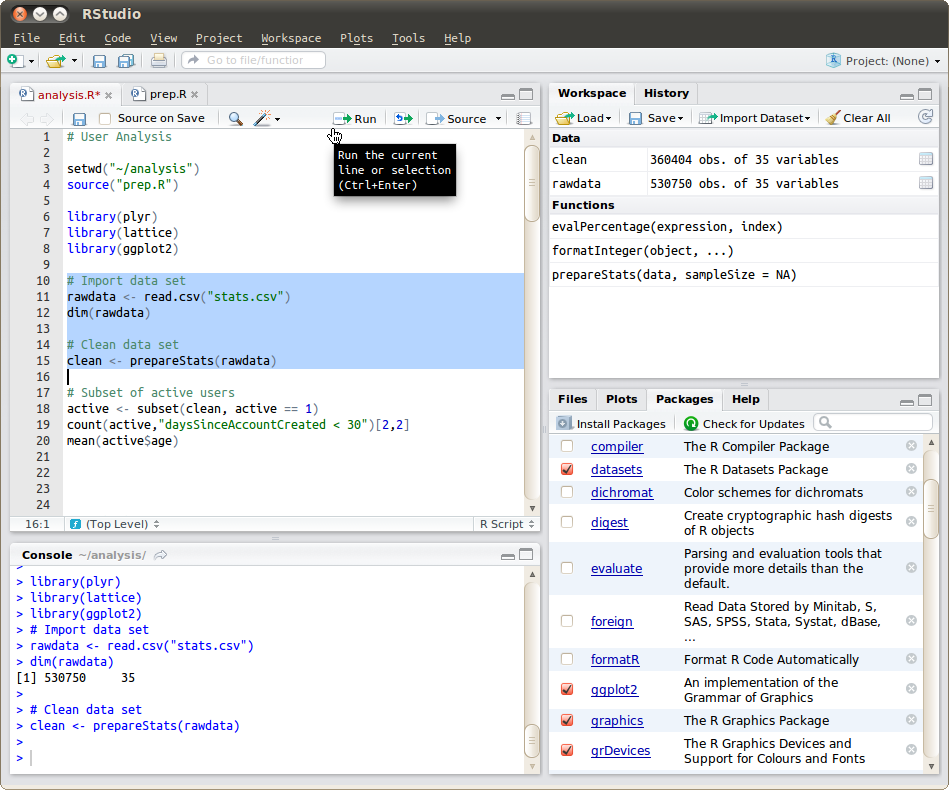
If you are still not sure how to get started with R, Rstudio, and tidyverse, see if the following information helps. It was written by Dr. Jennifer (Jenny) Bryan for her STAT 545 class, and in addition to the following start-up information, you may want to bookmark her class page as a reference throughout the rest of the semester!
Install R, a free software environment for statistical computing and graphics from CRAN, the Comprehensive R Archive Network. I highly recommend you install a precompiled binary distribution for your operating system – use the links up at the top of the CRAN page linked above!
Install RStudio’s IDE (stands for integrated development environment), a powerful user interface for R. Get the Open Source Edition of RStudio Desktop.
If you have a pre-existing installation of R and/or RStudio, we highly recommend that you reinstall both and get as current as possible. It can be considerably harder to run old software than new.
If you upgrade R, you will need to update any packages you have installed. The command below should get you started, though you may need to specify more arguments if, e.g., you have been using a non-default library for your packages.
update.packages(ask = FALSE, checkBuilt = TRUE)Note: this will only look for updates on CRAN. So if you use a package that lives only on GitHub or if you want a development version from GitHub, you will need to update manually, e.g. via devtools::install_github().
Do whatever is appropriate for your OS to launch RStudio. You should get a window similar to the screenshot you see here, but yours will be more boring because you haven’t written any code or made any figures yet!
Put your cursor in the pane labelled Console, which is where you interact with the live R process. Create a simple object with code like x <- 2 * 4 (followed by enter or return). Then inspect the x object by typing x followed by enter or return. You should see the value 8 print to screen. If yes, you’ve succeeded in installing R and RStudio.
R is an extensible system and many people share useful code they have developed as a package via CRAN and GitHub. To install a package from CRAN, for example the dplyr package for data manipulation, here is one way to do it in the R console (there are others).
install.packages("dplyr", dependencies = TRUE)By including dependencies = TRUE, we are being explicit and extra-careful to install any additional packages the target package, dplyr in the example above, needs to have around.
You could use the above method to install the following packages, all of which we will use:
Note that if you install the tidyverse, it includes many of the other packages above!
install.packages('tidyverse', dependencies = TRUE)The above will get your basic setup ready but here are some links if you are interested in reading a bit further.