Basic Principles
Problems & Warnings
Visualizing Correlation & Models in R
Example Comparison: The Story of the Kendall Name
Plotting in Python
Using Tableaux
Summer 2020
Outline
Basic Principles
Characteristics of Correlations
When a correlation exists between variables, it can be described by:
Direction – positive, negative, etc.
Strength – degree to which correlation exists
Shape – linear, curvilinear, etc.
Direction

Strength

Shape

Bias

Statistical Summaries of Correlations
Linear Correlation Coefficient – expressed as \(r\)
Coefficient of Determination – expressed as \(r^2\)
Or better – adjusted \(r^2\)
Also:
- AIC - Akaike Information Criterion
- BIC - Bayesian Information Criterion
Problems & Warnings
Correlation vs. Causation
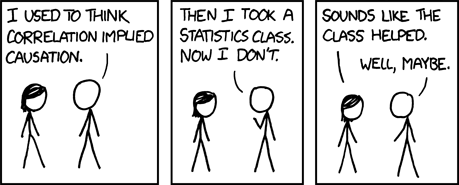
Correlation vs. Causation, p.2
correlation is a measure for how related the values of different variables are
causation is the concept that some set of variables explain the cause of some other set of variables
There are several reasons that variables correlate but are not causal:
- There are unmeasured, confounding variables that explain the variables
- There is a complex relationship between measured and unmeasured variables that explain the variables
- Chance
When correlation is significant, it can suggest some kind of relationship in the data exists, though not why
Look Hard Enough, There Will be Correlation
The real world involves many, many variables that interrelate in complex ways
Also, chance is only “random” if you aren’t already looking for it
If you want to find correlation and you look hard enough, then you will find it
So beware of confirmation bias
Or just weirdness
Sociologists Are Driving Space Innovation

Problems with \(r^2\)
But every time you add a predictor to your model, \(r^2\) will tend to go up, even if by chance
With too many predictors and too large a polynomials, the model simply memorizes the data (chance and all) – overfitting
Adjusted \(r^2\) compensates (somewhat) for the number of predictors used in the model
Predicted \(r^2\) tells how strongly correlated the model is over new data (not directly modeled) – it is a measure of generalization of the model
Extreme Outliers can Really Mess Things Up

Extreme Outliers can Really Mess Things Up, Source
library(ggplot2)
x = c(rnorm(30,mean=1,sd=1), rnorm(3, mean=10, sd=1))
y = c(rnorm(30,mean=1,sd=1), rnorm(3, mean=10, sd=1))
myData = data.frame(x,y)
adjRsq = summary(lm(y ~ x, myData))$adj.r
ggplot(myData, aes(x,y)) +
geom_smooth(method="lm", color="firebrick", size=1.25) +
geom_point(size=5, shape=21, fill="pink") +
annotate("text",4, 10,
label=paste("Adjusted r =", round(adjRsq,3)),
size=6) +
theme(text=element_text(family="Times", size=18))
Visualizing Correlation & Models in R
Linear Correlations, Visualization

Linear Correlations Source, p.1 (left panel)
library(ggplot2)
library(gridExtra)
x = 10*runif(30)
mydata = data.frame(x=x,y=2*x-3+rnorm(30,sd=2))
fit = lm(data=mydata,y~x)
b = fit$coefficients[1]
m = fit$coefficients[2]
rsq = summary(fit)$r.squared
pc = ggplot(mydata,aes(x,y)) +
geom_point(shape=21,fill="white",size=5) +
geom_smooth(method=lm,size=2,se=FALSE,color="darkblue") +
annotate("text",min(mydata$x),max(mydata$y),
label=paste("y =",round(m,2),"x +",round(b,2)),
hjust=0,size=8) +
annotate("text",min(mydata$x),max(mydata$y)-1.5,
label=paste("r^2 =",round(rsq,2)),
hjust=0, size=8) +
annotate("text",max(mydata$x),min(mydata$y),
label="Positive Correlation",size=10,hjust=1, color="darkgreen") +
theme(text=element_text(size=18,family="Times"))
Linear Correlations Source, p.2 (right panel)
mydata = data.frame(x=x,y=-2*x-3+rnorm(30,sd=2))
fit = lm(data=mydata,y~x)
b = fit$coefficients[1]
m = fit$coefficients[2]
rsq = summary(fit)$r.squared
nc = ggplot(mydata,aes(x,y)) +
geom_point(shape=21,fill="white",size=5) +
geom_smooth(method=lm,size=2,se=FALSE,color="darkblue") +
annotate("text",max(mydata$x),max(mydata$y),
label=paste("y =",round(m,2),"x +",round(b,2)),
hjust=1,size=8) +
annotate("text",max(mydata$x),max(mydata$y)-1.5,
label=paste("r^2 =",round(rsq,2)),
hjust=1, size=8) +
annotate("text",min(mydata$x),min(mydata$y),
label="Negative Correlation",size=10,hjust=0, color="darkred") +
theme(text=element_text(size=18,family="Times"))
grid.arrange(pc,nc,ncol=2)
Plotting Model Fits, p.1
The R plot() command gives you a lot of information about the model fits
We can parse the coefficients and plot the model directly with it, as well
But ggplot2 gives us an easier way to model and plot at the same time
Notice that the aes() function already makes us choose the response (\(y\)) and explanatory (\(x\)) variables
ggplot(Orange,aes(age,circumference)) + geom_point(shape=21,fill="wheat",size=5) + geom_smooth(method=lm,size=2,color="darkorange",se=FALSE) + theme(text=element_text(family="Times", size=18))
Plotting Model Fits, p.2

Plotting Model Fits, p.3
ggplot also gives us the ability to co-plot the error range of the fit
ggplot(Orange,aes(age,circumference)) +
geom_point(shape=21,fill="wheat",size=5) +
geom_smooth(method=lm,size=2,color="darkorange",se=TRUE) +
xlab("Tree Age") + ylab("Tree Circumference") +
theme(text=element_text(size=18,family="Times"))
Plotting Model Fits, p.4

More Linear Fits

More Linear Fits, Source
library(dplyr,quietly=TRUE, warn.conflicts=FALSE)
crimeURL = "http://datasets.flowingdata.com/crimeRatesByState2005.csv"
crime = filter(read.csv(crimeURL),
state != "United States",
state != "District of Columbia")
ggplot(crime, aes(murder,burglary)) +
geom_point(shape=21,size=4,fill="lightblue") +
geom_smooth(method="lm", size=1.5, color="darkblue") +
xlab("Murders per 100K People") +
ylab("Burglaries per 100K People") +
ggtitle("Murders vs. Burglaries by State in 2005") +
theme(text=element_text(size=18, family="Times"))
Pairwise Linear Fits

More Linear Fits, Source
library(dplyr,quietly=TRUE, warn.conflicts=FALSE)
library(GGally)
crimeURL = "http://datasets.flowingdata.com/crimeRatesByState2005.csv"
crime = filter(read.csv(crimeURL),
state != "United States",
state != "District of Columbia")
ggpairs(crime[,2:9])
Traditional R Model Plots

Traditional R Model Plots, Source
library(dplyr,quietly=TRUE, warn.conflicts=FALSE)
crimeURL = "http://datasets.flowingdata.com/crimeRatesByState2005.csv"
crime = filter(read.csv(crimeURL),
state != "United States",
state != "District of Columbia")
crimeModel = lm(data=crime, formula=murder ~ burglary)
plot(crimeModel, which=1, pch=19, col="gray", lwd=3)
GGPlot Residuals

GGPlot Residuals, Source
library(ggplot2)
myCars <- mtcars
mpgCarModel <- lm(mpg ~ hp, data = myCars)
myCars$predicted <- predict(mpgCarModel) # Save the predicted values
myCars$residuals <- residuals(mpgCarModel) # Save the residual values
ggplot(myCars, aes(x = hp, y = mpg)) +
geom_smooth(method = "lm", se = FALSE, color = "gray", size=2) +
geom_segment(aes(xend = hp, yend = predicted),
alpha = .2, size=1.25) +
geom_point(aes(color = abs(residuals)),
size=5) + # Color mapped to abs(residuals)
scale_color_continuous(name="Residual\nMangitude",
low = "black",
high = "red") + # Colors to use here
# guides(color = FALSE) + # Color legend removed
geom_point(aes(y = predicted), shape = 1) +
xlab("Horse Power of the Car") +
ylab("Car Mileage (mpg)") +
theme(text=element_text(size=18, family="Times"))
Use Non-Linear Models for Non-Linear Data
hatcolorURL = "http://cs.ucf.edu/~wiegand/ids6938/datasets/hatcolor.csv" hatcolor = read.table(hatcolorURL,header=TRUE) summary(lm(data=hatcolor,formula=Coolitude ~ HatLightness))$r.squared
## [1] 0.005302867
summary(lm(data=hatcolor,formula=Coolitude ~ poly(HatLightness,2)))$r.squared
## [1] 0.8888319
Using ggplot to Visualize These Models

Using ggplot to Visualize These Models, Source
ggplot(hatcolor,aes(HatLightness,Coolitude)) +
geom_point(shape=21,fill="lightblue",size=6) +
geom_smooth(method="lm",se=FALSE,fill=NA,size=2,color="darkblue",
formula=y ~ poly(x,2)) +
xlab("Lightness of Hat Color") + ylab("Coolitude of Hat-Wearer") +
theme(text=element_text(size=18,family="Times"))
Model Prediction (a reminder)
carModel = lm(data=mtcars, formula=mpg ~ wt + factor(cyl))
newCarData = data.frame(wt=c(2.5,1.9),
cyl=factor(c(4,6), levels= levels(factor(mtcars$cyl))))
newCarData$mpg = predict(carModel, newdata=newCarData)
print(newCarData)
## wt cyl mpg ## 1 2.5 4 25.97676 ## 2 1.9 6 23.64455
LOESS Modeling and Prediction (a reminder)
library(dplyr,quietly=TRUE, warn.conflicts=FALSE)
crimeURL = "http://datasets.flowingdata.com/crimeRatesByState2005.csv"
crime = filter(read.csv(crimeURL),
state != "United States",
state != "District of Columbia")
crimeModel = loess(data=crime, formula=burglary ~ murder)
predict(crimeModel, data.frame(murder=c(2.1,6.9, 8.7)), type="response")
## 1 2 3 ## 527.3236 880.5817 904.6269
LOESS and Prediction, Visualization

LOESS and Prediction, Source
library(dplyr,quietly=TRUE, warn.conflicts=FALSE)
crimeURL = "http://datasets.flowingdata.com/crimeRatesByState2005.csv"
crime = filter(read.csv(crimeURL),
state != "United States",
state != "District of Columbia")
crimeModel = loess(data=crime, formula=burglary ~ murder)
newCrimeData = data.frame(murder=c(2.1, 6.9, 8.7))
newCrimeData$burglary = predict(crimeModel, newCrimeData, type="response")
ggplot(crime, aes(murder,burglary)) +
geom_point(shape=21,size=4,fill="lightblue") +
geom_smooth(method="loess", size=1.5, color="darkblue") +
geom_point(data=newCrimeData, shape=21,size=6,fill="white") +
xlab("Murders per 100K People") +
ylab("Burglaries per 100K People") +
ggtitle("Murders vs. Burglaries by State in 2005") +
theme(text=element_text(size=18, family="Times"))
Regression and Small Multiples

Regression and Small Multiples
library(dplyr,quietly=TRUE, warn.conflicts=FALSE)
crimeURL = "http://datasets.flowingdata.com/crimeRatesByState2005.csv"
crime = filter(read.csv(crimeURL),
state != "United States")
pairs(crime[,2:9], panel=panel.smooth,
lwd=2,
cex=1.5,
pch=19, col="darkgray")
The Trouble with Bubbles
- Bubble plots let you plot three numeric dimensions by encoding one using size of the point
- But “size” in ggplot refers to the diameter of the point, which means the area of the plot increases as a square of the “size” parameter
- This distorts the numeric values
- Plus we don’t perceive area very well
- Plus we don’t understand area of a circle as well as a square
Alternative to Bubble Plots

Alternative to Bubble Plots, Source
library(dplyr,quietly=TRUE, warn.conflicts=FALSE)
crimeURL = "http://datasets.flowingdata.com/crimeRatesByState2005.csv"
crime = filter(read.csv(crimeURL),
state != "United States",
state != "District of Columbia")
ggplot(crime, aes(x=murder, y=burglary, size=sqrt(population))) +
geom_point(shape=0) +
scale_size_continuous(name="Population\nSize (x100K)", range=c(4,15) ) +
xlab("Murder Rate (per 100K)") +
ylab("Burglary (per 100K)") +
ggtitle("Crime Across the US") +
theme(text=element_text(size=18,family="Times"))
Chernoff Faces
Chernoff Faces in R
First: install aplpack

## effect of variables: ## modified item Var ## "height of face " "murder" ## "width of face " "forcible_rape" ## "structure of face" "robbery" ## "height of mouth " "aggravated_assault" ## "width of mouth " "burglary" ## "smiling " "larceny_theft" ## "height of eyes " "motor_vehicle_theft" ## "width of eyes " "murder" ## "height of hair " "forcible_rape" ## "width of hair " "robbery" ## "style of hair " "aggravated_assault" ## "height of nose " "burglary" ## "width of nose " "larceny_theft" ## "width of ear " "motor_vehicle_theft" ## "height of ear " "murder"
Example Comparison: The Story of the Kendall Name
Is Kendall Commonly a Boy or Girl Name?
- My father-in-law’s first name is Kendall
- He once noted to me that when he met someone else with that name:
- If they were older than 30, they were usually a man
- If they were younger than that, they were usually a women
- I decided to check his hypothesis
The Social Security Administration
- The Social Security Administration maintains a data set for the names of all people born in the US
- SSN Dataset
- The main dataset is a zip file containing a separate CSV for every year since 1880
There’s a Definite Gender Shift in the Name Kendall

Not Because Boys Aren’t Being Named Kendall

Some Context Might Help …

It’s True for Other Names, e.g. Riley

And Morgan

Bottom Line Regarding Kendall
- In the 80s and 90s, there was a general uptick in gender neutral naming
- Since some girls had been named ‘Kendall’, that was considered gender neutral and people started using it more for both sexes
- This was propelled by popular female characters and celebrities with that name
- People named Kendall born before 1993 are likely men, those born after are likely women (current age: 27)
- My father-in-law’s intuition was dead-on (don’t tell him I said that)
- The source is here, if you want it
Plotting in Python
Matplotlib
Most plotting in Python either users the Matplotlib package directly or wraps around it
The syntax for Matplotlib is not like ggplot2 in R:
- There is no graphics grammar / pipeline
- Each construct (figure, axes, lines, points) have to be individually constructed
- It’s more like programming than it is with R/ggplot2
The easiest way to learn Matplot lib is to:
- Go to the Matplotlib Gallery
- Find a plot kind of like yours
- Then copy and modify the code
Example Bar Plot, Source
import numpy as np
import matplotlib.pyplot as plt
# Example data
people = ('Tom', 'Dick', 'Harry', 'Slim', 'Jim')
y_pos = np.arange(len(people))
performance = 3 + 10 * np.random.rand(len(people))
error = np.random.rand(len(people))
# Create the figure and axes/subplot in the 'default' style
plt.rcdefaults()
fig, ax = plt.subplots()
fig.set_size_inches( (10,5) ) # Set the size of the figure boundary
# Add the bars with error whiskers
ax.barh(y_pos, performance, xerr=error, align='center', color='green', ecolor='black')
# Setup the ticks and labels
ax.set_yticks(y_pos)
ax.set_yticklabels(people)
ax.invert_yaxis() # labels read top-to-bottom
ax.set_xlabel('Performance')
ax.set_title('How fast do you want to go today?')
# Show the plot
plt.show()
Example Bar Plot

Example Polar Plot, Source
import numpy as np
import matplotlib.pyplot as plt
# Create some data points in polar coordinates
r = np.arange(0,1,0.001)
theta = 2 * 2*np.pi * r
ind = 800
thisr, thistheta = r[ind], theta[ind]
# Create the figure, axes/subplot, line plot, and points plot
fig = plt.figure()
ax = fig.add_subplot(111, polar=True)
line, = ax.plot(theta, r, color='#ee8d18', lw=3)
ax.plot([thistheta], [thisr], 'o')
# Add the annotation to the subplot
ax.annotate('a polar annotation',
xy=(thistheta, thisr), # theta, radius
xytext=(0.05, 0.05), # fraction, fraction
textcoords='figure fraction',
arrowprops=dict(facecolor='black', shrink=0.05),
horizontalalignment='left',
verticalalignment='bottom')
# Show the plot
plt.show()
Example Polar Plot

Using GGPlot for Python
- There is a ggplot library for Python
- It leverages the same “grammar for graphics” as it does in R
- Many of the calls are very similar, though in Python syntax
- It really just wraps around Matplotlib
- Like R’s ggplot2 uses data.frame, Python’s ggplot reads and understands pandas dataframe
- Only a subset of ggplot2 functionality is accessible with Python’s implementation
Example Line Plot
from ggplot import *
ggplot(aes(x='date', y='beef'), data=meat) +\
geom_line() +\
stat_smooth(colour='blue', span=0.2)
Other examples in the ggplot gallery docs
Using Seaborn for Python
- There is similar library called Seaborn
- The interface is nicer than Matplot, though it is not the ggplot semantics
- Seaborn also reads and understands pandas dataframes
- Seaborn is better documented and more stable than the ggplot implementation for Python, but it doesn’t do as much
Example Line Plot
import seaborn as sns
sns.set(style="darkgrid")
# Load an example dataset with long-form data
fmri = sns.load_dataset("fmri")
# Plot the responses for different events and regions
sns.lineplot(x="timepoint", y="signal",
hue="region", style="event",
data=fmri)
Other examples in the seaborn gallery
Using Tableau
What Is Tableau?
- Tableau is a WYSWG data analysis tool
- You can pull data in, manipulate it, and plot from an easy GUI interface
- It can produce dynamic data visualizations and dashboards that can be published
- It also has a Story features that let’s you create presentations directly in Tableau
- Tableau is not free, though there is a free one-year version for students
- Tableau Dashboard Gallery