Shiny App for Predicting Text
Harsh Baxi
March 9, 2020
Overview
The webpage Predict text provides a English text prediction tool which is based on three large text datasets provided by Coursera:

The prediction tool uses a simple methodology to predict the next word(s) - it searches the list of Trigrams and Bigrams and word associations extracted from the text datasets:

The details of the processing and analysis of the text datases are described next.
Step 1: Split/Cleanup/Analyze datasets
The analysis of the input datasets was carried out using the text mining capabilities offered by the tm package.
Given the large size of the text source files, each dataset was split into 20 subsets and the text in each subset was processed through a set of “cleanup” transformations such as converting all chararcters to lowercase, remove all non-alphabet characters, removing profanities etc.
The cleaned up text datasets were then analyzed to extract the unigram, bigram and trigram sequences and their counts for each subset.
The process is illustrated for the “en_US_blogs.txt” input file in the figure below:

Note: The cleanup transformations were carried out twice: once with “stopwords” left in the text and the second time with the “stopwords” removed. This gave us two sets of “clean” text data.
Step 2: Merge results
In the first merge step, the Ngram frequency data from the analysis step for each data subset was merged to get one unigram, bigram, trigram dataset for each of the three text sources (news, blogs & twitter).
The counts for each Ngram from all the subsets were summed up in the combined Ngram data file.

In the second merge step, the Ngram data from the three sources were combined to give a single Ngram file for all the input text datasets.
As mentioned on the previous slide, we generated two sets of Ngram data, with and without stopwords.
Step 3: Word Associations
Word associations would be the fall-back in cases where the word(s) ending the user input do not appear at the start of a bigram or a trigram.
To start, we collect all non-stopword unigrams that do not appear at the start of a bigram/trigram. We then use the findAssocs functionality the tm package to analyze all sentences in the cleaned up text datasets that contain each of these unigrams and get the top 5 words associated with each of the unigrams.

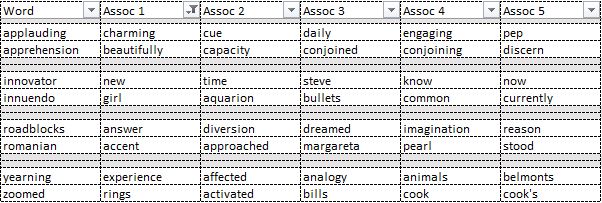
Note: If the list of word associations does not help with the prediction, we display a message saying “Unable to predict text for this phrase.”.
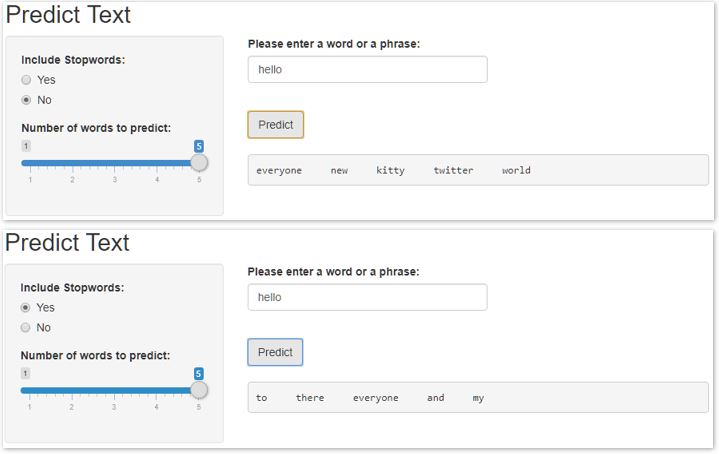
Prediction Shiny App
The Shiny App allows the user to change two settings:
- whether or not to include stopwords - each time the user changes the setting, the app will reload the correct model data
- number of words to predict
The example below shows the different sets of results obtained by changing the stopword settings.