DATA 606 Data Project
Michael Y.
May 2019
Part 1 - Introduction
The “Oxford Comma” is the subject of endless debate among grammarians. It’s the comma that precedes the final conjunction in a listing of 3 or more items. For example, the sentence
“For breakfast I like to eat cereal, toast, and juice.”
contains the Oxford Comma, while
“I am planning to invite Tim, Dick and Harry.”
does not.
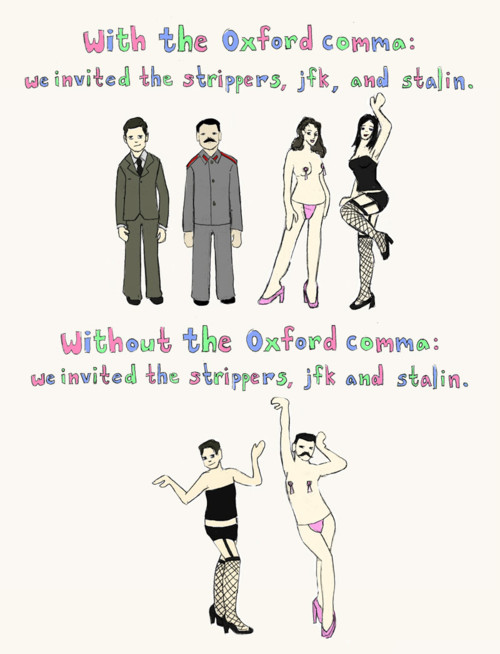
In cases like the above, there is really no difference in interpretation, but there are notable examples where the lack of an Oxford Comma can produce humorous results. For example:

[Source: https://www.verbicidemagazine.com/wp-content/uploads/2011/09/Oxford-Comma.jpg]
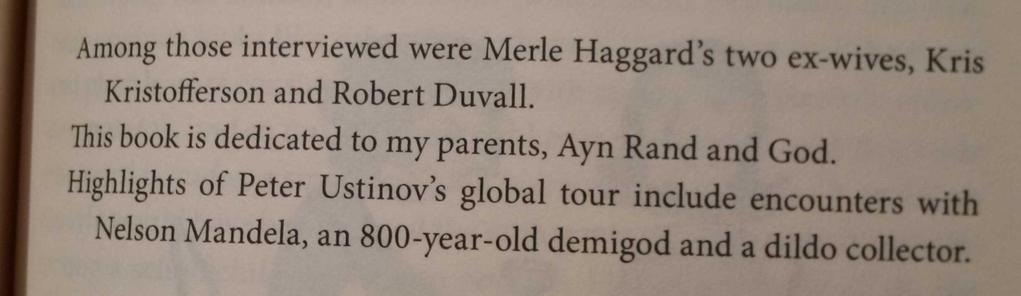
Some additional humorous examples include:

[Source: https://www.thepoke.co.uk/wp-content/uploads/2015/05/bn2hf3Q.jpg]
On a more serious note, ambiguities in contracts because of the presence or absence of the Oxford Comma have resulted in costly legal disputes, such as a case in Maine where truckers for a dairy sued for overtime pay\(^5\) because an ambiguity in Maine law (missing Oxford comma!) made it unclear whether or not they would be paid overtime.
As originally written, the law carved out an exemption from overtime for:
The canning, processing, preserving, freezing, drying, marketing, storing, packing for shipment or distribution of:
Agricultural produce;
Meat and fish products; and
Perishable foods.
The case hinged upon the absence of a comma between the words “shipment” and “or”, with the drivers contending that the phrase “packing for shipment or distribution of” meant that the overtime exemption only applied to the activity of packing (for shipment or distribution), while the dairy argued that the legislative intent was for packing for shipment to represent one activity, and distribution to represent a separate activity. The drivers do not perform packing, but they do perform distribution. If the law had been drafted with a comma following the word “shipment” the there would be no ambiguity, and the drivers would have no case.
Following a favorable ruling \(^7\) from the US Court of Appeals for the First Circuit, the drivers settled their case\(^6\) for a $5 million payout from the dairy.
Thus, the use of the “Oxford Comma” is important.
In this study we will be looking at a data set in which people from across the USA responded to a survey which inquired as to whether or not they preferred the Oxford Comma. The survey also collected self-reported data concerning Age, Income, Educational level, Gender, and geographic location. The purpose of this study will be to determine which of those variables (if any) reveal a strong enough association with the propensity to prefer (or, not prefer) the Oxford Comma.
Part 2 - Data
Data Source
Data collection: Describe how the data were collected.
If you collected the data, state self-collected. If not, provide a citation/link.
In June of 2014, FiveThirtyEight.com ran an online poll (using “surveymonkey.com”) asking Americans whether they preferred the serial comma (also known as the Oxford Comma.)
Additional questions were posed regarding the respondents’ educational level, income level, age, and what part of the country each person was from.
Additional grammatical questions which were part of the same poll concerned usage of the word “data”: respondents were asked whether they considered “data” to be singular or plural. (Such questions have been omitted from the present analysis.)
Following conclusion of the poll, FiveThirtyEight.com published a piece Elitist, Superfluous, Or Popular? We Polled Americans on the Oxford Comma\(^1\) and made the underlying dataset\(^2\) available on github .
I loaded up the data from fivethirtyeight’s github site.
The initial variable names were awful:
# load data from fivethirtyeight
commadata <- read.csv("https://raw.githubusercontent.com/fivethirtyeight/data/master/comma-survey/comma-survey.csv",na="",stringsAsFactors = T)
# summary(commadata)
initial_variable_names <- names(commadata)
kable(t(rbind(seq(initial_variable_names),initial_variable_names)),caption="Initial variable names")%>%
kable_styling(c("striped", "bordered"))| initial_variable_names | |
|---|---|
| 1 | RespondentID |
| 2 | In.your.opinion..which.sentence.is.more.gramatically.correct. |
| 3 | Prior.to.reading.about.it.above..had.you.heard.of.the.serial..or.Oxford..comma. |
| 4 | How.much..if.at.all..do.you.care.about.the.use..or.lack.thereof..of.the.serial..or.Oxford..comma.in.grammar. |
| 5 | How.would.you.write.the.following.sentence. |
| 6 | When.faced.with.using.the.word..data…have.you.ever.spent.time.considering.if.the.word.was.a.singular.or.plural.noun. |
| 7 | How.much..if.at.all..do.you.care.about.the.debate.over.the.use.of.the.word..data..as.a.singluar.or.plural.noun. |
| 8 | In.your.opinion..how.important.or.unimportant.is.proper.use.of.grammar. |
| 9 | Gender |
| 10 | Age |
| 11 | Household.Income |
| 12 | Education |
| 13 | Location..Census.Region. |
So, I cleaned up the variable names:
###### Clean up the names
new_variable_names <- c("RespondentID",
                        "USES_Oxford",
                        "HEARD_Oxford",
                        "CARE_Oxford",
                        "DATA_Sentence",
                        "DATA_Plural",
                        "DATA_Care",
                        "Grammar_Important",
                        "Gender",
                        "Age",
                        "Income",
                        "Education",
                        "Location")
names(commadata) <- new_variable_names
kable(t(rbind(seq(new_variable_names),new_variable_names)),caption="New variable names")%>%
kable_styling(c("striped", "bordered"))| new_variable_names | |
|---|---|
| 1 | RespondentID |
| 2 | USES_Oxford |
| 3 | HEARD_Oxford |
| 4 | CARE_Oxford |
| 5 | DATA_Sentence |
| 6 | DATA_Plural |
| 7 | DATA_Care |
| 8 | Grammar_Important |
| 9 | Gender |
| 10 | Age |
| 11 | Income |
| 12 | Education |
| 13 | Location |
What are the cases, and how many are there? (Remember: case = units of observation or units of experiment)
The raw dataset contains 1129 cases, each of which represents a response to an online poll conducted in June 2014, where participants were asked various questions, including:
- whether they knew what the Oxford Comma is,
- which of two sentences (one with the serial comma, and one without) they preferred, and
- whether they believed the use of proper grammar was important.
Additionally, participants were asked questions regarding their gender, age, income, educational attainment, and geographic region.
The overall dataset includes the following variables and possible responses:
| n | variable | question or description | type | data dictionary |
|---|---|---|---|---|
| 1 | RespondentID |
numerical ID of participant | numerical, discrete | unique identifiers assigned by the survey site (surveymonkey.com) |
| 2 | USES_Oxford |
“In your opinion, which sentence is more gramatically correct?” | categorical, nominal | 1-“It’s important for a person to be honest, kind and loyal.” 2-“It’s important for a person to be honest kind and loyal.” |
| 3 | HEARD_Oxford |
“Prior to reading about it above, had you heard of the serial (or Oxford) comma?” | categorical, binary | “No”, “Yes” |
| 4 | CARE_Oxford |
“How much, if at all, do you care about the use (or lack thereof) of the serial (or Oxford) comma in grammar?” | categorical, ordinal | “Not at All” , “Not Much” , “Some” , “A lot” |
| 5 | DATA_Sentence |
“How would you write the following sentence?” (One uses “Data” as singular, the other as plural) | categorical, binary | Plural: “Some experts say it’s important to drink milk, but the data are inconclusive.” ; Singular: “Some experts say it’s important to drink milk, but the data is inconclusive.” |
| 6 | DATA_Plural |
“When faced with using the word ‘data’, have you ever spent time considering if the word was a singular or plural noun?” | categorical, binary | “Yes”, “No” |
| 7 | DATA_Care |
“How much, if at all, do you care about the debate over the use of the word ‘data’ as a singluar or plural noun?” | categorical, ordinal | “Not at All” , “Not Much” , “Some” , “A lot” |
| 8 | Grammar_Important |
“In your opinion, how important or unimportant is proper use of grammar?” | Categorical, ordinal | “Very unimportant”, “Somewhat unimportant”, “Neither important nor unimportant (neutral)”, “Somewhat important”, “Very important” |
| 9 | Gender |
Participant’s gender (only “Male” and “Female” choices offered) | Categorical, binary | “Female”, “Male” |
| 10 | AgeBands |
Participant’s age, in one of four bands | Categorical, ordinal | “18-29”, “30-44”, “45-60”, “> 60” |
| 11 | IncomeBands |
Participant’s household income, in one of five bands | Categorical, ordinal | “$0 -$24,999” , “$25,000-$49,999” , “$50,000-$99,999” , “$100,000-$149,999” , “$150,000+” |
| 12 | Education |
Participant’s level of education, in one of five categories | Categorical, ordinal | “Less than high school degree”, “High school degree”, Some college or Associate degree“,”Bachelor degree“,”Graduate degree“ |
| 13 | Location |
Participant’s geographic location, in one of 9 regions | Categorical, nominal | “New England”,“Middle Atlantic”,“South Atlantic”," East North Central“,”East South Central“,”West North Central“,”West South Central“,”Mountain“,”Pacific“ |
I made various adjustments to the initial data, including:
Dropping variable [1] RespondentID, as it is not needed
#### [1] `RespondentID` should not impact the results -- it is just an identifier, so drop it
commadata$RespondentID <- NULL
Recategorizing [2] USES_Oxford variable as “True” or “False”
# [2] The question posed to participants was whether they preferred a sentence using the Oxford Comma

#t(t(table(commadata$USES_Oxford)))
#  It's important for a person to be honest, kind and loyal.   488
#  It's important for a person to be honest, kind, and loyal.  641
#### Replace the response with False / True:
levels(commadata$USES_Oxford) <- c(F,T)
kable(table(commadata$USES_Oxford,useNA = "ifany"),
      col.names=c("Did the respondent prefer the sentence containing the Oxford Comma?","Freq"),
      caption="Variable `USES_Oxford`") %>%
kable_styling(c("striped", "bordered"))| Did the respondent prefer the sentence containing the Oxford Comma? | Freq |
|---|---|
| FALSE | 488 |
| TRUE | 641 |
Resequencing the (unordered) levels for [4] CARE_Oxford to reflect the ordering:
# [4] Resequence the levels for the responses to reflect how much does the participant ***care about*** the Oxford Comma?
# First ten observations:
# t(t(head(commadata$CARE_Oxford,10)))
# Summary table (sequence is not ordinal):
# kable(table(commadata$CARE_Oxford,useNA = "ifany"),format="markdown")

# What are the original levels on the CARE_Oxford variable?
# t(t(levels(commadata$CARE_Oxford)))

### use fct_relevel from library `forcats` to sort the CARE_Oxford levels ordinally
commadata$CARE_Oxford = fct_relevel(commadata$CARE_Oxford, levels(commadata$CARE_Oxford)[c(2,3,4,1)])

#### Don't use Ordinal variable in the regression because the result is handled differently than one would expect...
#is.ordered(commadata$CARE_Oxford)
#commadata$CARE_Oxford=ordered(commadata$CARE_Oxford)
#is.ordered(commadata$CARE_Oxford)
# Now, "ordered":
#summary(glm(USES_Oxford ~ CARE_Oxford , data = commadata, family=binomial))

#t(t(levels(commadata$CARE_Oxford)))
#t(t(summary(commadata$CARE_Oxford)))      # resequenced to reflect ordering from  "Not at all" to "A lot"


kable(table(commadata$CARE_Oxford,useNA = "ifany"),
      col.names=c("How much do you care about the Oxford Comma?","Freq"),
      caption="Variable `CARE_Oxford`") %>%
kable_styling(c("striped", "bordered"))| How much do you care about the Oxford Comma? | Freq |
|---|---|
| Not at all | 126 |
| Not much | 268 |
| Some | 414 |
| A lot | 291 |
| NA | 30 |
Recategorizing the responses to [5] DATA_Sentence to reflect “PLURAL” or “SINGULAR”
# [5] Another question asked users whether they think the word "data" should be considered singular or plural.

#t(t(table(commadata$DATA_Sentence,useNA = "ifany")))
#  Some experts say it's important to drink milk, but the data are inconclusive.  228
#  Some experts say it's important to drink milk, but the data is inconclusive.   865

### Replace the above sentences with the word "PLURAL" or "SINGULAR" to reflect user preference

levels(commadata$DATA_Sentence) <- c("PLURAL","SINGULAR")

kable(table(commadata$DATA_Sentence,useNA = "ifany"),
      col.names=c("Do you consider the word 'DATA' to be Plural or Singular?","Freq"),
      caption="Variable `DATA_Sentence`") %>%
kable_styling(c("striped", "bordered"))| Do you consider the word ‘DATA’ to be Plural or Singular? | Freq |
|---|---|
| PLURAL | 228 |
| SINGULAR | 865 |
| NA | 36 |
Resequencing the (unordered) levels for [7] DATA_Care to reflect the ordering:
#### [7] Resequence the levels for the responses to reflect how much does the participant care about whether "Data" is considered Singular or Plural

# First ten observations:
#t(t(head(commadata$DATA_Care,10)))

# Summary table (sequence is not ordinal):
#t(t(table(commadata$DATA_Care,useNA = "ifany")))

# What are the original levels on the DATA_Care variable?
#t(t(levels(commadata$DATA_Care)))

### use fct_relevel from library `forcats` to sort the DATA_Care levels ordinally
commadata$DATA_Care = fct_relevel(commadata$DATA_Care, levels(commadata$DATA_Care)[c(2,3,4,1)])

#t(t(levels(commadata$DATA_Care)))

#t(t(summary(commadata$DATA_Care)))      # resequenced to reflect ordering from  "Not at all" to "A lot"

### Make sure the results are still same

#print("DATA_Care levels:")
#t(t(table(commadata$DATA_Care,useNA = "ifany")))
#t(t(head(commadata$DATA_Care,10)))


kable(table(commadata$DATA_Care,useNA = "ifany"),
      col.names=c("How much do you care about the debate over the use of the word 'data' as singular vs. plural?","Freq"),
      caption="Variable `DATA_Care`") %>%
kable_styling(c("striped", "bordered"))| How much do you care about the debate over the use of the word ‘data’ as singular vs. plural? | Freq |
|---|---|
| Not at all | 203 |
| Not much | 403 |
| Some | 352 |
| A lot | 133 |
| NA | 38 |
Resequencing the (unordered) levels for [8] Grammar_Important to reflect the ordering:
#### [8] Resequence the levels for the the responses to ***Importance of Proper Use of Grammar***?

# What are the original levels on the Grammar_Important variable?
# t(t(levels(commadata$Grammar_Important)))

# Shorten "Neither important nor unimportant (neutral)" to "Neutral" to avoid printing/display width problems
levels(commadata$Grammar_Important)[1]="Neutral"

### use fct_relevel from library `forcats` to sort the Grammar_Important levels ordinally
commadata$Grammar_Important = fct_relevel(commadata$Grammar_Important, levels(commadata$Grammar_Important)[c(5,3,1,2,4)])

# Resequenced levels:
# t(t(levels(commadata$Grammar_Important)))

kable(table(commadata$Grammar_Important,useNA = "ifany"),
      col.names=c("In your opinion, how important or unimportant is proper use of grammar?","Freq"),
      caption="Variable `Grammar_Important`") %>%
kable_styling(c("striped", "bordered"))| In your opinion, how important or unimportant is proper use of grammar? | Freq |
|---|---|
| Very unimportant | 5 |
| Somewhat unimportant | 7 |
| Neutral | 26 |
| Somewhat important | 333 |
| Very important | 688 |
| NA | 70 |
Resequencing the (unordered) levels for [10] AgeBands to reflect the ordering of the bands:
#### [10] Fix the `Age` variable - resequence the levels, and create a numeric equivalent, based upon the midpoints

# First ten entries from the Age variable:
#t(t(head(commadata$Age,10)))

# Save the Age bands
commadata$AgeBands <- commadata$Age

# What are the original levels on the Age variable?
#t(t(levels(commadata$Age)))

### use fct_relevel from library `forcats` to sort the age levels ordinally
commadata$AgeBands = fct_relevel(commadata$AgeBands, levels(commadata$Age)[c(2,3,4,1)])

# What are the resequenced levels on the Age variable?
#t(t(levels(commadata$AgeBands)))

### Make sure the results are still same

# Age bands:
#t(t(table(commadata$AgeBands,useNA = "ifany")))

# First ten entries:
#t(t(head(commadata$AgeBands,10)))

kable(table(commadata$AgeBands,useNA = "ifany"),
      col.names=c("Age Band","Freq"),
      caption="Variable `AgeBands`") %>%
kable_styling(c("striped", "bordered"))| Age Band | Freq |
|---|---|
| 18-29 | 221 |
| 30-44 | 254 |
| 45-60 | 290 |
| > 60 | 272 |
| NA | 92 |
Additionally, I created a new numeric variable [10b] AgeNumeric , with its value set to the midpoint of each AgeBand, so we can treat Age as a numeric variable rather than as categorical.
(Note: for “> 60” , we’ll arbitrarily use 65 for the right-censored data.)
#### Copy the factors from AgeBands to create "AgeNumeric"  (Factors are actually stored internally as 1,2,3,4)
commadata$AgeNumeric <- commadata$AgeBands

#### Overwrite the levels  (e.g., "18-29") with their midpoint (here, 23.5)
levels(commadata$AgeNumeric) <- c(23.5,37,52.5,65)   ##age bands 18-29 ; 30-44 ; 45-60 ; Over 60

# The above variable is still stored as strings.
# Replace the above string values with their numeric equivalents:
commadata$AgeNumeric <- as.numeric(levels(commadata$AgeNumeric))[commadata$AgeNumeric]


kable(table(commadata$AgeNumeric,useNA = "ifany"),
      col.names=c("Age(Numeric): Midpoint of AgeBand","Freq"),
      caption="Variable `AgeNumeric`") %>%
kable_styling(c("striped", "bordered"))| Age(Numeric): Midpoint of AgeBand | Freq |
|---|---|
| 23.5 | 221 |
| 37 | 254 |
| 52.5 | 290 |
| 65 | 272 |
| NA | 92 |
Resequencing the (unordered) levels for [11] IncomeBands to reflect the ordering of the bands:
#### [11] Fix the `Income` variable - resequence the levels

#t(t(head(commadata$Income,10)))

# Save the income bands
commadata$IncomeBands <- commadata$Income

# What are the original levels on the income variable?
#t(t(levels(commadata$Income)))

### use fct_relevel from library forcats to sort the income levels ordinally
commadata$IncomeBands = fct_relevel(commadata$IncomeBands, levels(commadata$IncomeBands)[c(1,4,5,2,3)])

kable(table(commadata$IncomeBands,useNA = "ifany"),
      col.names=c("Income Band","Freq"),
      caption="Variable `IncomeBands`") %>%
kable_styling(c("striped", "bordered"))| Income Band | Freq |
|---|---|
| $0 - $24,999 | 121 |
| $25,000 - $49,999 | 158 |
| $50,000 - $99,999 | 290 |
| $100,000 - $149,999 | 164 |
| $150,000+ | 103 |
| NA | 293 |
Resequencing the (unordered) levels for [12] Education to reflect the ordering of the Educational Attainment:
#### [12] Resequence the levels for the ***Education*** variable

# What are the original levels on the Education variable?
#t(t(levels(commadata$Education)))
#[1,] "Bachelor degree"
#[2,] "Graduate degree"
#[3,] "High school degree"
#[4,] "Less than high school degree"
#[5,] "Some college or Associate degree"


### use fct_relevel from library forcats to sort the Education levels ordinally
commadata$Education = fct_relevel(commadata$Education, levels(commadata$Education)[c(4,3,5,1,2)])

#t(t(levels(commadata$Education)))

#t(t(summary(commadata$Education)))              # resequenced to reflect ordering from "Less than high school degree" to "Graduate degree"

kable(table(commadata$Education,useNA = "ifany"),
      col.names=c("Level of Educational Attainment of participant","Freq"),
      caption="Variable `Education`") %>%
kable_styling(c("striped", "bordered"))| Level of Educational Attainment of participant | Freq |
|---|---|
| Less than high school degree | 11 |
| High school degree | 100 |
| Some college or Associate degree | 295 |
| Bachelor degree | 344 |
| Graduate degree | 276 |
| NA | 103 |
Resequencing the levels for [13] Education to reflect geography (east coast to west coast):
#### [13] Resequence the levels for the ***Location*** variable to reflect geography (east to west)

# What are the original levels on the Location variable?
#t(t(levels(commadata$Location)))
# [1,] "East North Central"
# [2,] "East South Central"
# [3,] "Middle Atlantic"
# [4,] "Mountain"
# [5,] "New England"
# [6,] "Pacific"
# [7,] "South Atlantic"
# [8,] "West North Central"
# [9,] "West South Central"


### use fct_relevel from library forcats to sort the Location levels so they reflect geography from East to West
commadata$Location = fct_relevel(commadata$Location, levels(commadata$Location)[c(5,3,7,1,2,8,9,4,6)])

#t(t(levels(commadata$Location)))

#t(t(summary(commadata$Location)))              # resequenced to reflect ordering from east coast to west coast

kable(table(commadata$Location,useNA = "ifany"),
      col.names=c("Geographic location of participant","Freq"),
      caption="Variable `Location`") %>%
kable_styling(c("striped", "bordered"))| Geographic location of participant | Freq |
|---|---|
| New England | 73 |
| Middle Atlantic | 140 |
| South Atlantic | 164 |
| East North Central | 170 |
| East South Central | 43 |
| West North Central | 82 |
| West South Central | 88 |
| Mountain | 87 |
| Pacific | 180 |
| NA | 102 |
Let’s drop the “DATA (singular vs. plural)” questions from the analysis, as those responses represent a different question:
Drop cases containing NAs
After dropping the incomplete cases (those where at least one response was “NA”), the size of the data set has been reduced to 828 cases, none of which contains any “NA” values.
Variables: What are the two variables you will be studying? State the type of each variable.
Dependent Variable
What is the response variable? Is it quantitative or qualitative?
The response variable is USES_Oxford - it is a True/False variable which indicates whether a subject prefers the use of the Oxford Comma, or not.
Independent Variable
You should have two independent variables, one quantitative and one qualitative.
I am going to implement stepwise logistic regression on all of the variables to determine which are most indicative as to whether an individual prefers the use of the Oxford Comma. (I will omit the variables pertaining to whether “Data” is singular or plural, as those represent a side question.)
Most significantly, I’ll explore whether there is any association favoring the Oxford Comma based upon participant Age, Income, Gender, Education, and geographic Location . Additionally there are variables indicating whether the user has previously heard about the Oxford Comma HEARD_Oxford and how much the respondent cares about it CARE_Oxford. Initially we will include these variables too, but later we will drop them as well.
The raw variables Age and Income are presented as categorical, as the results are given in bands rather than exact values. However, I will simulate quantitative (discrete) variables by creating a numerical equivalent where for each case I will set the value to the midpoint of the range.
Gender and Location are qualitative, non-ordinal variables.
Education is a qualitative variable, but it is ordinal as the various levels of education can be ranked. Likewise, CARE_Oxford is ordinal, as the available categories indicate how much the respondent cares, and can be ranked.
My conjecture would be that users of the Oxford Comma would tend to be younger, higher in income, and higher in education than non-users.
I do not have any prior expectation that Gender would impact the results.
It would be interesting to see whether Location has any impact on the results, as regional dialects can impact usage of English in various parts of the country.
Type of study:
What is the type of study, observational or an experiment?
This is an observational study.
Explain how you’ve arrived at your conclusion using information on the sampling and/or experimental design.
The study was commissioned by FiveThirtyEight.com , which engaged surveymonkey.com to obtain responses from an online poll.
It is not clear what criteria (if any) may have been used to filter the pool of individuals who became aware of the survey during the three day window when it was online. To be an experiment there would need to be a random selection of individuals between treatment and control groups, which is clearly not the case here.
Scope of inference - generalizability:
Identify the population of interest, and whether the findings from this analysis can be generalized to that population, or, if not, a subsection of that population.
The population of interest would be all the adults in the USA.
While the respondents to the survey appear (based upon summary statistics) to be well-distributed across factors such as geography, income, age, gender, and level of education, the survey was limited to individuals who self-selected to participate in an online poll organized by FiveThirtyEight.com and executed through SurveyMonkey.com .
Explain why or why not.
FiveThirtyEight.com is an opinion polling aggregation and analysis website founded in 2008 by Nate Silver, who gained attention for his precise forecasts of US election results. To participate in the 2014 Oxford Comma poll examined here, users would have to be aware of the FiveThirtyEight website and interested in taking the time to submit their responses during the three-day window that the poll was open on surveymoney.com .
Also discuss any potential sources of bias that might prevent generalizability.
The set of individuals who have interest in the matters discussed at FiveThirtyEight.com , and those who choose to participate in online surveys, may differ from the US population.
Therefore it is unclear as to whether the results of the survey could be generalized to the entire US population. Without further details on the methodology for participant selection, it would be difficult to assert that the participants were independent and identically distributed across the variables of interest.
Thus, we cannot be sure that the sample made available for the survey is free from bias.
Scope of inference - causality: Can these data be used to establish causal links between the variables of interest?
Because this is an observational study, it cannot be used to establish causality.
Explain why or why not.
This is simply a survey which shows associations between various preferences. It is not meant to assert that one variable “causes” another.
Part 3 - Exploratory data analysis
Exploratory data analysis: Perform relevant descriptive statistics, including summary statistics and visualization of the data. Also address what the exploratory data analysis suggests about your research question.
[2] Does the respondent prefer to use the oxford comma?
kable(table(comma2$USES_Oxford,useNA = "ifany"),
      col.names=c("Among complete cases, did the respondent prefer the sentence containing the Oxford Comma?","Freq"),
      caption="Variable `USES_Oxford`") %>%
kable_styling(c("striped", "bordered"))| Among complete cases, did the respondent prefer the sentence containing the Oxford Comma? | Freq |
|---|---|
| FALSE | 358 |
| TRUE | 470 |
plot.new()
bx02 <- barplot(table(comma2$USES_Oxford),col=c("red","green"),
        xlab = "Do you prefer to use the Oxford Comma?",
        ylab = "Frequency",
        ylim=c(0,max(table(comma2$USES_Oxford))*1.1),

        main =   "Oxford Comma ***USAGE*** among respondents to FiveThirtyEight.com poll")
text(x = bx02,
     y=table(comma2$USES_Oxford)+10,
     label = as.character(table(comma2$USES_Oxford), pos=3, cex=1.0,  col="black"))
[3] Has the respondent previously heard about the Oxford Comma?
kable(table(comma2$HEARD_Oxford,useNA = "ifany"),
      col.names=c("Had you previously heard about the Oxford Comma?","Freq"),
      caption="Variable `HEARD_Oxford`") %>%
kable_styling(c("striped", "bordered"))| Had you previously heard about the Oxford Comma? | Freq |
|---|---|
| No | 329 |
| Yes | 499 |
bx03 <- barplot(table(comma2$HEARD_Oxford),col=c("red","green"),
        xlab = "Have you previously heard about the Oxford Comma?",
        ylab = "Frequency",
        ylim=c(0,max(table(comma2$HEARD_Oxford))*1.1),
        main =   "Oxford Comma ***AWARENESS*** among respondents to FiveThirtyEight.com poll")
text(x = bx03,
     y=table(comma2$HEARD_Oxford)+14,
     label = as.character(table(comma2$HEARD_Oxford), pos=3, cex=1.0,  col="black"))
[4] Does the respondent care about the Oxford Comma?
kable(table(comma2$CARE_Oxford,useNA = "ifany"),
      col.names=c("How much (if at all) do you care about the Oxford Comma?","Freq"),
      caption="Variable `CARE_Oxford`") %>%
kable_styling(c("striped", "bordered")) # already resequenced above to reflect ordering from "A lot" to "Not at all"| How much (if at all) do you care about the Oxford Comma? | Freq |
|---|---|
| Not at all | 86 |
| Not much | 208 |
| Some | 311 |
| A lot | 223 |
### Barplot of degree to which respondent cares about the Oxford Comma
bx04 <-barplot(table(comma2$CARE_Oxford),col=rainbow(4),
        xlab = "How much do you care?",
        ylab = "Frequency",
        ylim=c(0,max(table(comma2$CARE_Oxford))*1.1),
        main =   "How much do respondents CARE about the 'Oxford Comma' ?")
text(x = bx04,
     y=table(comma2$CARE_Oxford)+10,
     label = as.character(table(comma2$CARE_Oxford), pos=3, cex=1.0,  col="black"))
The results somewhat resemble a normal distribution, e.g., if we were to assign ascending numerical values to the categories.
Have you Heard vs. Do you Care?
# Have you previously heard about the Oxford Comma vs. how much do you care about it?
kable(table(comma2$CARE_Oxford,comma2$HEARD_Oxford)) %>%
  kable_styling(c("striped", "bordered")) %>%
add_header_above(c("How much (if at all) do you CARE about the Oxford Comma?", "Have you previously HEARD about the Oxford Comma?" = 2 ))| No | Yes | |
|---|---|---|
| Not at all | 60 | 26 |
| Not much | 98 | 110 |
| Some | 127 | 184 |
| A lot | 44 | 179 |
mosaicplot(comma2$HEARD_Oxford ~ comma2$CARE_Oxford,col=rainbow(4),las=1,
           xlab="Have you (previously) heard of the Oxford Comma?",
           ylab="Do you care?",
           main = "'Have you HEARD' vs. 'Do you CARE?'")
Respondents who have previously heard of the Oxford Comma are more likely to care about it, while those who have not previously heard about it are less likely.
[8] Does the respondent believe that correct grammar is important?
kable(table(comma2$Grammar_Important,useNA = "ifany"),
      col.names=c("Do you believe that correct grammar is important?","Freq"),
      caption="Variable `Grammar_Important`") %>%
kable_styling(c("striped", "bordered")) # already resequenced above to reflect ordering| Do you believe that correct grammar is important? | Freq |
|---|---|
| Very unimportant | 2 |
| Somewhat unimportant | 5 |
| Neutral | 21 |
| Somewhat important | 267 |
| Very important | 533 |
### Barplot of importance of correct grammar
barplot_names = levels(comma2$Grammar_Important)
barplot_names[3]="Neutral"                          # otherwise this entry is too long
bx08 <- barplot(table(comma2$Grammar_Important),col=rainbow(5),names.arg = barplot_names,
        xlab = "Opinion",
        ylab = "Frequency",
        ylim=c(0,max(table(comma2$Grammar_Important))*1.1),
        main =  "Do you believe that correct grammar is important?")
text(x = bx08,
     y=table(comma2$Grammar_Important)+10,
     label = as.character(table(comma2$Grammar_Important), pos=3, cex=1.0,  col="black"))
[9] What is the respondent’s gender ?
kable(table(comma2$Gender,useNA = "ifany"),
      col.names=c("What is your gender?","Freq"),
      caption="Variable `Gender`") %>%
kable_styling(c("striped", "bordered")) | What is your gender? | Freq |
|---|---|
| Female | 437 |
| Male | 391 |
Usage of Oxford Comma by gender: Is there any obvious difference?
# Number of each gender using Oxford Comma
tbl09ax <- table(comma2$USES_Oxford, comma2$Gender)
tbl09a <- prop.table(table(comma2$USES_Oxford, comma2$Gender))
bx09a <- barplot(tbl09a,col=c("red","green"),beside=T,
                  xlab = "Do you prefer to use the Oxford Comma? (Red=no, Green=yes)",
                  ylab = "Percentage",
                  ylim=c(0,max(tbl09a)*1.1),
                  main = "Count, Percentage of Oxford Comma users/nonusers (overall)"
)
text(x = bx09a,
     y=tbl09a+0.010,
     label = as.character(tbl09ax), pos=3, cex=1.0,  col="black")


# Percentage within each row using the Oxford Comma
tbl09b = prop.table(table(comma2$USES_Oxford, comma2$Gender),1)
bx09b <- barplot(t(tbl09b),col=c("pink","lightblue"),beside=T,
                 legend=colnames(tbl09b),
                  xlab = "What fraction of users/nonusers are members of each gender?",
                  ylab = "Fraction",
                  ylim=c(0,max(tbl09b)*1.1),
                  main = "Fraction of Oxford Comma users/nonusers who are female(pink) / male(blue)"

                 )
text(x = bx09b,
     y=t(tbl09b)+0.010,
     label = as.character(t(round(tbl09b,3))), pos=3, cex=1.0,  col="black")

# Percentage within each column using the Oxford Comma
tbl09c = prop.table(table(comma2$USES_Oxford, comma2$Gender),2)
bx09c <- barplot(tbl09c,col=c("red","green"),beside=T,
                  legend.text=rownames(tbl09c),
                  args.legend = list(x = "topleft"),
                  xlab = "What fraction of each gender prefer the Oxford Comma?",
                  ylab = "Fraction",
                  ylim=c(0,max(tbl09c)*1.1),
                  main = "Fraction of Males/Females who are Oxford Comma users/nonusers"

                 )
text(x = bx09c,
     y=tbl09c+0.010,
     label = as.character(round(tbl09c,3)), pos=3, cex=1.0,  col="black")


mosaicplot(comma2$Gender~ comma2$USES_Oxford, col=c("Red","Green"),
           xlab="Gender", ylab="Uses Oxford Comma?",
           main = "Use of Oxford Comma by Gender")


The percentage of each gender using the Oxford Comma is about the same.
[10] What is the respondent’s age band ?
kable(table(comma2$AgeBands,useNA = "ifany"),
      col.names=c("Age Band","Freq (complete cases only)"),
      caption="Variable `AgeBands`") %>%
kable_styling(c("striped", "bordered")) # already resequenced to reflect ordering of age bands| Age Band | Freq (complete cases only) |
|---|---|
| 18-29 | 174 |
| 30-44 | 205 |
| 45-60 | 248 |
| > 60 | 201 |
### Barplot of age bands
tbl10 <- table(comma2$AgeBands)
bx10 <-  barplot(tbl10,col=rainbow(4),space = 1,
                 xlab = "Age Bands", ylab = "Frequency",
                 ylim=c(0,max(tbl10)*1.1),
                 main =   "Age range of respondents to 'Oxford Comma' survey")

text(x = bx10,
     y=tbl10+4,
     label = as.character(round(tbl10,3)), pos=3, cex=1.0,  col="black")
The above results appear to resemble a normal distribution. (Unfortunately, as the data source does not provide raw data on this quantitative variable but rather only gives results as aggregated into four age buckets, it is not possible to perform scatterplots, etc., directly on this variable.)
[11] What is the respondent’s income band ?
kable(table(comma2$IncomeBands,useNA = "ifany"),
      col.names=c("Income Band","Freq (complete cases only)"),
      caption="Variable `IncomeBands`") %>%
kable_styling(c("striped", "bordered")) # resequenced to reflect ordering of income bands| Income Band | Freq (complete cases only) |
|---|---|
| $0 - $24,999 | 120 |
| $25,000 - $49,999 | 157 |
| $50,000 - $99,999 | 286 |
| $100,000 - $149,999 | 163 |
| $150,000+ | 102 |
### Barplot of income bands


tbl11 <- table(comma2$IncomeBands)
bx11 <-  barplot(tbl11,col=rainbow(5),space = 1,
                 xlab = "Income Ranges", ylab = "Frequency",
                 ylim=c(0,max(tbl11)*1.1),
                 main =   "Income range of respondents to 'Oxford Comma' survey")

text(x = bx11,
     y=tbl11+4,
     label = as.character(round(tbl11,3)), pos=3, cex=1.0,  col="black")
The above results appear to resemble a normal distribution. (Unfortunately, as the data source does not provide raw data on this quantitative variable but rather only gives results as aggregated into five income buckets, it is not possible to perform scatterplots, etc., directly on this variable.)
Distribution by Age vs. Income
# Table of all respondents (excepting cases containing NAs) by Age and Income

tblAgeIncomeAll <- table(comma2$AgeBands,comma2$IncomeBands)
kable(tblAgeIncomeAll) %>%
  kable_styling(c("striped", "bordered")) %>%
add_header_above(c(" ", "Number of respondents, by Age and Income" = 5 ))| $0 - $24,999 | $25,000 - $49,999 | $50,000 - $99,999 | $100,000 - $149,999 | $150,000+ | |
|---|---|---|---|---|---|
| 18-29 | 56 | 42 | 43 | 20 | 13 |
| 30-44 | 24 | 41 | 75 | 47 | 18 |
| 45-60 | 19 | 32 | 106 | 52 | 39 |
| > 60 | 21 | 42 | 62 | 44 | 32 |
plot(comma2$IncomeBands,comma2$AgeBands,
     col=rainbow(4),
     xlab="Income", ylab="Age",
     main="Distribution of all respondents by Age and Income")
While we cannot illustrate linear regression on the Age vs. Income, because each of these variables has been stored as a categorical range, we can approximate the result by replacing each such range with a number. By assigning the midpoint of each Income and Age band to new Numeric variables, we can perform a regression based upon these results (although, the value of doing so may be questionable.) Note that for the open-ended upper bands on each variable, we’ll arbitrarily assume age=65 for AgeBand “>60” and income = $160,000 for IncomeBand “> $150,000” .
Additionally, we can “jitter” the points to distribute their display around the such midpoint, we can get a slightly better picture as to how many points fall into each group.
linearmodelAll <- lm(comma2$AgeNumeric ~ comma2$IncomeNumeric)
summary(linearmodelAll)
##
## Call:
## lm(formula = comma2$AgeNumeric ~ comma2$IncomeNumeric)
##
## Residuals:
## Min 1Q Median 3Q Max
## -27.53 -11.68 1.47 11.37 23.87
##
## Coefficients:
## Estimate Std. Error t value Pr(>|t|)
## (Intercept) 40.2899351 1.0049570 40.09 < 0.0000000000000002 ***
## comma2$IncomeNumeric 0.0000671 0.0000109 6.14 0.0000000012 ***
## ---
## Signif. codes: 0 '***' 0.001 '**' 0.01 '*' 0.05 '.' 0.1 ' ' 1
##
## Residual standard error: 14.7 on 826 degrees of freedom
## Multiple R-squared: 0.0437, Adjusted R-squared: 0.0426
## F-statistic: 37.8 on 1 and 826 DF, p-value: 0.00000000125plot(x=jitter(comma2$IncomeNumeric),y = jitter(comma2$AgeNumeric),col="blue",
main="Plot of income vs. age for all respondents,\n where band midpoints have been imputed (and jittered).")
abline(linearmodelAll,col="red")
AgeIncomeR2All <- summary(linearmodelAll)$r.squared
AgeIncomeCorrAll <- cor(comma2$AgeNumeric , comma2$IncomeNumeric)
These results show a correlation between overall age and income of 0.209064 which corresponds to an R-squared of 0.043708 .
Oxford Comma Users
comma2True <- comma2[comma2$USES_Oxford==T,]
# Table of Oxford Comma USERS by Age and Income
tblAgeIncomeTrue <- table(comma2True$AgeBands,comma2True$IncomeBands)
kable(tblAgeIncomeTrue) %>%
  kable_styling(c("striped", "bordered")) %>%
add_header_above(c(" ", "Number of respondents who ARE Oxford Comma users" = 5 ))| $0 - $24,999 | $25,000 - $49,999 | $50,000 - $99,999 | $100,000 - $149,999 | $150,000+ | |
|---|---|---|---|---|---|
| 18-29 | 50 | 27 | 33 | 17 | 9 |
| 30-44 | 16 | 26 | 41 | 29 | 9 |
| 45-60 | 10 | 12 | 55 | 26 | 20 |
| > 60 | 7 | 16 | 31 | 22 | 14 |
plot(comma2True$IncomeBands,comma2True$AgeBands,
     col=rainbow(4),
     main="Distribution of all Oxford comma USERS by Age and Income")

# Percentage in each group who ARE Oxford comma users
pctTrue <- (tblAgeIncomeTrue/tblAgeIncomeAll)
kable(pctTrue)%>%
  kable_styling(c("striped", "bordered")) %>%
add_header_above(c(" ", "Fraction in each group who ARE Oxford Comma users" = 5 ))| $0 - $24,999 | $25,000 - $49,999 | $50,000 - $99,999 | $100,000 - $149,999 | $150,000+ | |
|---|---|---|---|---|---|
| 18-29 | 0.892857 | 0.642857 | 0.767442 | 0.850000 | 0.692308 |
| 30-44 | 0.666667 | 0.634146 | 0.546667 | 0.617021 | 0.500000 |
| 45-60 | 0.526316 | 0.375000 | 0.518868 | 0.500000 | 0.512821 |
| > 60 | 0.333333 | 0.380952 | 0.500000 | 0.500000 | 0.437500 |

For just those individuals who DO prefer the Oxford Comma, we perform the same linear regression as above on the Age and Income values, where we have assumed each value to be at the midpoint of the respective range, but displayed on the graph using jitter:
linearmodelTrue <- lm(comma2True$AgeNumeric ~ comma2True$IncomeNumeric)
summary(linearmodelTrue)
##
## Call:
## lm(formula = comma2True$AgeNumeric ~ comma2True$IncomeNumeric)
##
## Residuals:
## Min 1Q Median 3Q Max
## -26.47 -13.23 -1.97 10.16 28.27
##
## Coefficients:
## Estimate Std. Error t value Pr(>|t|)
## (Intercept) 35.6059322 1.3029324 27.33 < 0.0000000000000002 ***
## comma2True$IncomeNumeric 0.0000898 0.0000144 6.22 0.0000000011 ***
## ---
## Signif. codes: 0 '***' 0.001 '**' 0.01 '*' 0.05 '.' 0.1 ' ' 1
##
## Residual standard error: 14.8 on 468 degrees of freedom
## Multiple R-squared: 0.0763, Adjusted R-squared: 0.0744
## F-statistic: 38.7 on 1 and 468 DF, p-value: 0.00000000111plot(x = jitter(comma2True$IncomeNumeric),
y = jitter(comma2True$AgeNumeric),
col="Violet",
main="Plot of income vs. age for OXFORD COMMA USERS,\n where band midpoints have been imputed (and jittered).")
abline(linearmodelTrue,col="red")
AgeIncomeR2True <- summary(linearmodelTrue)$r.squared
AgeIncomeCorrTrue <- cor(comma2True$AgeNumeric,
comma2True$IncomeNumeric)
Among individuals who indicate that they prefer to use the Oxford Comma, these results show a correlation between overall age and income of 0.276278 which corresponds to an R-squared of 0.076329 .
Oxford Comma non-users
comma2False <- comma2[comma2$USES_Oxford==F,]

# Table of Oxford Comma NON-users by Age and Income
tblAgeIncomeFalse <- table(comma2False$AgeBands,comma2False$IncomeBands)
kable(tblAgeIncomeFalse)%>%
  kable_styling(c("striped", "bordered")) %>%
add_header_above(c(" ", "Number of respondents who are NOT Oxford Comma users" = 5 ))| $0 - $24,999 | $25,000 - $49,999 | $50,000 - $99,999 | $100,000 - $149,999 | $150,000+ | |
|---|---|---|---|---|---|
| 18-29 | 6 | 15 | 10 | 3 | 4 |
| 30-44 | 8 | 15 | 34 | 18 | 9 |
| 45-60 | 9 | 20 | 51 | 26 | 19 |
| > 60 | 14 | 26 | 31 | 22 | 18 |
plot(comma2False$IncomeBands,comma2False$AgeBands,
     col=rainbow(4),
     main="Distribution of all Oxford comma NON-USERS by Age and Income")

# Percentage in each group who are NOT Oxford comma users

pctFalse <- (tblAgeIncomeFalse/tblAgeIncomeAll)
kable(pctFalse)%>%
  kable_styling(c("striped", "bordered")) %>%
add_header_above(c(" ", "Fraction in each group who are NOT Oxford Comma Users" = 5 ))| $0 - $24,999 | $25,000 - $49,999 | $50,000 - $99,999 | $100,000 - $149,999 | $150,000+ | |
|---|---|---|---|---|---|
| 18-29 | 0.107143 | 0.357143 | 0.232558 | 0.150000 | 0.307692 |
| 30-44 | 0.333333 | 0.365854 | 0.453333 | 0.382979 | 0.500000 |
| 45-60 | 0.473684 | 0.625000 | 0.481132 | 0.500000 | 0.487179 |
| > 60 | 0.666667 | 0.619048 | 0.500000 | 0.500000 | 0.562500 |

For just those individuals who DO NOT prefer the Oxford Comma, we perform the same linear regression as above on the Age and Income values, where we have assumed each value to be at the midpoint of the respective range, but displayed on the graph using jitter:
linearmodelFalse <- lm(comma2False$AgeNumeric ~ comma2False$IncomeNumeric)
summary(linearmodelFalse)
##
## Call:
## lm(formula = comma2False$AgeNumeric ~ comma2False$IncomeNumeric)
##
## Residuals:
## Min 1Q Median 3Q Max
## -28.25 -12.47 3.03 14.19 17.21
##
## Coefficients:
## Estimate Std. Error t value Pr(>|t|)
## (Intercept) 47.4570696 1.4654966 32.38 <0.0000000000000002 ***
## comma2False$IncomeNumeric 0.0000268 0.0000156 1.73 0.085 .
## ---
## Signif. codes: 0 '***' 0.001 '**' 0.01 '*' 0.05 '.' 0.1 ' ' 1
##
## Residual standard error: 13.6 on 356 degrees of freedom
## Multiple R-squared: 0.0083, Adjusted R-squared: 0.00552
## F-statistic: 2.98 on 1 and 356 DF, p-value: 0.0852plot(x = jitter(comma2False$IncomeNumeric),
y = jitter(comma2False$AgeNumeric),
col="brown",
main="Plot of income vs. age for Oxford comma NON-users,\n where band midpoints have been imputed (and jittered).")
abline(linearmodelFalse,col="red")
AgeIncomeR2False <- summary(linearmodelFalse)$r.squared
AgeIncomeCorrFalse <- cor(comma2False$AgeNumeric,
comma2False$IncomeNumeric)
Among individuals who indicate that they prefer to NOT use the Oxford Comma, these results show a correlation between overall age and income of 0.091109 , which corresponds to an R-squared of 0.008301 .
From the above barplots, it is noteworthy that there is a significant difference among the group consisting of the youngest (age 18-29) and lowest income (<$25,000) individuals, in that nearly all of such (50 of 56) ARE Oxford Comma Users.
Among those who do use the Oxford Comma, the median age falls in the 30-44 band, while among those who do NOT use the Oxford Comma, the median age falls in the 45-60 age band.
[12] What is the respondent’s level of education?
kable(table(comma2$Education,useNA = "ifany"),
      col.names=c("Education","Freq (complete cases only)"),
      caption="Variable `Education`") %>%
kable_styling(c("striped", "bordered")) # already resequenced to reflect ordering of educational attainment| Education | Freq (complete cases only) |
|---|---|
| Less than high school degree | 8 |
| High school degree | 82 |
| Some college or Associate degree | 228 |
| Bachelor degree | 281 |
| Graduate degree | 229 |
### Barplot of educational attainment
tbl12 <- table(comma2True$Education)
bx12 <-  barplot(tbl12,col=rainbow(5),space = 1,
                 xlab = "Educational Attainment", ylab = "Frequency",
                 ylim=c(0,max(tbl12)*1.1),
                 main =   "Educational Attainment of respondents to 'Oxford Comma' survey")

text(x = bx12,
     y=tbl12+4,
     label = as.character(round(tbl12,3)), pos=3, cex=1.0,  col="black")
The data is left-skewed, with the median respondent having a bachelor’s degree.
[13] Geography
# Where is the respondent located?
kable(table(comma2$Location,useNA = "ifany"),
      col.names=c("Location","Freq (complete cases only)"),
      caption="Variable `Location`") %>%
kable_styling(c("striped", "bordered")) # already resequenced to reflect geography (east to west)| Location | Freq (complete cases only) |
|---|---|
| New England | 59 |
| Middle Atlantic | 108 |
| South Atlantic | 132 |
| East North Central | 131 |
| East South Central | 38 |
| West North Central | 68 |
| West South Central | 73 |
| Mountain | 67 |
| Pacific | 152 |
EastCoast = summary(comma2$Location)[c(1,2,3)]
MiddleUSA = summary(comma2$Location)[c(4,5,6,7)]
WesternUSA = summary(comma2$Location)[c(8,9)]
The respondents are geographically well-distributed across the USA, with 299 from the East Coast, 310 from the Central portion of the country, and 219 from the West.
# Table of Oxford Comma Usage by region
kable(table(comma2$Location,comma2$USES_Oxford),
      #col.names=c("Location","Freq (complete cases only)"),
      caption="Variable `Location`") %>%
    kable_styling(c("striped", "bordered")) %>%
add_header_above(c(" ", "Oxford Comma User?" = 2 ))| FALSE | TRUE | |
|---|---|---|
| New England | 26 | 33 |
| Middle Atlantic | 62 | 46 |
| South Atlantic | 47 | 85 |
| East North Central | 44 | 87 |
| East South Central | 15 | 23 |
| West North Central | 31 | 37 |
| West South Central | 30 | 43 |
| Mountain | 27 | 40 |
| Pacific | 76 | 76 |
# Mosaic Plot
mosaicplot(data=comma2, USES_Oxford ~ Location, col=rainbow(9), las=1, main =  "Oxford Comma Usage by region")
Part 4 - Inference
If your data fails some conditions and you can’t use a theoretical method, then you should use simulation. If you can use both methods, then you should use both methods. It is your responsibility to figure out the appropriate methodology.
Check conditions
The test that will be used is the Chi-Squared test.
There are two conditions\(^3\) that must be checked before performing a chi-square test:
Independence. Each case that contributes a count to the table must be independent of all the other cases in the table.
Sample size / distribution. Each particular scenario (i.e. cell count) must have at least 5 expected cases.
These conditions are met for each of the tests that we will try.
Each case is independent, as it represents an individual who responded to the Oxford Comma survey in 2014.
Additionally, the contingency tables will demonstrate at least 5 cases in the respective cells.
Theoretical inference (if possible) - hypothesis test and confidence interval
The hypothesis tests below will be chi-squared tests, of the form:
\(H_0\) : Response and explanatory variable are independent.
\(H_a\) : Response and explanatory variable are dependent.
In each case, the response variable will be USES_Oxford .
We will look at several explanatory variables which are selected by stepwise regression, which indicates that they show the best association with the response variable.
Simulation based inference - hypothesis test and confidence interval
We can obtain a confidence interval on a metric known as “Cramer’s V” which serves as a measure of association between categorical variables where a variable has more than 2 cases.
Brief description of methodology that reflects your conceptual understanding
First, we seek to determine which variable(s) provide the strongest association to determine whether or not an individual prefers to use the Oxford Comma. We start by performing “Forward” and “Backward” stepwise regressions.
The “Forward”" Stepwise regression starts with an “empty”" model and adds one variable at a time (whichever provides the best improvement to the model) until none of the remaining variables would improve the model according to a metric which rewards parsimony (having few parameters) by introducing a penalty for each added variable.
The “Backward” stepwise regression does the reverse – it starts from a full model (incorporating all variables) and then drops one variable at a time, selecting which to drop by determining which provides the best improvement to the same metric as that used above. The algorithm halts when dropping any of the remaining variables would fail to improve the model.
In many cases, the “Forward” and “Backward” stepwise regressions will converge on the same set of variables, however there are edge cases where, because of interactions between variables, the optimal solution can’t be reached by one of the the methods.
There are several metrics which can be used to rank comparative model quality; the one used here is known as the “Akaike Information Criterion” (AIC), which is based upon Maximum Likelihood Estimation, with a penalty term to discourage having too many variables in the model.
\({AIC = 2k - 2log(\Lambda)}\) , where \(k\) is the number of parameters in the model and \(\Lambda\) is the maximum likelihood for such model.
The goal of the model selection algorithm is to minimize the AIC.
Eliminating collinearities:
List of variables considered (after eliminating collinearities) using all-categorical dataset (comma3bands):
kable(names(comma3bands),col.names = c("List of variables considered")) %>%
kable_styling(c("striped", "bordered"))| List of variables considered |
|---|
| USES_Oxford |
| HEARD_Oxford |
| CARE_Oxford |
| Grammar_Important |
| Gender |
| Education |
| Location |
| AgeBands |
| IncomeBands |
The “Backward” stepwise regression starts from a full model and then eliminates one variable at a time (whichever contributes least to the regression result.) A measure known as the “Akaike Information Criterion” computes a relative ranking on each candidate model. It is based upon maximum likelihood estimation, with a penalty for too many parameters.
At each step, the AIC is computed for the current model, and for each possible model where a single one of the current parameters is dropped. If there is a variable which, when dropped, will cause the largest reduction in the AIC, then that variable is dropped. The algorithm halts when eliminating any of the remaining variables would cause the AIC to rise.
Baseline regressions: Full and Empty models
Full model: starting point for Backward stepwise
fullmodel <- glm(USES_Oxford ~ ., data = comma3bands, family=binomial)
summary(fullmodel)
##
## Call:
## glm(formula = USES_Oxford ~ ., family = binomial, data = comma3bands)
##
## Deviance Residuals:
## Min 1Q Median 3Q Max
## -2.398 -1.029 0.498 0.932 1.971
##
## Coefficients:
## Estimate Std. Error z value Pr(>|z|)
## (Intercept) 12.7559 367.1267 0.03 0.97228
## HEARD_OxfordYes 0.1705 0.1741 0.98 0.32754
## CARE_OxfordNot much 0.5987 0.3024 1.98 0.04769 *
## CARE_OxfordSome 1.3952 0.2981 4.68 0.000002875546 ***
## CARE_OxfordA lot 2.1700 0.3326 6.53 0.000000000068 ***
## Grammar_ImportantSomewhat unimportant -12.5507 367.1270 -0.03 0.97273
## Grammar_ImportantNeutral -12.1230 367.1260 -0.03 0.97366
## Grammar_ImportantSomewhat important -12.7682 367.1257 -0.03 0.97226
## Grammar_ImportantVery important -12.8531 367.1257 -0.04 0.97207
## GenderMale 0.0253 0.1621 0.16 0.87580
## EducationHigh school degree 0.2295 0.8251 0.28 0.78093
## EducationSome college or Associate degree 0.0610 0.8057 0.08 0.93966
## EducationBachelor degree 0.5123 0.8088 0.63 0.52646
## EducationGraduate degree 0.7820 0.8185 0.96 0.33935
## LocationMiddle Atlantic -0.6369 0.3629 -1.76 0.07925 .
## LocationSouth Atlantic 0.4086 0.3567 1.15 0.25203
## LocationEast North Central 0.4030 0.3550 1.14 0.25625
## LocationEast South Central -0.0695 0.4703 -0.15 0.88246
## LocationWest North Central -0.2936 0.4037 -0.73 0.46698
## LocationWest South Central 0.2562 0.3965 0.65 0.51819
## LocationMountain -0.1652 0.4054 -0.41 0.68365
## LocationPacific -0.3187 0.3446 -0.92 0.35507
## AgeBands30-44 -0.9014 0.2588 -3.48 0.00049 ***
## AgeBands45-60 -1.3089 0.2567 -5.10 0.000000340400 ***
## AgeBands> 60 -1.4975 0.2701 -5.54 0.000000029409 ***
## IncomeBands$25,000 - $49,999 -0.6689 0.2960 -2.26 0.02384 *
## IncomeBands$50,000 - $99,999 -0.2941 0.2762 -1.06 0.28693
## IncomeBands$100,000 - $149,999 -0.4074 0.3049 -1.34 0.18151
## IncomeBands$150,000+ -0.7056 0.3352 -2.11 0.03529 *
## ---
## Signif. codes: 0 '***' 0.001 '**' 0.01 '*' 0.05 '.' 0.1 ' ' 1
##
## (Dispersion parameter for binomial family taken to be 1)
##
## Null deviance: 1132.66 on 827 degrees of freedom
## Residual deviance: 955.38 on 799 degrees of freedom
## AIC: 1013
##
## Number of Fisher Scoring iterations: 12The “Full Model” shows the result of a logistic regression where all variables are included. It shows a strong association on the variable CARE_Oxford (i.e., does the participant “care about” the Oxford Comma) and on AgeBands, while showing a still significant, but weaker, association with IncomeBands.
Empty model: starting point for Forward stepwise
emptymodel <- glm(USES_Oxford ~ 1, data = comma3bands, family=binomial )
summary(emptymodel)
##
## Call:
## glm(formula = USES_Oxford ~ 1, family = binomial, data = comma3bands)
##
## Deviance Residuals:
## Min 1Q Median 3Q Max
## -1.29 -1.29 1.06 1.06 1.06
##
## Coefficients:
## Estimate Std. Error z value Pr(>|z|)
## (Intercept) 0.2722 0.0701 3.88 0.0001 ***
## ---
## Signif. codes: 0 '***' 0.001 '**' 0.01 '*' 0.05 '.' 0.1 ' ' 1
##
## (Dispersion parameter for binomial family taken to be 1)
##
## Null deviance: 1132.7 on 827 degrees of freedom
## Residual deviance: 1132.7 on 827 degrees of freedom
## AIC: 1135
##
## Number of Fisher Scoring iterations: 4The “Empty Model” illustrates the worst-case of having no independent variables – it only generates an intercept.
Stepwise Regressions
Backwards
The backwards stepwise regression starts from the full model and then eliminates variables, one by one.
At each step, the remaining variable which provides the weakest contribution to the model is eliminated.
Such variable is determined by computing the AIC for the model containing all the variables currently included in the model, and then recomputing each possible AIC that would result if one of the remaining variables were dropped; the variable which, when eliminated, causes the largest possible drop in the AIC, is removed, and the algorithm continues on the remaining variables until the AIC will not get any smaller.
backwards <- step(fullmodel,trace = 1)## Start: AIC=1013.38
## USES_Oxford ~ HEARD_Oxford + CARE_Oxford + Grammar_Important +
## Gender + Education + Location + AgeBands + IncomeBands
##
## Df Deviance AIC
## - Grammar_Important 4 959.0 1009
## - Gender 1 955.4 1011
## - HEARD_Oxford 1 956.3 1012
## - IncomeBands 4 963.1 1013
## <none> 955.4 1013
## - Education 4 966.3 1016
## - Location 8 977.4 1019
## - AgeBands 3 992.8 1045
## - CARE_Oxford 3 1020.1 1072
##
## Step: AIC=1009.01
## USES_Oxford ~ HEARD_Oxford + CARE_Oxford + Gender + Education +
## Location + AgeBands + IncomeBands
##
## Df Deviance AIC
## - Gender 1 959.1 1007
## - HEARD_Oxford 1 959.9 1008
## <none> 959.0 1009
## - IncomeBands 4 967.2 1009
## - Education 4 969.8 1012
## - Location 8 981.3 1015
## - AgeBands 3 998.8 1043
## - CARE_Oxford 3 1027.4 1071
##
## Step: AIC=1007.12
## USES_Oxford ~ HEARD_Oxford + CARE_Oxford + Education + Location +
## AgeBands + IncomeBands
##
## Df Deviance AIC
## - HEARD_Oxford 1 960.0 1006
## <none> 959.1 1007
## - IncomeBands 4 967.3 1007
## - Education 4 969.8 1010
## - Location 8 981.3 1013
## - AgeBands 3 999.1 1041
## - CARE_Oxford 3 1027.4 1069
##
## Step: AIC=1006.02
## USES_Oxford ~ CARE_Oxford + Education + Location + AgeBands +
## IncomeBands
##
## Df Deviance AIC
## <none> 960.0 1006
## - IncomeBands 4 968.1 1006
## - Education 4 972.1 1010
## - Location 8 982.4 1012
## - AgeBands 3 1006.8 1047
## - CARE_Oxford 3 1037.7 1078summary(backwards)##
## Call:
## glm(formula = USES_Oxford ~ CARE_Oxford + Education + Location +
## AgeBands + IncomeBands, family = binomial, data = comma3bands)
##
## Deviance Residuals:
## Min 1Q Median 3Q Max
## -2.324 -1.033 0.496 0.943 1.905
##
## Coefficients:
## Estimate Std. Error z value Pr(>|z|)
## (Intercept) 0.2125 0.8633 0.25 0.8056
## CARE_OxfordNot much 0.6011 0.2967 2.03 0.0428 *
## CARE_OxfordSome 1.3674 0.2876 4.76 0.0000019840196 ***
## CARE_OxfordA lot 2.1435 0.3081 6.96 0.0000000000035 ***
## EducationHigh school degree 0.1532 0.8308 0.18 0.8537
## EducationSome college or Associate degree -0.0360 0.8086 -0.04 0.9645
## EducationBachelor degree 0.4278 0.8102 0.53 0.5975
## EducationGraduate degree 0.7117 0.8173 0.87 0.3839
## LocationMiddle Atlantic -0.6296 0.3619 -1.74 0.0819 .
## LocationSouth Atlantic 0.4278 0.3551 1.20 0.2282
## LocationEast North Central 0.4308 0.3535 1.22 0.2231
## LocationEast South Central -0.0154 0.4676 -0.03 0.9737
## LocationWest North Central -0.2776 0.4012 -0.69 0.4889
## LocationWest South Central 0.2745 0.3947 0.70 0.4867
## LocationMountain -0.1461 0.4025 -0.36 0.7166
## LocationPacific -0.2824 0.3422 -0.83 0.4092
## AgeBands30-44 -0.9268 0.2565 -3.61 0.0003 ***
## AgeBands45-60 -1.3720 0.2504 -5.48 0.0000000428244 ***
## AgeBands> 60 -1.5947 0.2596 -6.14 0.0000000008144 ***
## IncomeBands$25,000 - $49,999 -0.6898 0.2940 -2.35 0.0190 *
## IncomeBands$50,000 - $99,999 -0.3122 0.2737 -1.14 0.2539
## IncomeBands$100,000 - $149,999 -0.4285 0.3025 -1.42 0.1566
## IncomeBands$150,000+ -0.7247 0.3317 -2.18 0.0289 *
## ---
## Signif. codes: 0 '***' 0.001 '**' 0.01 '*' 0.05 '.' 0.1 ' ' 1
##
## (Dispersion parameter for binomial family taken to be 1)
##
## Null deviance: 1132.66 on 827 degrees of freedom
## Residual deviance: 960.02 on 805 degrees of freedom
## AIC: 1006
##
## Number of Fisher Scoring iterations: 4The first variable to be dropped was Grammar_Important.
The second variable to be dropped was Gender.
The third variable to be dropped was HEARD_Oxford.
The remaining independent variables all contribute to the model such that the Akaike Information Criterion (AIC) is minimized (i.e., removing any of them would cause the AIC to increase above its final level, 1006) :
USES_Oxford ~ CARE_Oxford + Education + Location + AgeBands + IncomeBands
Forward
The forward stepwise regression starts from the empty model (no independent variables) and then adds variables, one-by-one, where the variables considered are the same as those available in the full model. At each step, the variable which provides the strongest contribution to the model is added.
forwards <- step(emptymodel,scope=list(lower=formula(emptymodel),upper=formula(fullmodel)), direction="forward",trace=1)## Start: AIC=1134.66
## USES_Oxford ~ 1
##
## Df Deviance AIC
## + CARE_Oxford 3 1044 1052
## + AgeBands 3 1080 1088
## + HEARD_Oxford 1 1102 1106
## + Location 8 1112 1130
## + IncomeBands 4 1122 1132
## <none> 1133 1135
## + Gender 1 1133 1137
## + Grammar_Important 4 1128 1138
## + Education 4 1128 1138
##
## Step: AIC=1052.14
## USES_Oxford ~ CARE_Oxford
##
## Df Deviance AIC
## + AgeBands 3 999.9 1014
## + HEARD_Oxford 1 1034.5 1044
## + IncomeBands 4 1033.2 1049
## + Location 8 1026.1 1050
## <none> 1044.1 1052
## + Grammar_Important 4 1036.6 1053
## + Gender 1 1044.1 1054
## + Education 4 1039.9 1056
##
## Step: AIC=1013.92
## USES_Oxford ~ CARE_Oxford + AgeBands
##
## Df Deviance AIC
## + Location 8 978.8 1009
## + Education 4 990.4 1012
## + HEARD_Oxford 1 997.7 1014
## <none> 999.9 1014
## + IncomeBands 4 993.0 1015
## + Gender 1 999.9 1016
## + Grammar_Important 4 995.6 1018
##
## Step: AIC=1008.85
## USES_Oxford ~ CARE_Oxford + AgeBands + Location
##
## Df Deviance AIC
## + Education 4 968.1 1006
## + HEARD_Oxford 1 976.7 1009
## <none> 978.8 1009
## + IncomeBands 4 972.1 1010
## + Gender 1 978.7 1011
## + Grammar_Important 4 975.2 1013
##
## Step: AIC=1006.14
## USES_Oxford ~ CARE_Oxford + AgeBands + Location + Education
##
## Df Deviance AIC
## + IncomeBands 4 960.0 1006
## <none> 968.1 1006
## + HEARD_Oxford 1 967.3 1007
## + Gender 1 968.0 1008
## + Grammar_Important 4 964.0 1010
##
## Step: AIC=1006.02
## USES_Oxford ~ CARE_Oxford + AgeBands + Location + Education +
## IncomeBands
##
## Df Deviance AIC
## <none> 960.0 1006
## + HEARD_Oxford 1 959.1 1007
## + Gender 1 959.9 1008
## + Grammar_Important 4 956.4 1010summary(forwards)##
## Call:
## glm(formula = USES_Oxford ~ CARE_Oxford + AgeBands + Location +
## Education + IncomeBands, family = binomial, data = comma3bands)
##
## Deviance Residuals:
## Min 1Q Median 3Q Max
## -2.324 -1.033 0.496 0.943 1.905
##
## Coefficients:
## Estimate Std. Error z value Pr(>|z|)
## (Intercept) 0.2125 0.8633 0.25 0.8056
## CARE_OxfordNot much 0.6011 0.2967 2.03 0.0428 *
## CARE_OxfordSome 1.3674 0.2876 4.76 0.0000019840196 ***
## CARE_OxfordA lot 2.1435 0.3081 6.96 0.0000000000035 ***
## AgeBands30-44 -0.9268 0.2565 -3.61 0.0003 ***
## AgeBands45-60 -1.3720 0.2504 -5.48 0.0000000428244 ***
## AgeBands> 60 -1.5947 0.2596 -6.14 0.0000000008144 ***
## LocationMiddle Atlantic -0.6296 0.3619 -1.74 0.0819 .
## LocationSouth Atlantic 0.4278 0.3551 1.20 0.2282
## LocationEast North Central 0.4308 0.3535 1.22 0.2231
## LocationEast South Central -0.0154 0.4676 -0.03 0.9737
## LocationWest North Central -0.2776 0.4012 -0.69 0.4889
## LocationWest South Central 0.2745 0.3947 0.70 0.4867
## LocationMountain -0.1461 0.4025 -0.36 0.7166
## LocationPacific -0.2824 0.3422 -0.83 0.4092
## EducationHigh school degree 0.1532 0.8308 0.18 0.8537
## EducationSome college or Associate degree -0.0360 0.8086 -0.04 0.9645
## EducationBachelor degree 0.4278 0.8102 0.53 0.5975
## EducationGraduate degree 0.7117 0.8173 0.87 0.3839
## IncomeBands$25,000 - $49,999 -0.6898 0.2940 -2.35 0.0190 *
## IncomeBands$50,000 - $99,999 -0.3122 0.2737 -1.14 0.2539
## IncomeBands$100,000 - $149,999 -0.4285 0.3025 -1.42 0.1566
## IncomeBands$150,000+ -0.7247 0.3317 -2.18 0.0289 *
## ---
## Signif. codes: 0 '***' 0.001 '**' 0.01 '*' 0.05 '.' 0.1 ' ' 1
##
## (Dispersion parameter for binomial family taken to be 1)
##
## Null deviance: 1132.66 on 827 degrees of freedom
## Residual deviance: 960.02 on 805 degrees of freedom
## AIC: 1006
##
## Number of Fisher Scoring iterations: 4The variables added to the empty model, in sequence, are the following:
CARE_Oxford + AgeBands + Location + Education + IncomeBands
In this case, this result matches that from the backwards stepwise regression (but note that this need not always happen.)
So far, the results indicate that the variable with the strongest association with USES_Oxford is CARE_Oxford : i.e., a person who cares about the Oxford Comma is most likely to use it.
We can confirm this with a Chi-Squared test:
Chi-Squared Test on USES_Oxford vs. CARE_Oxford
Xsq1 <- chisq.test(xtabs( ~ USES_Oxford+CARE_Oxford, data=comma3bands))
Xsq1
##
## Pearson's Chi-squared test
##
## data: xtabs(~USES_Oxford + CARE_Oxford, data = comma3bands)
## X-squared = 85.64, df = 3, p-value <0.0000000000000002The result of the Chi-Squared test indicates a significant association between USES_Oxford and CARE_Oxford.
Chi-Squared Residuals
Xsq1$residuals %>% kable() %>%
  kable_styling(c("striped", "bordered")) %>%
add_header_above(c("Do you use the Oxford Comma?", "RESIDUALS: How much do you care about the Oxford Comma?" = 4 ))| Not at all | Not much | Some | A lot | |
|---|---|---|---|---|
| FALSE | 4.23370 | 2.9597 | -0.730098 | -4.62539 |
| TRUE | -3.69499 | -2.5831 | 0.637197 | 4.03683 |
# Plot the residuals
assocplot(xtabs( ~ CARE_Oxford+USES_Oxford, data=comma3bands),col=c("green","red"),main = "RESIDUALS: Do you CARE about the Oxford Comma? vs. Do you USE the Oxford Comma?")
Inference function (from OpenIntro - Labs 5 and 6)
Theoretical:
#require(DATA606)
inference(y = comma3bands$USES_Oxford, x = comma3bands$CARE_Oxford, est = "proportion", type = "ht",alternative = "greater", method = "theoretical",eda_plot = T,inf_plot =  T)
## Response variable: categorical, Explanatory variable: categorical
## Chi-square test of independence
##
## Summary statistics:
## x
## y Not at all Not much Some A lot Sum
## FALSE 63 118 126 51 358
## TRUE 23 90 185 172 470
## Sum 86 208 311 223 828## H_0: Response and explanatory variable are independent.
## H_A: Response and explanatory variable are dependent.
## Check conditions: expected counts
## x
## y Not at all Not much Some A lot
## FALSE 37.18 89.93 134.47 96.42
## TRUE 48.82 118.07 176.53 126.58
##
## Pearson's Chi-squared test
##
## data: y_table
## X-squared = 85.64, df = 3, p-value <0.0000000000000002
Simulation:
#require(DATA606)
inference(y = comma3bands$USES_Oxford, x = comma3bands$CARE_Oxford, est = "proportion", type = "ht",alternative = "greater", method = "simulation",eda_plot = T,inf_plot =  T)
## Response variable: categorical, Explanatory variable: categorical
## Chi-square test of independence
##
## Summary statistics:
## x
## y Not at all Not much Some A lot Sum
## FALSE 63 118 126 51 358
## TRUE 23 90 185 172 470
## Sum 86 208 311 223 828## H_0: Response and explanatory variable are independent.
## H_A: Response and explanatory variable are dependent.
##
## Pearson's Chi-squared test with simulated p-value (based on 10000 replicates)
##
## data: y_table
## X-squared = 85.64, df = NA, p-value = 0.0001
Cramer’s V
While the chi-squared test indicates the significance of an association between categorical variables, it does not tell us about the strength of such association.
For numerical variables, we are familiar with computing the correlation, \(R\), and the goodness-of-fit, \(R^2\), to indicate such strength.
We cannot do this directly on categorical variables when a variable has more than 2 categories.
But, there is a measure known as “Cramer’s V” which adjusts the Chi-Squared statistic to a value between 0 and 1, thus giving us a measure which indicates the strength of the association.
Cramer’s V is computed by taking the square root of the chi-squared statistic divided by the sample size and the minimum dimension minus 1:
\[ V = \sqrt{ \frac{{\chi^2}/{n}} {min(k-1,r-1)}} \] where \({\chi^2}\) is the result of the Chi-Squared calculation; \(n\) is the grand total of observations; \(k\) is the number of columns, and \(r\) is the number of rows.
Assocstats from vcd: includes Cramer’s V
#require(vcd)
assocstats(xtabs( ~  CARE_Oxford +USES_Oxford, data=comma3bands))
## X^2 df P(> X^2)
## Likelihood Ratio 88.516 3 0
## Pearson 85.639 3 0
##
## Phi-Coefficient : NA
## Contingency Coeff.: 0.306
## Cramer's V : 0.322# Cramer's V
#require(questionr)
cramer.v(xtabs( ~ CARE_Oxford +USES_Oxford, data=comma3bands))## [1] 0.321603The result, 0.3216, indicates the strength of the association between the 2 variables.
Compute confidence intervals on Cramer’s V
#require(rcompanion)
cramerV(xtabs( ~  CARE_Oxford +USES_Oxford, data=comma3bands),ci=TRUE,conf=0.95,histogram=T,R=1000)
## r lower.ci upper.ci
## 1 0.3216 0.262 0.3855
The above result displays the confidence interval on Cramer’s V, based upon 1000 bootstrap samples. (The values will fluctuate slightly across runs.)
However, these results are not very informative, because it is to be expected that a person who cares about the Oxford Comma would be a user of the Oxford comma.
Therefore it would be interesting to drop the other Oxford variables CARE_Oxford, HEARD_Oxford from the model and re-fit the regression without it:
comma4bands <- comma3bands
comma4bands$CARE_Oxford <- NULL
comma4bands$HEARD_Oxford <- NULL
kable(names(comma4bands),col.names = c("Reduced List of variables considered")) %>%
kable_styling(c("striped", "bordered"))| Reduced List of variables considered |
|---|
| USES_Oxford |
| Grammar_Important |
| Gender |
| Education |
| Location |
| AgeBands |
| IncomeBands |
Full model: starting point for Backward stepwise on smaller dataset
fullmodel4 <- glm(USES_Oxford ~ ., data = comma4bands, family=binomial)
summary(fullmodel4)
##
## Call:
## glm(formula = USES_Oxford ~ ., family = binomial, data = comma4bands)
##
## Deviance Residuals:
## Min 1Q Median 3Q Max
## -2.13 -1.11 0.61 1.03 1.86
##
## Coefficients:
## Estimate Std. Error z value Pr(>|z|)
## (Intercept) 13.8278 377.0545 0.04 0.971
## Grammar_ImportantSomewhat unimportant -12.9553 377.0548 -0.03 0.973
## Grammar_ImportantNeutral -12.5549 377.0539 -0.03 0.973
## Grammar_ImportantSomewhat important -12.8790 377.0536 -0.03 0.973
## Grammar_ImportantVery important -12.4467 377.0536 -0.03 0.974
## GenderMale 0.0120 0.1530 0.08 0.937
## EducationHigh school degree 0.2536 0.8199 0.31 0.757
## EducationSome college or Associate degree 0.1668 0.8004 0.21 0.835
## EducationBachelor degree 0.6208 0.8028 0.77 0.439
## EducationGraduate degree 0.9041 0.8096 1.12 0.264
## LocationMiddle Atlantic -0.5828 0.3438 -1.70 0.090 .
## LocationSouth Atlantic 0.4924 0.3357 1.47 0.143
## LocationEast North Central 0.5048 0.3352 1.51 0.132
## LocationEast South Central 0.1599 0.4438 0.36 0.719
## LocationWest North Central -0.1862 0.3784 -0.49 0.623
## LocationWest South Central 0.3574 0.3720 0.96 0.337
## LocationMountain 0.0597 0.3835 0.16 0.876
## LocationPacific -0.2435 0.3241 -0.75 0.452
## AgeBands30-44 -1.0330 0.2462 -4.20 0.000027192707 ***
## AgeBands45-60 -1.4579 0.2421 -6.02 0.000000001729 ***
## AgeBands> 60 -1.6788 0.2519 -6.66 0.000000000027 ***
## IncomeBands$25,000 - $49,999 -0.6584 0.2788 -2.36 0.018 *
## IncomeBands$50,000 - $99,999 -0.3906 0.2596 -1.50 0.132
## IncomeBands$100,000 - $149,999 -0.4084 0.2863 -1.43 0.154
## IncomeBands$150,000+ -0.6642 0.3170 -2.10 0.036 *
## ---
## Signif. codes: 0 '***' 0.001 '**' 0.01 '*' 0.05 '.' 0.1 ' ' 1
##
## (Dispersion parameter for binomial family taken to be 1)
##
## Null deviance: 1132.7 on 827 degrees of freedom
## Residual deviance: 1029.3 on 803 degrees of freedom
## AIC: 1079
##
## Number of Fisher Scoring iterations: 12Backwards stepwise regression on smaller dataset
backwards4 <- step(fullmodel4,trace = 1)## Start: AIC=1079.31
## USES_Oxford ~ Grammar_Important + Gender + Education + Location +
## AgeBands + IncomeBands
##
## Df Deviance AIC
## - Gender 1 1029 1077
## - IncomeBands 4 1036 1078
## <none> 1029 1079
## - Grammar_Important 4 1038 1080
## - Education 4 1043 1085
## - Location 8 1055 1089
## - AgeBands 3 1085 1129
##
## Step: AIC=1077.32
## USES_Oxford ~ Grammar_Important + Education + Location + AgeBands +
## IncomeBands
##
## Df Deviance AIC
## - IncomeBands 4 1036 1076
## <none> 1029 1077
## - Grammar_Important 4 1038 1078
## - Education 4 1043 1083
## - Location 8 1055 1087
## - AgeBands 3 1085 1127
##
## Step: AIC=1076.31
## USES_Oxford ~ Grammar_Important + Education + Location + AgeBands
##
## Df Deviance AIC
## <none> 1036 1076
## - Grammar_Important 4 1044 1076
## - Education 4 1049 1081
## - Location 8 1062 1086
## - AgeBands 3 1100 1134summary(backwards4)##
## Call:
## glm(formula = USES_Oxford ~ Grammar_Important + Education + Location +
## AgeBands, family = binomial, data = comma4bands)
##
## Deviance Residuals:
## Min 1Q Median 3Q Max
## -2.101 -1.125 0.628 1.035 1.853
##
## Coefficients:
## Estimate Std. Error z value Pr(>|z|)
## (Intercept) 13.7854 378.4721 0.04 0.971
## Grammar_ImportantSomewhat unimportant -13.2615 378.4724 -0.04 0.972
## Grammar_ImportantNeutral -12.7441 378.4715 -0.03 0.973
## Grammar_ImportantSomewhat important -13.0701 378.4712 -0.03 0.972
## Grammar_ImportantVery important -12.6659 378.4712 -0.03 0.973
## EducationHigh school degree 0.1587 0.8148 0.19 0.846
## EducationSome college or Associate degree 0.0820 0.7956 0.10 0.918
## EducationBachelor degree 0.4846 0.7948 0.61 0.542
## EducationGraduate degree 0.7595 0.8006 0.95 0.343
## LocationMiddle Atlantic -0.5712 0.3438 -1.66 0.097 .
## LocationSouth Atlantic 0.4856 0.3360 1.45 0.148
## LocationEast North Central 0.5149 0.3352 1.54 0.124
## LocationEast South Central 0.1053 0.4418 0.24 0.812
## LocationWest North Central -0.1909 0.3767 -0.51 0.612
## LocationWest South Central 0.3234 0.3720 0.87 0.385
## LocationMountain 0.0594 0.3802 0.16 0.876
## LocationPacific -0.2444 0.3241 -0.75 0.451
## AgeBands30-44 -1.0800 0.2423 -4.46 0.0000083077337 ***
## AgeBands45-60 -1.5196 0.2354 -6.46 0.0000000001076 ***
## AgeBands> 60 -1.7452 0.2485 -7.02 0.0000000000022 ***
## ---
## Signif. codes: 0 '***' 0.001 '**' 0.01 '*' 0.05 '.' 0.1 ' ' 1
##
## (Dispersion parameter for binomial family taken to be 1)
##
## Null deviance: 1132.7 on 827 degrees of freedom
## Residual deviance: 1036.3 on 808 degrees of freedom
## AIC: 1076
##
## Number of Fisher Scoring iterations: 12Forward stepwise regression, starting from emptymode, on smaller dataset
forwards4 <- step(emptymodel,scope=list(lower=formula(emptymodel),upper=formula(fullmodel4)), direction="forward",trace=1)## Start: AIC=1134.66
## USES_Oxford ~ 1
##
## Df Deviance AIC
## + AgeBands 3 1080 1088
## + Location 8 1112 1130
## + IncomeBands 4 1122 1132
## <none> 1133 1135
## + Gender 1 1133 1137
## + Grammar_Important 4 1128 1138
## + Education 4 1128 1138
##
## Step: AIC=1088.36
## USES_Oxford ~ AgeBands
##
## Df Deviance AIC
## + Location 8 1058 1082
## + Education 4 1069 1085
## <none> 1080 1088
## + Grammar_Important 4 1072 1088
## + Gender 1 1080 1090
## + IncomeBands 4 1075 1091
##
## Step: AIC=1081.51
## USES_Oxford ~ AgeBands + Location
##
## Df Deviance AIC
## + Education 4 1044 1076
## + Grammar_Important 4 1049 1081
## <none> 1058 1082
## + Gender 1 1058 1084
## + IncomeBands 4 1052 1084
##
## Step: AIC=1076.32
## USES_Oxford ~ AgeBands + Location + Education
##
## Df Deviance AIC
## + Grammar_Important 4 1036 1076
## <none> 1044 1076
## + IncomeBands 4 1038 1078
## + Gender 1 1044 1078
##
## Step: AIC=1076.31
## USES_Oxford ~ AgeBands + Location + Education + Grammar_Important
##
## Df Deviance AIC
## <none> 1036 1076
## + IncomeBands 4 1029 1077
## + Gender 1 1036 1078summary(forwards4)##
## Call:
## glm(formula = USES_Oxford ~ AgeBands + Location + Education +
## Grammar_Important, family = binomial, data = comma3bands)
##
## Deviance Residuals:
## Min 1Q Median 3Q Max
## -2.101 -1.125 0.628 1.035 1.853
##
## Coefficients:
## Estimate Std. Error z value Pr(>|z|)
## (Intercept) 13.7854 378.4721 0.04 0.971
## AgeBands30-44 -1.0800 0.2423 -4.46 0.0000083077337 ***
## AgeBands45-60 -1.5196 0.2354 -6.46 0.0000000001076 ***
## AgeBands> 60 -1.7452 0.2485 -7.02 0.0000000000022 ***
## LocationMiddle Atlantic -0.5712 0.3438 -1.66 0.097 .
## LocationSouth Atlantic 0.4856 0.3360 1.45 0.148
## LocationEast North Central 0.5149 0.3352 1.54 0.124
## LocationEast South Central 0.1053 0.4418 0.24 0.812
## LocationWest North Central -0.1909 0.3767 -0.51 0.612
## LocationWest South Central 0.3234 0.3720 0.87 0.385
## LocationMountain 0.0594 0.3802 0.16 0.876
## LocationPacific -0.2444 0.3241 -0.75 0.451
## EducationHigh school degree 0.1587 0.8148 0.19 0.846
## EducationSome college or Associate degree 0.0820 0.7956 0.10 0.918
## EducationBachelor degree 0.4846 0.7948 0.61 0.542
## EducationGraduate degree 0.7595 0.8006 0.95 0.343
## Grammar_ImportantSomewhat unimportant -13.2615 378.4724 -0.04 0.972
## Grammar_ImportantNeutral -12.7441 378.4715 -0.03 0.973
## Grammar_ImportantSomewhat important -13.0701 378.4712 -0.03 0.972
## Grammar_ImportantVery important -12.6659 378.4712 -0.03 0.973
## ---
## Signif. codes: 0 '***' 0.001 '**' 0.01 '*' 0.05 '.' 0.1 ' ' 1
##
## (Dispersion parameter for binomial family taken to be 1)
##
## Null deviance: 1132.7 on 827 degrees of freedom
## Residual deviance: 1036.3 on 808 degrees of freedom
## AIC: 1076
##
## Number of Fisher Scoring iterations: 12These results yield the following model:
USES_Oxford ~ Grammar_Important + Education + Location + AgeBands
where the only variable exhibiting strong association is AgeBands .
Chi-Squared Test on USES_Oxford vs. AgeBands
Xsq4 <- chisq.test(xtabs( ~ USES_Oxford+AgeBands, data=comma4bands))
Xsq4
##
## Pearson's Chi-squared test
##
## data: xtabs(~USES_Oxford + AgeBands, data = comma4bands)
## X-squared = 49.85, df = 3, p-value = 0.0000000000862The result of the Chi-Squared test indicates a significant association between USES_Oxford and AgeBands.
Chi-Squared Residuals
Xsq4$residuals %>% kable() %>%
  kable_styling(c("striped", "bordered")) %>%
add_header_above(c("Do you use the Oxford Comma?", "RESIDUALS: AgeBands" = 4 ))| 18-29 | 30-44 | 45-60 | > 60 | |
|---|---|---|---|---|
| FALSE | -4.29254 | -0.492347 | 1.71636 | 2.58457 |
| TRUE | 3.74634 | 0.429699 | -1.49796 | -2.25570 |
# Plot the residuals
assocplot(xtabs( ~ AgeBands + USES_Oxford, data=comma4bands),col=c("green","red"),main = "RESIDUALS: AgeBands vs. Do you USE the Oxford Comma?")
Inference function: USES_Oxford vs. AgeBands
Theoretical:
#require(DATA606)
inference(y = comma4bands$USES_Oxford, x = comma4bands$AgeBands, est = "proportion", type = "ht",alternative = "greater", method = "theoretical",eda_plot = T,inf_plot =  T)
## Response variable: categorical, Explanatory variable: categorical
## Chi-square test of independence
##
## Summary statistics:
## x
## y 18-29 30-44 45-60 > 60 Sum
## FALSE 38 84 125 111 358
## TRUE 136 121 123 90 470
## Sum 174 205 248 201 828## H_0: Response and explanatory variable are independent.
## H_A: Response and explanatory variable are dependent.
## Check conditions: expected counts
## x
## y 18-29 30-44 45-60 > 60
## FALSE 75.23 88.64 107.23 86.91
## TRUE 98.77 116.36 140.77 114.09
##
## Pearson's Chi-squared test
##
## data: y_table
## X-squared = 49.85, df = 3, p-value = 0.0000000000862
The result shows a strongly declining association with age on the usage of the Oxford Comma.
Simulation:
#require(DATA606)
inference(y = comma4bands$USES_Oxford, x = comma4bands$AgeBands, est = "proportion", type = "ht",alternative = "greater", method = "simulation",eda_plot = T,inf_plot =  T)
## Response variable: categorical, Explanatory variable: categorical
## Chi-square test of independence
##
## Summary statistics:
## x
## y 18-29 30-44 45-60 > 60 Sum
## FALSE 38 84 125 111 358
## TRUE 136 121 123 90 470
## Sum 174 205 248 201 828## H_0: Response and explanatory variable are independent.
## H_A: Response and explanatory variable are dependent.
##
## Pearson's Chi-squared test with simulated p-value (based on 10000 replicates)
##
## data: y_table
## X-squared = 49.85, df = NA, p-value = 0.0001
The simulation gives results which are consistent with the theoretical.
Cramer’s V for AgeBands
#require(vcd)
assocstats(xtabs( ~  AgeBands +USES_Oxford, data=comma4bands))
## X^2 df P(> X^2)
## Likelihood Ratio 52.295 3 0.000000000025910
## Pearson 49.846 3 0.000000000086164
##
## Phi-Coefficient : NA
## Contingency Coeff.: 0.238
## Cramer's V : 0.245# Cramer's V
#require(questionr)
cramer.v(xtabs( ~ AgeBands +USES_Oxford, data=comma4bands))## [1] 0.245358The result here, 0.245358, is not as strong as that computed above with respect to CARE_Oxford.
Compute confidence intervals on Cramer’s V for AgeBands
#require(rcompanion)
cramerV(xtabs( ~  AgeBands +USES_Oxford, data=comma4bands),ci=TRUE,conf=0.95,histogram=T,R=1000)
## r lower.ci upper.ci
## 1 0.2454 0.1839 0.3151
The above result displays the confidence interval on the Cramer’s V for AgeBands vs. USES_Oxford, based upon 1000 bootstrap samples. (The values will fluctuate slightly across runs.)
IncomeBands : A variable which is not as closely associated with Oxford Comma usage
Contrary to my prior conjecture, preference for usage of the Oxford comma is not so closely tied to Income.
Chi-Squared Test on USES_Oxford vs. IncomeBands
Xsq5 <- chisq.test(xtabs( ~ USES_Oxford+IncomeBands, data=comma4bands))
Xsq5
##
## Pearson's Chi-squared test
##
## data: xtabs(~USES_Oxford + IncomeBands, data = comma4bands)
## X-squared = 10.76, df = 4, p-value = 0.0295The result of the Chi-Squared test indicates an association between USES_Oxford and IncomeBands which is significant at 95% confidence, but not at 99%.
Chi-Squared Residuals
Xsq5$residuals %>% kable() %>%
  kable_styling(c("striped", "bordered")) %>%
add_header_above(c("Do you use the Oxford Comma?", "RESIDUALS: IncomeBands" = 5 ))| $0 - $24,999 | $25,000 - $49,999 | $50,000 - $99,999 | $100,000 - $149,999 | $150,000+ | |
|---|---|---|---|---|---|
| FALSE | -2.06635 | 0.985353 | 0.210699 | -0.175801 | 0.888217 |
| TRUE | 1.80342 | -0.859973 | -0.183889 | 0.153431 | -0.775196 |
# Plot the residuals
assocplot(xtabs( ~ IncomeBands + USES_Oxford, data=comma4bands),col=c("green","red"),main = "RESIDUALS: IncomeBands vs. Do you USE the Oxford Comma?")
The results for IncomeBands do not show the clear ordinal relationship which AgeBands showed.
Inference function: USES_Oxford vs. IncomeBands
Theoretical:
#require(DATA606)
inference(y = comma4bands$USES_Oxford, x = comma4bands$IncomeBands, est = "proportion", type = "ht",alternative = "greater", method = "theoretical",eda_plot = T,inf_plot =  T)
## Response variable: categorical, Explanatory variable: categorical
## Chi-square test of independence
##
## Summary statistics:
## x
## y $0 - $24,999 $25,000 - $49,999 $50,000 - $99,999 $100,000 - $149,999 $150,000+ Sum
## FALSE 37 76 126 69 50 358
## TRUE 83 81 160 94 52 470
## Sum 120 157 286 163 102 828## H_0: Response and explanatory variable are independent.
## H_A: Response and explanatory variable are dependent.
## Check conditions: expected counts
## x
## y $0 - $24,999 $25,000 - $49,999 $50,000 - $99,999 $100,000 - $149,999 $150,000+
## FALSE 51.88 67.88 123.66 70.48 44.1
## TRUE 68.12 89.12 162.34 92.52 57.9
##
## Pearson's Chi-squared test
##
## data: y_table
## X-squared = 10.76, df = 4, p-value = 0.0295
Unlike the earlier results for AgeBands, these results do not show a monotonic association with IncomeBands regarding the usage of the Oxford Comma.
Simulation:
#require(DATA606)
inference(y = comma4bands$USES_Oxford, x = comma4bands$IncomeBands, est = "proportion", type = "ht",alternative = "greater", method = "simulation",eda_plot = T,inf_plot =  T)
## Response variable: categorical, Explanatory variable: categorical
## Chi-square test of independence
##
## Summary statistics:
## x
## y $0 - $24,999 $25,000 - $49,999 $50,000 - $99,999 $100,000 - $149,999 $150,000+ Sum
## FALSE 37 76 126 69 50 358
## TRUE 83 81 160 94 52 470
## Sum 120 157 286 163 102 828## H_0: Response and explanatory variable are independent.
## H_A: Response and explanatory variable are dependent.
##
## Pearson's Chi-squared test with simulated p-value (based on 10000 replicates)
##
## data: y_table
## X-squared = 10.76, df = NA, p-value = 0.0327
The simulation gives results which are consistent with the theoretical. In the earlier results, the p-values were so small that the software was not able to display any difference between the theoretical value and the simulated value.
Here, we observe that the theoretical p-value is 0.0295, while the simulated p-value is slightly different (the exact value differs from run to run.)
Cramer’s V for IncomeBands
#require(vcd)
assocstats(xtabs( ~  IncomeBands +USES_Oxford, data=comma4bands))
## X^2 df P(> X^2)
## Likelihood Ratio 10.996 4 0.026609
## Pearson 10.755 4 0.029458
##
## Phi-Coefficient : NA
## Contingency Coeff.: 0.113
## Cramer's V : 0.114# Cramer's V
#require(questionr)
cramer.v(xtabs( ~ IncomeBands +USES_Oxford, data=comma4bands))## [1] 0.113971The result here, 0.113971, is not as strong as those computed above with respect to CARE_Oxford and AgeBands.
Compute confidence intervals on Cramer’s V for IncomeBands
#require(rcompanion)
cramerV(xtabs( ~  IncomeBands +USES_Oxford, data=comma4bands),ci=TRUE,conf=0.95,histogram=T,R=1000)
## r lower.ci upper.ci
## 1 0.114 0.06318 0.1942
The above result displays the confidence interval on Cramer’s V for IncomeBands vs. USES_Oxford, based upon 1000 bootstrap samples. (The values will fluctuate slightly across runs.)
The results here are substantially lower than those for the variables considered above. However, note that here we are not seeking to determine whether or not the confidence interval covers zero – because Cramer’s V cannot be negative. The test of significance is determined by the Chi-Squared statistic and the associated p-value, while Cramer’s V illustrates the strength of the relationship, assuming significance has been established.
Part 5 - Conclusion
The dataset indicates a negative correlation between usage of the Oxford comma and Age of the participant, with younger people most likely to use the Oxford Comma. In retrospect, it would have been preferable to have a dataset with more granularity on the quantitative variables (Age and Income) rather than what was available, with such items folded into the 4 and 5 bands (respectively) provided.
One question is whether similar results would be obtained if we treated the Quantitative variables (Age and Income) as numeric rather than categorical by imputing specific numeric figures to each observation (e.g, by adding random jitter to the midpoint of the band, or by randomly simulating such variables within each respective band).
Numerical results from such imputation were inconclusive and have been dropped from the report. (The scatterplots shown above use the jittered values only for display of the points; the calculation of each regression line imputed the midpoint value for each observation in its respective band.)
References
Hickey, Walt, “Elitist, Superfluous, Or Popular? We Polled Americans on the Oxford Comma” (June 17, 2014), FiveThirtyEight.com . Retrieved May 15, 2019, from https://fivethirtyeight.com/features/elitist-superfluous-or-popular-we-polled-americans-on-the-oxford-comma/.
FiveThirtyEight.com survey of Oxford Comma Usage (2014, June). Retrieved May 15, 2019, from https://raw.githubusercontent.com/fivethirtyeight/data/master/comma-survey/comma-survey.csv.
Diez, D. M., Barr, C. D., & Cetinkaya-Rundel, M. (2012). OpenIntro statistics. Lexington, KY: CreateSpace. Can be downloaded from https://www.openintro.org/stat/textbook.php?stat_book=os
Yampol, M. (May, 2019). GitHub. from https://github.com/myampol/MY606/tree/master/
Victor, Daniel, “Lack of Oxford Comma Could Cost Maine Company Millions in Overtime Dispute” (March 16, 2017), New York Times. Retrieved on May 15, 2019 from https://www.nytimes.com/2017/03/16/us/oxford-comma-lawsuit.html
Victor, Daniel, “Oxford Comma Dispute Is Settled as Maine Drivers Get $5 Million” (February 9, 2018), New York Times. Retrieved on May 15, 2019 from https://www.nytimes.com/2018/02/09/us/oxford-comma-maine.html
O’Connor v. Oakhurst Dairy, No. 16-1901 (1st Cir. 2017). Retrieved on May 15, 2019 from https://law.justia.com/cases/federal/appellate-courts/ca1/16-1901/16-1901-2017-03-13.html