Leon Eyrich Jessen, PhD
May 30th 2018
Postdoctoral Researcher
Immunoinformatics and Machine Learning group
Department of Bio and Health Informatics
Technical University of Denmark
Intelligent Cloud Conference 2018
Day 2 — AI / Data Science Track — session 4 — 13:30-14:30
@jessenleon
Keras and TensorFlow for R by RStudio CEO JJ AllaireComputerome is in the top 150 largest supercomputers in the world
Located at DTU Campus Risø
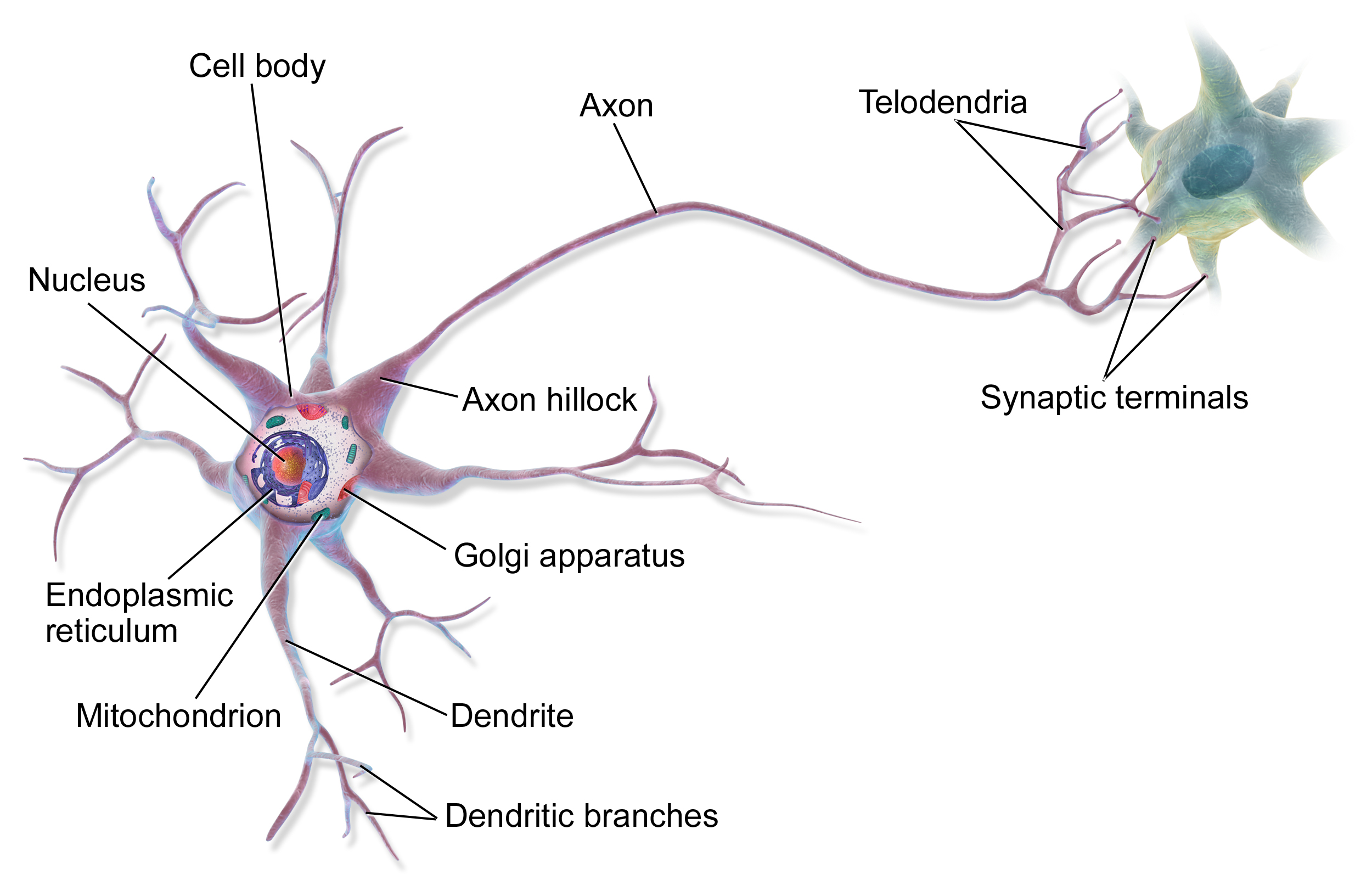
Source: Bruce Blaus | Multipolar Neuron | CC BY 3.0
Input:
Output:
Input: \( O = H_{j} \cdot w_{j} + H_{j+1} \cdot w_{j+1} + H_{j+...} \cdot w_{j+...} + H_{m} \cdot w_{m} + B_{H} \cdot w_{m+1} = \sum_{j}^{m} H_{j} \cdot w_{j} + B_{H} \cdot w_{m+1} = \sum_{j}^{m+1} H_{j} \cdot w_{j} = \textbf{H} \cdot \textbf{w} \)
Output: \( S(O) = \frac{1}{1+e^{-O}} \)
Error: \( E = MSE(O,T) = \frac{1}{2} \left( o - t \right)^2 \)
Updates: \( \Delta w = - \epsilon \frac{\delta E}{\delta w} \) and \( \Delta v = - \epsilon \frac{\delta E}{\delta v} \), where \( \epsilon \) is the learning rate
C++ (I.e. not confined to ANNs)PythonPython running on top of TensorFlow (or CNTK or Theano)R by François Chollet and JJ AllaireR API calls the Keras Python API, which calls the core Python TensorFlow API which calls the TensorFlow C++ librarySources: keras.io, tensorflow.rstudio.com, github.com/tensorflow, keras.rstudio.com, Machine Learning with R and TensorFlow, TensorFlow and Keras in R - Josh Gordon meets with J.J. Allaire
Using Hadley Wickham's devtools, it is straightforward to install both keras and TensorFlow:
install.packages('devtools')
devtools::install_github("rstudio/keras")
library("keras")
install_keras()
Hereafter all we will need to do, is run
library("keras")
That's it! Now we're ready to do deep learning in R!
Sepal.Length, Sepal.Width, Petal.Length and Petal.Width setosa versicolor and virginicasetosa is clearly separated, whereas versicolor and virginica seem more intertwinedPC1 and PC2Here is an illustration of the model we will be building with 35 parameters, i.e. \( (n_{features} + 1) \cdot m_{hidden} + (m_{hidden} + 1) \cdot l_{output} \)
We start with slightly wrangling the iris data set by renaming and scaling the features and converting character labels to numeric:
nn_dat = iris %>% as_tibble %>%
mutate(sepal_l_feat = scale(Sepal.Length),
sepal_w_feat = scale(Sepal.Width),
petal_l_feat = scale(Petal.Length),
petal_w_feat = scale(Petal.Width),
class_num = as.numeric(Species) - 1, # factor, so = 0, 1, 2
class_label = Species) %>%
select(contains("feat"), class_num, class_label)
nn_dat
# A tibble: 150 x 6
sepal_l_feat sepal_w_feat petal_l_feat petal_w_feat class_num
<dbl> <dbl> <dbl> <dbl> <dbl>
1 -0.898 1.02 -1.34 -1.31 0.
2 -1.14 -0.132 -1.34 -1.31 0.
3 -1.38 0.327 -1.39 -1.31 0.
4 -1.50 0.0979 -1.28 -1.31 0.
5 -1.02 1.25 -1.34 -1.31 0.
6 -0.535 1.93 -1.17 -1.05 0.
7 -1.50 0.786 -1.34 -1.18 0.
8 -1.02 0.786 -1.28 -1.31 0.
9 -1.74 -0.361 -1.34 -1.31 0.
10 -1.14 0.0979 -1.28 -1.44 0.
# ... with 140 more rows, and 1 more variable: class_label <fct>
Here, we use scaling such that the mean of each feature is 0 and the standard deviation is 1
Feature distributions before scaling
Feature distributions after scaling
Then, we split the iris data into a training and a test data set, setting aside 20% of the data for left out data partition, to be used for final performance evaluation:
test_f = 0.20
nn_dat = nn_dat %>%
mutate(partition = sample(c('train','test'), nrow(.), replace = TRUE, prob = c(1 - test_f, test_f)))
Based on the partition, we can now create training and test data, where x is a matrix and y is the one-hot encoding of the category
x_train = nn_dat %>% filter(partition == 'train') %>% select(contains("feat")) %>% as.matrix
y_train = nn_dat %>% filter(partition == 'train') %>% pull(class_num) %>% to_categorical
x_test = nn_dat %>% filter(partition == 'test') %>% select(contains("feat")) %>% as.matrix
y_test = nn_dat %>% filter(partition == 'test') %>% pull(class_num) %>% to_categorical
Thereby yielding
x_train %>% head(3)
sepal_l_feat sepal_w_feat petal_l_feat petal_w_feat
[1,] -0.8976739 1.01560199 -1.335752 -1.311052
[2,] -1.5014904 0.09788935 -1.279104 -1.311052
[3,] -1.0184372 0.78617383 -1.279104 -1.311052
y_train %>% head(3)
[,1] [,2] [,3]
[1,] 1 0 0
[2,] 1 0 0
[3,] 1 0 0
With the data in place, we now set the architecture of our artificical neural network:
model = keras_model_sequential()
model %>%
layer_dense(units = 4, activation = 'sigmoid', input_shape = 4) %>%
layer_dense(units = 3, activation = 'softmax')
compile our model:
model %>% compile(
loss = 'categorical_crossentropy',
optimizer = optimizer_rmsprop(),
metrics = c('accuracy')
)
and train our classifier
history = model %>% fit(
x = x_train, y = y_train,
epochs = 200,
batch_size = 20,
validation_split = 0,
view_metrics = FALSE,
verbose = 0
)
The fit() function returns a history object, which we can plot like so
plot(history)
We can use the evaluate() function, to get the loss and accuracy metrics from the model
perf = model %>% evaluate(x_test, y_test)
print(perf)
$loss
[1] 0.3366045
$acc
[1] 0.972973
We can use the predict() and predict_classes() function for predicting soft and hard classifications respectively:
model %>% predict(x_test) %>% head
[,1] [,2] [,3]
[1,] 0.8970004 0.09539866 0.007600991
[2,] 0.9257328 0.06898528 0.005281978
[3,] 0.9348749 0.06047851 0.004646669
[4,] 0.9333495 0.06154421 0.005106285
[5,] 0.9334606 0.06181232 0.004727044
[6,] 0.9097174 0.08376918 0.006513394
model %>% predict_classes(x_test) %>% head
[1] 0 0 0 0 0 0
…and finally we can visualise the confusion matrix based on the original 20% left out test data
price_dat %>% dim
[1] 2667 12
price_dat %>% select(1:6) %>% head(3)
# A tibble: 3 x 6
street street_num floor_num date_of_sale quarter_of_sale rooms
<chr> <int> <int> <date> <dbl> <int>
1 Østerbrogade 92 1 2018-02-27 2018. 3
2 Amerika Plads 36 2 2015-02-20 2015. 4
3 Amerika Plads 36 3 2015-08-06 2015. 4
price_dat %>% select(7:12) %>% head(3)
# A tibble: 3 x 6
sqm price sqm_price year_of_build lon lat
<int> <dbl> <dbl> <int> <dbl> <dbl>
1 136 7350000. 54044. 1904 12.6 55.7
2 103 3100000. 30097. 2008 12.6 55.7
3 103 3100000. 30097. 2008 12.6 55.7
lon and lat are the longitude and latitude geocodes for the apartment address)z_lim = 0.5
price_dat = price_dat %>%
mutate(z_price = price %>% scale %>% as.numeric,
price_class = ifelse( z_price < -z_lim, 0, ifelse( z_price < z_lim, 1, 2)))
floor_num, quarter_of_sale, rooms, sqm, year_of_build, lon and latprice_classprice_dat_features = price_dat %>%
select(floor_num, quarter_of_sale, rooms, sqm, year_of_build, lon, lat, price_class)
price_dat_features
# A tibble: 2,667 x 8
floor_num quarter_of_sale rooms sqm year_of_build lon lat
<int> <dbl> <int> <int> <int> <dbl> <dbl>
1 1 2018. 3 136 1904 12.6 55.7
2 2 2015. 4 103 2008 12.6 55.7
3 3 2015. 4 103 2008 12.6 55.7
4 4 2015. 4 139 2008 12.6 55.7
5 3 2016. 4 124 2008 12.6 55.7
6 2 2017. 3 88 2005 12.6 55.7
7 3 2017. 3 92 2005 12.6 55.7
8 3 2017. 3 88 2005 12.6 55.7
9 3 2015. 4 88 2005 12.6 55.7
10 0 2015. 3 96 2005 12.6 55.7
# ... with 2,657 more rows, and 1 more variable: price_class <dbl>
PC1 and PC2PC2 and PC3Now, we have the scaled feature data
nn_dat %>% head(3)
# A tibble: 3 x 8
floor_num_feat quarter_of_sale_fe… rooms_feat sqm_feat year_of_build_fe…
<dbl> <dbl> <dbl> <dbl> <dbl>
1 -0.675 1.73 0.0354 1.11 -0.736
2 -0.130 -1.45 0.829 0.308 1.90
3 0.414 -1.24 0.829 0.308 1.90
# ... with 3 more variables: lon_feat <dbl>, lat_feat <dbl>,
# price_class <dbl>
Which we split the apartment data into a training and a test data set, setting aside 20% of the data for left out data partition, to be used for final performance evaluation:
test_f = 0.20
nn_dat = nn_dat %>%
mutate(partition = sample(c('train','test'), nrow(.), replace = TRUE, prob = c(1 - test_f, test_f)))
Based on the partition, we can now create training and test data
x_train = nn_dat %>% filter(partition == 'train') %>% select(contains("feat")) %>% as.matrix
y_train = nn_dat %>% filter(partition == 'train') %>% pull(price_class) %>% to_categorical
x_test = nn_dat %>% filter(partition == 'test') %>% select(contains("feat")) %>% as.matrix
y_test = nn_dat %>% filter(partition == 'test') %>% pull(price_class) %>% to_categorical
With the data in place, we now set the architecture of our artificical neural network:
model = keras_model_sequential()
model %>%
layer_dense(units = 7, activation = 'sigmoid', input_shape = ncol(nn_dat)-2) %>%
layer_dense(units = 3, activation = 'softmax')
compile our model:
model %>% compile(
loss = 'categorical_crossentropy',
optimizer = optimizer_rmsprop(),
metrics = c('accuracy')
)
and train our classifier
history = model %>% fit(
x = x_train, y = y_train,
epochs = 100,
batch_size = 20,
validation_split = 0.2,
view_metrics = FALSE,
verbose = 0
)
The fit() function returns a history object, which we can plot like so
Note, how this time, we set a validation split, allowing us to see how the accuracy changes on both the training and the validation data
Here, it is quite clear that the accuracy on the training data is much better than that of the validation data
This is known as overfitting and results in learning the data, rather than the trend
plot(history)
We can use the evaluate() function, to get the loss and accuracy metrics from the model
perf = model %>% evaluate(x_test, y_test)
print(perf)
$loss
[1] 0.3757372
$acc
[1] 0.8513761
We can use the predict() and predict_classes() function for predicting soft and hard classifications respectively:
model %>% predict(x_test) %>% head
[,1] [,2] [,3]
[1,] 0.0166475065 0.8399269 0.14342552
[2,] 0.0152409216 0.8286623 0.15609674
[3,] 0.0009843368 0.2008899 0.79812580
[4,] 0.0183639005 0.8461133 0.13552286
[5,] 0.0136891408 0.8010342 0.18527672
[6,] 0.0417256877 0.9254940 0.03278036
model %>% predict_classes(x_test) %>% head
[1] 1 1 2 1 1 1
…and finally we can visualise the confusion matrix based on the original 20% left out test data
Figure by Eric A. J. Reits
Source: Simon Caulton | Adoptive T-cell therapy | CC BY 3.0
pep_dat
# A tibble: 15,840 x 3
peptide binder partition
<chr> <int> <int>
1 LLTDAQRIV 0 1
2 LMAFYLYEV 1 4
3 VMSPITLPT 0 1
4 SLHLTNCFV 0 5
5 RQFTCMIAV 0 3
6 FMNGHTHIA 1 2
7 KINPYFSGA 0 3
8 NIWLAIIEL 0 1
9 KIMPYVAQF 0 2
10 AIWERACTI 0 3
# ... with 15,830 more rows
LLTDAQRIV is what we will use as input to our modelOnce again, we check the class balance
We will use partition 6 as independent test set and then do 5-fold cross validation on partitions 1-5
pep_dat_test_set = pep_dat %>% filter(partition == 6)
pep_dat = pep_dat %>% filter(partition != 6)
partitions = pep_dat %>% count(partition) %>% pull(partition) # 1 2 3 4 5
data_splits = cross_fold_splits(partitions = partitions, print_splits = TRUE)
________________________________________________________________________________
Based on (1, 2, 3, 4, 5), the following 20 splits were created:
________________________________________________________________________________
Test partition = 1, Validation partition = 2, Training partitions = 3, 4, 5
Test partition = 1, Validation partition = 3, Training partitions = 2, 4, 5
Test partition = 1, Validation partition = 4, Training partitions = 2, 3, 5
Test partition = 1, Validation partition = 5, Training partitions = 2, 3, 4
Test partition = 2, Validation partition = 1, Training partitions = 3, 4, 5
Test partition = 2, Validation partition = 3, Training partitions = 1, 4, 5
Test partition = 2, Validation partition = 4, Training partitions = 1, 3, 5
Test partition = 2, Validation partition = 5, Training partitions = 1, 3, 4
Test partition = 3, Validation partition = 1, Training partitions = 2, 4, 5
Test partition = 3, Validation partition = 2, Training partitions = 1, 4, 5
Test partition = 3, Validation partition = 4, Training partitions = 1, 2, 5
Test partition = 3, Validation partition = 5, Training partitions = 1, 2, 4
Test partition = 4, Validation partition = 1, Training partitions = 2, 3, 5
Test partition = 4, Validation partition = 2, Training partitions = 1, 3, 5
Test partition = 4, Validation partition = 3, Training partitions = 1, 2, 5
Test partition = 4, Validation partition = 5, Training partitions = 1, 2, 3
Test partition = 5, Validation partition = 1, Training partitions = 2, 3, 4
Test partition = 5, Validation partition = 2, Training partitions = 1, 3, 4
Test partition = 5, Validation partition = 3, Training partitions = 1, 2, 4
Test partition = 5, Validation partition = 4, Training partitions = 1, 2, 3
________________________________________________________________________________
Set hyper parameters
model_activation = "sigmoid"
model_learning_rate = 0.0001
model_optimizer = optimizer_adam(lr = model_learning_rate)
model_loss = 'mean_squared_error'
model_metrics = 'mean_squared_error'
model_epochs = 10
model_batch_size = 20
model_layer_IN_n = 189 # 9 amino acids x 21 enc values
model_layer_H1_n = 189
model_layer_H2_n = 90
model_layer_H3_n = 45
model_layer_OUT_n = 1
Set architecture
model = keras_model_sequential() %>%
layer_dense(units = model_layer_H1_n, activation = model_activation, input_shape = model_layer_IN_n) %>%
layer_dense(units = model_layer_H2_n, activation = model_activation) %>%
layer_dense(units = model_layer_H3_n, activation = model_activation) %>%
layer_dense(units = model_layer_OUT_n, activation = model_activation)
Compiling the model
model %>% compile(loss = model_loss, optimizer = model_optimizer, metrics = model_metrics)
Note! The 20 splits result in our final model consisting of 20 models, each of which have 57,151 parameters. Together they form an ensembl of roughly 1,15 million parameters!
meta_data = list()
model_dir = 'models/'
for( mdl_i in names(data_splits) ){
# Set partitions
test_partition = data_splits[[mdl_i]]$test_partition
validation_partition = data_splits[[mdl_i]]$validation_partition
training_partitions = data_splits[[mdl_i]]$training_partitions
# Set model file
mdl_file = str_c(model_dir, mdl_i, ".hdf5")
# Set callbacks used for early stopping
callbacks_list = list( callback_early_stopping(monitor = "mean_squared_error", patience = 10),
callback_model_checkpoint(filepath = mdl_file, monitor = "val_loss",
save_best_only = TRUE) )
# Extract and encode current training data
pep_dat_training = pep_dat %>% filter(partition %in% training_partitions)
x_train = pep_dat_training %>% pull(peptide) %>% pep_encode_bl50 %>%
array_reshape(c(dim(.)[1], dim(.)[2] * dim(.)[3]))
y_train = pep_dat_training %>% pull(binder) %>% array
# Extract and encode current validation data
pep_dat_validation = pep_dat %>% filter(partition %in% validation_partition)
x_validation = pep_dat_validation %>% pull(peptide) %>% pep_encode_bl50 %>%
array_reshape(c(dim(.)[1], dim(.)[2] * dim(.)[3]))
y_validation = pep_dat_validation %>% pull(binder) %>% array
# Do training
history = model %>% fit(x = x_train, y = y_train, batch_size = model_batch_size, epochs = model_epochs,
callbacks = callbacks_list, validation_data = list(x_validation, y_validation))
# Save meta data
meta_data[[mdl_i]] = list(); meta_data[[mdl_i]]$mdl_file = mdl_file ; meta_data[[mdl_i]]$history = history
}
For each of the 20 models, we can now add predictions on the corresponding test set
for( mdl_id in names(meta_data) ){
# Load current model
mdl = load_model_hdf5(filepath = meta_data[[mdl_id]]$mdl_file)
meta_data[[mdl_id]]$model = mdl
# Do prediction. Note how prediction are ONLY made for data points from the
# test partition of the current model!
pred_id = str_c('pred_', mdl_id)
pep_dat = pep_dat %>%
mutate(!!pred_id := ifelse( partition == data_splits[[mdl_id]]$test_partition,
pep_predict(peptide = peptide, model = mdl), NA))
}
# Calculate mean predictions
pep_dat = pep_dat %>% mutate(pred_model_mean = select(., contains('pred_')) %>% rowMeans(na.rm = TRUE))
pep_dat
# A tibble: 13,139 x 24
peptide binder partition pred_model_01 pred_model_02 pred_model_03
<chr> <int> <int> <dbl> <dbl> <dbl>
1 LLTDAQRIV 0 1 0.528 0.125 0.0611
2 LMAFYLYEV 1 4 NA NA NA
3 VMSPITLPT 0 1 0.231 0.0582 0.0256
4 SLHLTNCFV 0 5 NA NA NA
5 RQFTCMIAV 0 3 NA NA NA
6 FMNGHTHIA 1 2 NA NA NA
7 KINPYFSGA 0 3 NA NA NA
8 NIWLAIIEL 0 1 0.334 0.269 0.534
9 KIMPYVAQF 0 2 NA NA NA
10 AIWERACTI 0 3 NA NA NA
# ... with 13,129 more rows, and 18 more variables: pred_model_04 <dbl>,
# pred_model_05 <dbl>, pred_model_06 <dbl>, pred_model_07 <dbl>,
# pred_model_08 <dbl>, pred_model_09 <dbl>, pred_model_10 <dbl>,
# pred_model_11 <dbl>, pred_model_12 <dbl>, pred_model_13 <dbl>,
# pred_model_14 <dbl>, pred_model_15 <dbl>, pred_model_16 <dbl>,
# pred_model_17 <dbl>, pred_model_18 <dbl>, pred_model_19 <dbl>,
# pred_model_20 <dbl>, pred_model_mean <dbl>
Only allow each model to predict on the unseen test partition
Receiver Operator Characterstics curve
((model_layer_IN_n + 1) * model_layer_H1_n + (model_layer_H1_n + 1) * model_layer_H2_n + (model_layer_H2_n + 1) * model_layer_H3_n + (model_layer_H3_n + 1) * model_layer_OUT_n) * 20
[1] 1143020
Be sure, that you “need” Deep Learning
Be aware that what you gain in performance, you may loose in model interpretability
Be very careful with overfitting, a predictive model only works, if it can actually extrapolate on unseen data
Check your data and partitions prior to modelling, sparsity, order, balance, etc.
C++ runtimeR or Python runtimes in the deploymenttfdeploy package serialises the saved models, so you can put REST interfaces on top of models or get models brought into javascript using the library keras.js, which lets you take a keras model and run it directly in the browserR is phenomenal for exploratory data analysis, training and authoring models and then you can deploy using languages well suited for deployment, e.g. javascriptSource: TensorFlow and Keras in R - Josh Gordon meets with J.J. Allaire
Books
Coursera Deep Learning courses deeplearning.ai
RR is extremely powerful and flexible and allows you to create and deploy complex models in a relatively simple fashionSource: TensorFlow and Keras in R - Josh Gordon meets with J.J. Allaire