2017年10月12日

创建向量

向量是用于存储数值型、字符型或逻辑型数据的一维数组。
组合函数c()可用来创建向量。
单个向量中的数据必须拥有相同的类型或模式。

a <- c(1, 2, 5, 3, 6, -2, 4) # 数值型向量
[1]  1  2  5  3  6 -2  4
b <- c("one", "two", "three") # 字符型向量
[1] "one"   "two"   "three"
c <- c(TRUE, TRUE, TRUE, FALSE, TRUE, FALSE) # 逻辑型向量
[1]  TRUE  TRUE  TRUE FALSE  TRUE FALSE
使用冒号可以生成一个数值序列。

a <- c(2 : 6) # 等价于 a <- c(2, 3, 4, 5, 6)
[1] 2 3 4 5 6

通过在方括号中给定元素所处位置的数值,可以访问向量中的元素。

a[1]
[1] 2
a[c(2, 4)]
[1] 3 5
a[1 : 2]
[1] 2 3

创建矩阵

矩阵是一个二维数组,每个元素都拥有相同的模式(数值型、字符型或逻辑型)。
通过函数matrix()创建矩阵。

y <- matrix(1 : 20, nrow = 5, ncol = 4)
     [,1] [,2] [,3] [,4]
[1,]    1    6   11   16
[2,]    2    7   12   17
[3,]    3    8   13   18
[4,]    4    9   14   19
[5,]    5   10   15   20

选择矩阵元素

y[2, ]
[1]  2  7 12 17
y[, 2]
[1]  6  7  8  9 10
y[1, 4]
[1] 16
y[1, c(3, 4)]
[1] 11 16

创建数据框

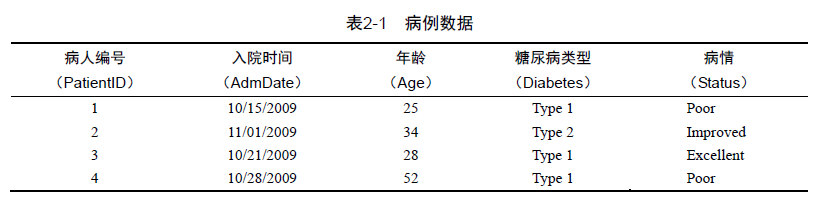
数据框(data frame)是R中用于存储数据的一种结构:列表示变量,行表示观测。在同一个数据框中可以存储不同类型(如数值型、字符型)的变量。

patientID <- c(1, 2, 3, 4)
[1] 1 2 3 4
age <- c(25, 34, 28, 52)
[1] 25 34 28 52
diabetes <- c("Type1", "Type2", "Type1", "Type1")
[1] "Type1" "Type2" "Type1" "Type1"
status <- c("Poor", "Improved", "Excellent", "Poor")
[1] "Poor"      "Improved"  "Excellent" "Poor"     

patientdata <- data.frame(patientID, age, diabetes, status)
  patientID age diabetes    status
1         1  25    Type1      Poor
2         2  34    Type2  Improved
3         3  28    Type1 Excellent
4         4  52    Type1      Poor

选择数据框的行或列

patientdata[, 1 : 2]
  patientID age
1         1  25
2         2  34
3         3  28
4         4  52

patientdata[1 : 2, ]
  patientID age diabetes   status
1         1  25    Type1     Poor
2         2  34    Type2 Improved
patientdata[, c("diabetes", "status")]
  diabetes    status
1    Type1      Poor
2    Type2  Improved
3    Type1 Excellent
4    Type1      Poor
patientdata$status
[1] Poor      Improved  Excellent Poor     
Levels: Excellent Improved Poor

summary(patientdata)
   patientID         age         diabetes       status 
 Min.   :1.00   Min.   :25.00   Type1:3   Excellent:1  
 1st Qu.:1.75   1st Qu.:27.25   Type2:1   Improved :1  
 Median :2.50   Median :31.00             Poor     :2  
 Mean   :2.50   Mean   :34.75                          
 3rd Qu.:3.25   3rd Qu.:38.50                          
 Max.   :4.00   Max.   :52.00                          
str(patientdata)
'data.frame':   4 obs. of  4 variables:
 $ patientID: num  1 2 3 4
 $ age      : num  25 34 28 52
 $ diabetes : Factor w/ 2 levels "Type1","Type2": 1 2 1 1
 $ status   : Factor w/ 3 levels "Excellent","Improved",..: 3 2 1 3

dim(patientdata)
[1] 4 4

因子

  patientID age diabetes    status
1         1  25    Type1      Poor
2         2  34    Type2  Improved
3         3  28    Type1 Excellent
4         4  52    Type1      Poor

变量可分名义型、有序型或连续型变量。
- 名义型变量是没有顺序之分的类别变量,比如糖尿病类型Diabetes(Type1、Type2)。
- 有序型变量是有顺序关系的类别变量,比如病情Status(poor、improved、excellent)。病情为poor(较差)病人的状态不如improved(病情好转)的病人,但并不知道相差多少。
- 连续型变量可以呈现某个范围内的任意值,同时表示了顺序和数量,比如年龄Age。

类别(名义型)变量和有序类别(有序型)变量在R中称为因子(factor)。因子在R中非常重要,它决定了数据的分析方式以及如何进行视觉呈现。

diabetes <- c("Type1", "Type2", "Type1", "Type1")
[1] "Type1" "Type2" "Type1" "Type1"
diabetes <- factor(diabetes)
[1] Type1 Type2 Type1 Type1
Levels: Type1 Type2

factor语句将此向量存储为(1, 2, 1, 1),并在内部将其关联为1=Type1和2=Type2(具体赋值根据字母顺序而定)。 针对向量diabetes进行的任何分析都会将其作为名义型变量对待。

status <- c("Poor", "Improved", "Excellent", "Poor")
[1] "Poor"      "Improved"  "Excellent" "Poor"     
status <- factor(status, order = TRUE)
[1] Poor      Improved  Excellent Poor     
Levels: Excellent < Improved < Poor

factor语句会将向量编码为(3, 2, 1, 3),并在内部将这些值关联为1=Excellent、2=Improved以及3=Poor。 针对此向量进行的任何分析都会将其作为有序型变量对待。

status <- factor(status, order = TRUE, 
                 levels = c("Poor", "Improved", "Excellent"))
[1] Poor      Improved  Excellent Poor     
Levels: Poor < Improved < Excellent

各水平的赋值将为1=Poor、2=Improved、3=Excellent。

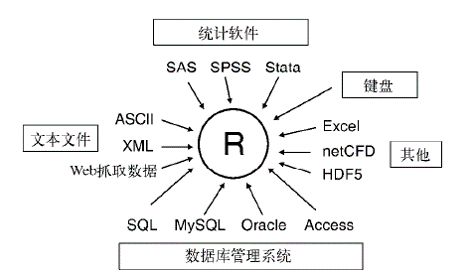
输入数据

最为常用的数据读取方式是用read.table()函数或read.csv()函数读取外部txt或csv格式的文件。

test.data <- read.table("D:/R/test1.txt", header = True, 
                         stringsAsFactors = False)
test.data <- read.csv("D:/R/test2.csv")

编辑数据

patientdata <- edit(patientdata)
fix(patientdata)

输出数据

write.csv()函数将数据框输出到外部csv格式的文件

write.csv(test.data, "D:/R/test3.csv")

输入数据