5/12/2017

Data wrangling

install.packages(c('dplyr','data.table'))

library(data.table) # melt & aggregate data
library(dplyr) # data manipulation
install.packages('tidyverse')
library(tidyverse) #includes ggplot2, dplyr, tidy, + more


Burrito data:

url<-'https://raw.githubusercontent.com/collnell/burritos/master/sd_burritos.csv'
ritos <- fread(url)

dplyr

  • Collection of small, simple functions
  • First argument is the dataframe, second describes action
  • Creates new dataframe


Verbs
- filter - subset rows - select - subset columns
- join - combine dataframes
- group by & summarize - summarize rows
- mutate - make new columns
- arrange - reorder rows

filter

  • Subset rows of a dataframe based on values
  • Comparison operators: >, >=, <, <=, != (not equal), == (equal)

Filter data to San Diego:

dim(ritos)
[1] 340  63
ritos<-filter(ritos, NonSD == 0) 
dim(ritos)  
[1] 332  63

filter

length(unique(ritos$Burrito)) #different kinds of burritos
[1] 90

Filter data to only California burritos:

ca<-filter(ritos, grepl('california', ritos$Burrito)) #pattern matching

length(unique(ca$Burrito))
[1] 20

select

Select columns of a dataframe using variable names

df<-select(ritos, Location, Yelp)
head(df)
                Location Yelp
1   graciela's taco shop  4.0
2   graciela's taco shop  4.0
3    cortez mexican food  4.2
4 el pueblo mexican food  4.0
5           pollos maria  4.0
6         senor grubby's  4.0
df<-select(ritos, Tortilla:Wrap) #columns with burrito ratings 
head(df)
  Tortilla Temp Meat Fillings Meat.filling Uniformity Salsa Synergy Wrap
1      4.0  4.0  3.0      3.5          4.0        4.5   4.0     4.0  4.5
2      3.5  4.0  3.5       NA          4.0         NA   4.0     4.0  1.5
3      3.5  4.0  2.5      3.0          1.5        2.5   2.5     2.8  5.0
4      4.5  4.5  3.5      4.0          4.5        5.0   2.5     4.5  5.0
5      4.0  5.0  4.0      3.5          4.5        5.0   2.5     4.5  4.0
6      2.0  3.5  3.0      1.5          1.0        1.0   2.5     1.5  3.5

select

#drop columns
df<-select(ritos, -Salsa, -Synergy, -Wrap)
colnames(df)
 [1] "Location"      "Burrito"       "Date"          "Neighborhood" 
 [5] "Address"       "Yelp"          "Google"        "Chips"        
 [9] "Cost"          "Hunger"        "Length"        "Circum"       
[13] "Volume"        "Tortilla"      "Temp"          "Meat"         
[17] "Fillings"      "Meat.filling"  "Uniformity"    "Taste"        
[21] "Rec"           "Reviewer"      "Notes"         "Unreliable"   
[25] "NonSD"         "Beef"          "Pico"          "Guac"         
[29] "Cheese"        "Fries"         "Sour.cream"    "Pork"         
[33] "Chicken"       "Shrimp"        "Fish"          "Rice"         
[37] "Beans"         "Lettuce"       "Tomato"        "Bell.peper"   
[41] "Carrots"       "Cabbage"       "Sauce"         "Salsa.1"      
[45] "Cilantro"      "Onion"         "Taquito"       "Pineapple"    
[49] "Ham"           "Chile.relleno" "Nopales"       "Lobster"      
[53] "Queso"         "Egg"           "Mushroom"      "Bacon"        
[57] "Sushi"         "Avocado"       "Corn"          "Zucchini"     

mutate

Add new variables using existing columns

df<-select(ritos, Taste, Rec, Cost, Volume)
df<-mutate(df, Cost_vol = Cost / Volume) #average rating
head(df)
  Taste  Rec Cost Volume  Cost_vol
1   4.0 <NA> 5.99     NA        NA
2   4.0 <NA> 5.99     NA        NA
3   3.2   no 6.25   0.58 10.775862
4   4.3  yes 4.99   0.67  7.447761
5   4.2 <NA> 6.59     NA        NA
6   1.5   no 9.00   0.70 12.857143

ggplot(df, aes(x=Cost_vol, y=Taste))+
  geom_point(aes(color=Rec))+
  labs(x='Cost by Volume')

%>% pipe

Combine multiple operations in series
- Easy to read, reduces nesting
- Create fewer dataframes

cali <- ritos %>%
  filter(NonSD == 0, grepl('california', ritos$Burrito))%>%
  select(-NonSD)%>%
  mutate(Cost_vol = Cost / Volume)

group_by & summarize

Summarize multiple rows

##find the mean
summarize(ritos, mean(Cost, na.rm = TRUE))
  mean(Cost, na.rm = TRUE)
1                 6.932308
summarize(ritos, sd(Cost, na.rm = TRUE))
  sd(Cost, na.rm = TRUE)
1                1.19633
#Uniformity by Rec
ritos %>% group_by(Rec) %>%
  summarize(mean(Uniformity, na.rm = TRUE))
# A tibble: 3 × 2
    Rec `mean(Uniformity, na.rm = TRUE)`
  <chr>                            <dbl>
1    no                         2.881250
2   yes                         3.691720
3  <NA>                         3.341284
#summarize multiple columns
ritos %>%   select(Rec, Yelp, Google) %>%
  group_by(Rec) %>%
  summarize_each(funs(mean(., na.rm = TRUE)))
# A tibble: 3 × 3
    Rec     Yelp   Google
  <chr>    <dbl>    <dbl>
1    no 3.718462 4.100000
2   yes 3.969799 4.270922
3  <NA> 3.773148 4.211765

California burrito

California burrito = carne asada + fries

Create a new dataframe from 'cali'
- Burritos containing beef & fries
- Find mean, standard error, number of burritos for Taste variable

California burrito

#standard error of the mean x
sem <- function(x) sd(x, na.rm = TRUE)/sqrt(length(x))

best <- cali %>%
  filter(!is.na(Fries), !is.na(Beef)) %>%
  select(-(Beef:Zucchini))%>%
  group_by(Neighborhood, Location) %>%
  summarize(quality = mean(Taste, na.rm=TRUE), 
            n = length(Taste),
            se = sem(Taste))

arrange

Reorder rows by column values

Where is the best California burrito?

best<-best%>%
  filter(n > 1)%>% #remove locations visited only once
  arrange(quality) 

head(best)
Source: local data frame [6 x 5]
Groups: Neighborhood [5]

     Neighborhood                       Location  quality     n         se
            <chr>                          <chr>    <dbl> <int>      <dbl>
1             utc        los primos mexican food 2.675000     4 0.42106017
2 university city      papa chito's mexican food 2.975000     2 0.77500000
3     kearny mesa             lolita's taco shop 3.150000     4 0.35237291
4        la jolla rigoberto's taco shop la jolla 3.250000     2 0.25000000
5         miramar      tony's fresh mexican food 3.325000     2 0.57500000
6         miramar     california burrito company 3.433333     3 0.06666667

ggplot(data = best, aes(x = reorder(Location, quality), y = quality))+
  geom_bar(stat = 'identity', fill='gold')+
  geom_errorbar(aes(ymin = quality - se, ymax = quality + se), width = .4)+
  coord_flip()+
  labs(title = 'The best burrito', y = 'Burrito Quality', x ='Location')+
  theme_classic()+
  theme(legend.position = 'none')

Exercise

Make a dataframe from 'ritos' with
- A single line for each location
- Total Yelp and Google ratings

What has the highest rating?

reviews<-ritos%>%
  mutate(rating = (Yelp+Google)/2, Cost_vol = Cost/Volume)%>%
  select(Location, rating)%>%
  unique()%>%
  arrange(desc(rating))

head(reviews)
                         Location rating
1       lola's 7 up market & deli   4.70
2                 mikes taco club   4.70
3                 la perla cocina   4.60
4 la morena taco shop and seafood   4.60
5                  mister falafel   4.55
6              sotos mexican food   4.55

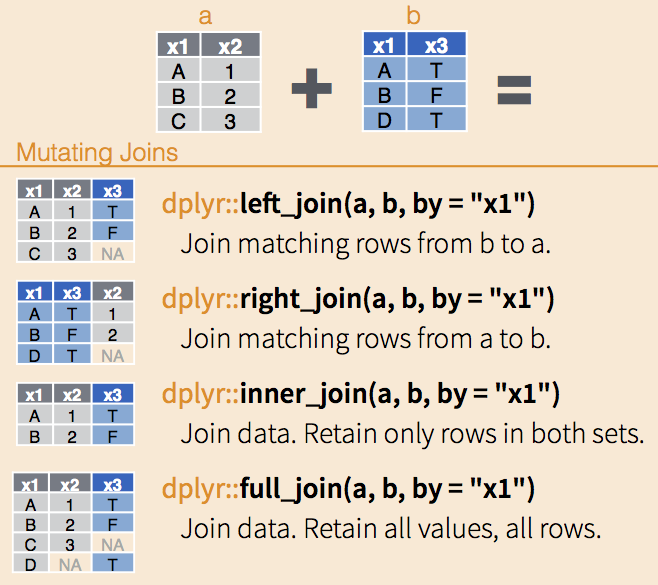
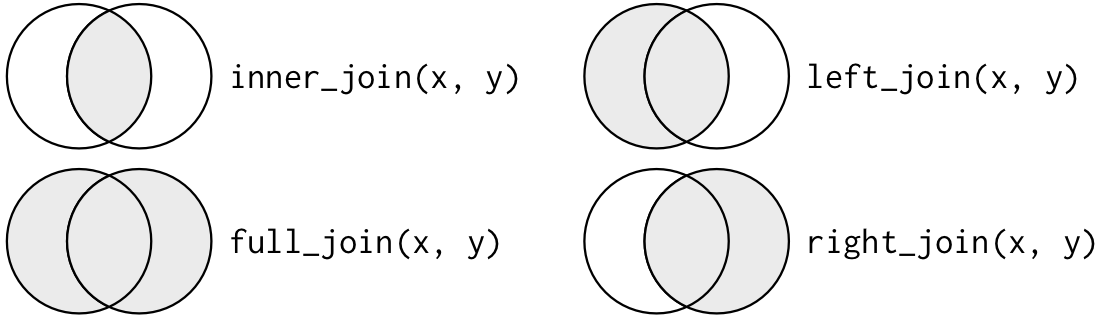
joins

joins

joins

Join restaurant reviews to burrito data by location

df <- left_join(best, reviews, by = 'Location')
str(df)
Classes 'grouped_df', 'tbl_df', 'tbl' and 'data.frame': 18 obs. of  6 variables:
 $ Neighborhood: chr  "utc" "university city" "kearny mesa" "la jolla" ...
 $ Location    : chr  "los primos mexican food" "papa chito's mexican food" "lolita's taco shop" "rigoberto's taco shop la jolla" ...
 $ quality     : num  2.67 2.98 3.15 3.25 3.33 ...
 $ n           : int  4 2 4 2 2 3 3 9 4 2 ...
 $ se          : num  0.421 0.775 0.352 0.25 0.575 ...
 $ rating      : num  3.35 2.9 4.2 3.25 3.55 3.95 4 3.9 4.2 4.6 ...
 - attr(*, "vars")=List of 1
  ..$ : symbol Neighborhood

ggplot(df, aes(x=rating, y=quality))+
  geom_point()+
  geom_smooth(method='lm', se=F, color='red', lty='dashed')+
  geom_text(aes(label=Location), position=position_jitter(width=.3, height=.1))+
  labs(x='Restaurant Rating', y='Burrito Quality')

library(ggrepel)

ggplot(df, aes(x=rating, y=quality))+
  geom_point()+
  geom_smooth(method='lm', se=F, color='red', lty='dashed')+
  geom_text_repel(aes(label=Location))+
  labs(x='Restaurant Rating', y='Burrito Quality')

data.table

  • Transform data between wide and long format
  • Faster than reshape2


Compare burrito score variables to overall taste score

library(data.table)

#select burrito rating variables and recommendation  
ing <- ritos %>%
  select(Rec,Tortilla:Taste)

head(ing)
   Rec Tortilla Temp Meat Fillings Meat.filling Uniformity Salsa Synergy
1 <NA>      4.0  4.0  3.0      3.5          4.0        4.5   4.0     4.0
2 <NA>      3.5  4.0  3.5       NA          4.0         NA   4.0     4.0
3   no      3.5  4.0  2.5      3.0          1.5        2.5   2.5     2.8
4  yes      4.5  4.5  3.5      4.0          4.5        5.0   2.5     4.5
5 <NA>      4.0  5.0  4.0      3.5          4.5        5.0   2.5     4.5
6   no      2.0  3.5  3.0      1.5          1.0        1.0   2.5     1.5
  Wrap Taste
1  4.5   4.0
2  1.5   4.0
3  5.0   3.2
4  5.0   4.3
5  4.0   4.2
6  3.5   1.5

melt

Convert data to long format

df.melt<-melt(ing, id.vars=c('Rec','Taste'))
str(df.melt)
'data.frame':   2988 obs. of  4 variables:
 $ Rec     : chr  NA NA "no" "yes" ...
 $ Taste   : num  4 4 3.2 4.3 4.2 1.5 3 3.5 2.75 3.2 ...
 $ variable: Factor w/ 9 levels "Tortilla","Temp",..: 1 1 1 1 1 1 1 1 1 1 ...
 $ value   : num  4 3.5 3.5 4.5 4 2 2.5 3.5 2.5 3 ...

ggplot(df.melt, aes(x = Taste, y = value))+
  geom_point()

ggplot(df.melt, aes(x = Taste, y = value, color = variable))+
  geom_point()+
  geom_smooth(method='lm', color='black')+
  facet_wrap(~variable)+
  labs(x='Burrito Quality', y='Score')

Resources