R for Everything: Getting, Cleaning, Visualizing, and Analyzing Data

David Ranzolin
November 17, 2016

About Me

Background

  • English and Religious Studies
  • Scout ~ three years
  • useR for ~ two years
  • @RCatLadies for ~ two years

About UC Scout

Overview

  • UC's online high school program, serving several thousand California students and teachers each year.

Mission

  • Reach out to educationally disadvantaged students, raising achievement levels and closing achievement gaps.

News

  • Recipient of $4 million grant from state legislature to develop 45 new courses.

Valid Inferences?

Premises

  1. R is flexible.
  2. R is powerful.
  3. R is affordable.
  4. R is accessible.

Conclusions

  1. You can use R.
  2. You should use R?

About R

Accessibility

  • Free, open source

Community

  • Diverse (relative to other programming languages)
  • Attentive to beginners
  • Innovative

Tools

  • RStudio
  • tidyverse

The tidyverse

Philosophy

  1. Data should be in a consistent form (data frame)
  2. Each variable is a column
  3. Sequence clear, logical steps

Installation

install.packages("tidyverse")
library(tidyverse) #loads readr, dplyr, tidyr, purrr, ggplot2, tibble 

The tidyverse: readr

Purpose

Fast and friendly way to read rectangular data.

Usage

To… Use…
Read delimited files read_delim(), read_csv(), read_tsv()
Read lines read_lines()
Read fixed width files read_fwf(), read_table()

df = data_frame(x = 1:3, y = x^2, z = sample(letters, 3, replace = TRUE))
write_csv(df, "my_csv.csv")
read_csv("my_csv.csv")
# A tibble: 3 × 3
      x     y     z
  <int> <dbl> <chr>
1     1     1     v
2     2     4     z
3     3     9     i

The tidyverse: dplyr

Purpose

Manipulate data frames: filtering, selecting, mutating, etc.

Usage

To… Use…
Select columns select()
Subset rows filter()
Create additional columns mutate()
Calculate summary statistics summarize()
Order rows arrange()
Perform joins inner_join(), left_join(), anti_join(), etc.
Group group_by()

The tidyverse: dplyr

select(iris, Sepal.Length, Petal.Length, Species)

filter(iris, Sepal.Length > 7)

mutate(iris, sepal = Sepal.Length + Sepal.Width)

summarize(iris, avg = mean(Sepal.Length))

The pipe (%>%) chains tidyverse functions together:

iris %>% 
  filter(Sepal.Length > 4) %>% 
  group_by(Species) %>% 
  summarize(avg = mean(Sepal.Width)) %>% 
  arrange(desc(avg))
# A tibble: 3 × 2
     Species   avg
      <fctr> <dbl>
1     setosa 3.428
2  virginica 2.974
3 versicolor 2.770

The tidyverse: tidyr

Purpose

Package to tidy and reshape data.

Usage

To… Use…
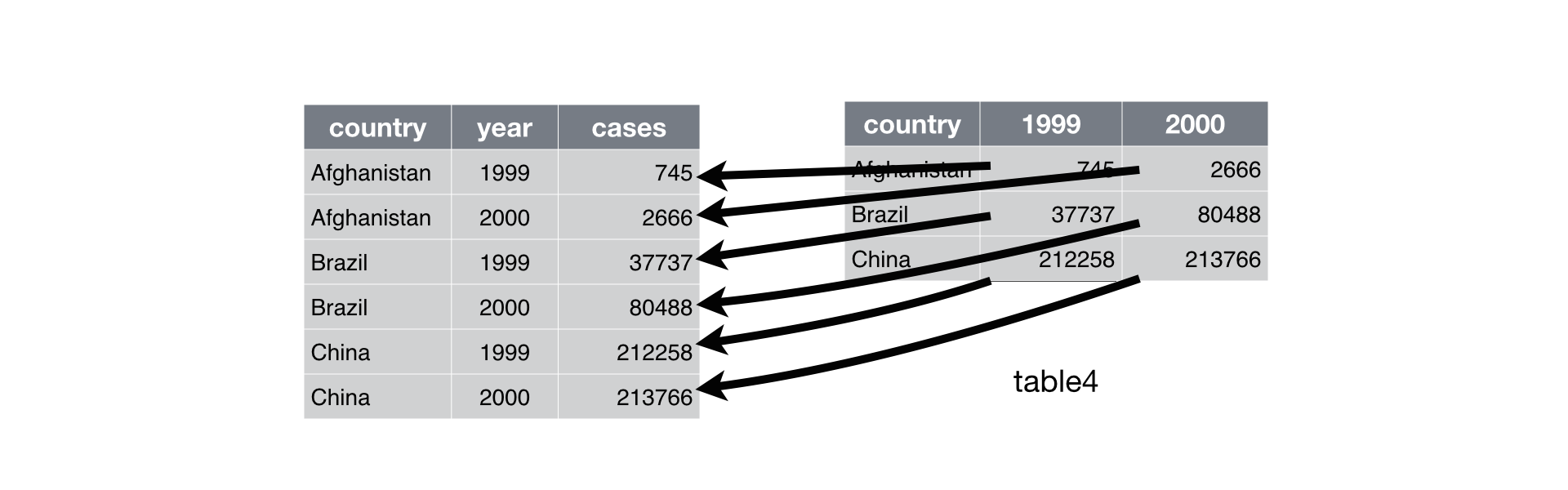
Make wide data long gather()
Make long data wide spread()

table4 %>% gather(year, cases, -country)
The tidyverse: purrr

Purpose

Work with lists and facilitate iteration.

Usage

To… Use…
Apply a function to each element map(), map_*()
Transpose a list transpose()
Flatten a list flatten()
Control error handling safely(), possibly()

map_dbl(1:3, log, base = 2)
[1] 0.000000 1.000000 1.584963

The tidyverse: purrr

Using purrr to calculate Ed-Data's Ethnic Diversity Index (EDI)

edi <- function(df) {
  if (!is.data.frame(df)) stop("student_df must be a data frame")
  if (!"ethnicity" %in% names(df)) stop("ethnicity must be a column")
  ur <- c("Decline/Don't Know", "Other", "")
  ur_fraction <- sum(df$ethnicity %in% ur) /
                 sum(!df$ethnicity %in% ur)
  diversity_rating <- df %>% 
    filter(!ethnicity %in% ur) %>% 
    split(.$ethnicity) %>% 
    map(~ nrow(.)/nrow(df)/(1 - ur_fraction)) %>% 
    map_dbl(~ (. - (1/13))^2) %>%  #There are thirteen reported ethnicities
    sum(.) %>% 
    sqrt(.)
  c2 <- -100 * sqrt(13*(13-1))/(13-1)
  100 + (c2 * diversity_rating)
}

The tidyverse: ggplot2

plot of chunk unnamed-chunk-9

The tidyverse: tibble

Purpose

Data frames with nicer behavior around printing and subsetting

Usage

df1 <- tibble(x1 = 1:3, y1 = 1, z1 = x1 ^ 2 + y1)
df1
# A tibble: 3 × 3
     x1    y1    z1
  <int> <dbl> <dbl>
1     1     1     2
2     2     1     5
3     3     1    10
df1$x
Warning: Unknown column 'x'
NULL

Showcase #1: A tidyverse script

Requirement

Email each student earning less than 80%, as well as their parents and school counselors.

Solution

R, tidyverse, rcanvas, and gmailr.

Step 1: Get course data from LMS

library(rcanvas)

premium_courses <- get_course_list() %>% 
  filter(grepl("Premium", name))

get_emails_and_grades <- function(id) {
  emails <- get_course_items(id, "users", include = "email") %>% 
    select(name, sis_user_id, sis_login_id, email)
  grades <- get_course_items(id, "enrollments") %>% 
    filter(enrollment_state == "active") %>% 
    select(id, user.name, user.sis_user_id, user.sis_login_id, grades.current_score) %>% 
  left_join(emails, grades, by = c("sis_user_id" = "user.sis_user_id"))
}

safe_function <- safely(get_emails_and_grades)

student_data <- premium_courses$id %>% 
  map(safe_function) %>% 
  bind_rows() %>% 
  left_join(premium_courses, by = c("course_id.x" = "id")) %>%
  select(name, sis_user_id, email, course_id.x, grades.current_score, sis_course_id)

Step 2: Get and tidy student contact data from SIS (CSV file)

student_contact <- read_csv("student_contact.csv") %>% 
  select(sis_user_id = `Student ID`, Student, Question, Answer, email = Email) %>%
  spread(Question, Answer)
# A tibble: 3 × 5
  sis_user_id        Student                  Email   `Parent Email`
        <chr>          <chr>                  <chr>            <chr>
1    A0004325 David Ranzolin  dranzolin@ucscout.org info@ucscout.org
2    A0004375   Sajira Awang     sawang@ucscout.org info@ucscout.org
3    A0004925 Lisa Dominguez ldominguez@ucscout.org info@ucscout.org
# ... with 1 more variables: `Counselor Email` <chr>

Step 3: Join LMS and SIS data together

email_df <- student_contact %>% 
  left_join(student_data, by = "sis_user_id") %>% 
  filter(grades.current_score < 80) %>% 
  select(-Sections, -course_id.x) %>% 
  rename(counselor_email = `Counselor Email`,
         parent_email = `Parent Email`)

Step 4: Prepare email components

subject <- "UC Scout Weekly Grade Update"
email_sender <- 'UC Scout <info@ucscout.org>' 
body <- "Dear %s,

We're writing to inform you that your current grade in %s is %s. You can view your course progress in your Online Classroom (classroom.ucscout.org). 
Please let us know if you need any assistance. You can also contact your teacher with any further questions or concerns.

Best wishes,
The Scout Team"

email_df2 <- email_df %>%
  mutate(
    To = sprintf('%s <%s>, <%s>, <%s>', name, email, counselor_email, parent_email),
    From = email_sender,
    Subject = subject,
    Body = sprintf(body, name, sis_course_id, grades.current_score)) %>%
  select(To, From, Subject, Body)

Step 5: Send the emails!

library(gmailr)
emails <- email_df2 %>% 
  pmap(mime)

use_secret_file("client_secret_PROJ-NAME.json")

safe_send_message <- safely(send_message)
sent_mail <- emails %>% 
  map(safe_send_message)

Showcase #2: HTML Reports with rmarkdown

Requirement

Produce a reproducible report with plots, tables, and prose commentary.

Solution

R, rmarkdown, and knitr.

Link: http://rpubs.com/daranzolin/cair-2016-report

Showcase #3: Web application with flexdashboard and shiny

Requirement

Create and share an interactive dashboard.

Solution

R, shiny, and flexdashboard.

Link: https://daranzolin.shinyapps.io/cair2016app/

Other Fun R Things

  • Tufte-style handouts
  • Storyboards
  • gganimate
  • bookdown
  • tidytext
  • Templates for journals, CVs, etc.
  • Shiny Gadgets
  • Rstudio Add-ins
  • #rstats

Valid Inferences?

Premises

  1. R is flexible.
  2. R is powerful.
  3. R is affordable.
  4. R is accessible.

Inferences

  1. You can use R.
  2. You should use R?

David Ranzolin

  • Email: dranzolin@ucscout.org
  • Twitter: @daranzolin
  • Github: github.com/daranzolin
  • Blog: daranzolin.github.io