RonR! First seminar

Introduction to R and its strengths

Jorge Cimentada
5th of March of 2016

Outline

  • Defining R and how it works
  • Exploring R and Rstudio
  • R graphics
    • for teaching
    • for exploratory analysis
    • advanced
    • interactive graphs
    • maps
  • R reports and presentations
  • R for exercises and homework
  • Extra: R summary statistics

What is R?

  • R is a language and environment for statistical computing and graphics

  • An effective data handling and storage facility;

  • A large, coherent, integrated collection of intermediate tools for data analysis;

  • Graphical facilities for data analysis and display either on-screen or on hardcopy;

  • Simple and effective programming language which includes conditionals, loops, user-defined recursive functions and input and output facilities.

Do you know what General Public License or GNU is?

  • You have the freedom to run the program as you wish, for any purpose (freedom 0).

  • You have the freedom to study how the program works, and change it so it does your computing as you wish (freedom 1).

  • You have the freedom to redistribute copies so you can help your neighbor (freedom 2).

  • You have the freedom to distribute copies of your modified versions to others (freedom 3).

How does R work?

Getting started

  • Go to www.r-project.org
  • Downloads: CRAN
  • Set your Mirror: Anywhere in Spain is fine.
  • Select 'Download R for Windows'.
  • Select base.
  • Select R 3.2.3 for Windows
    • The others are if you are a developer and wish to change the source code.

Let's go to R!

R interface

Downloading Rstudio

How does Rstudio look?
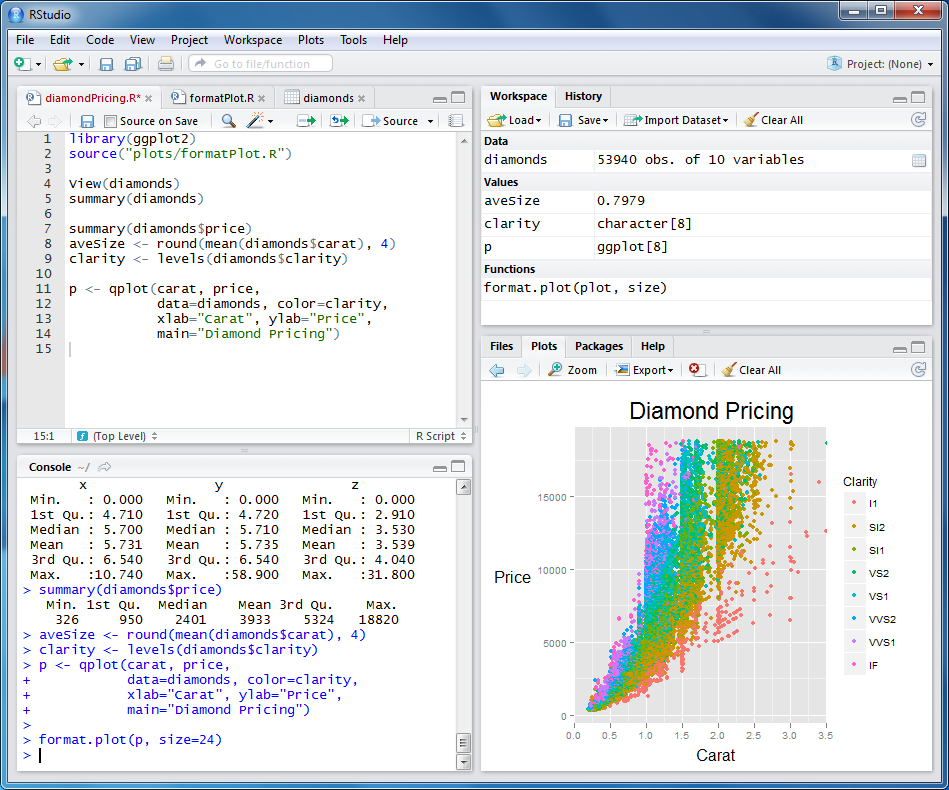
R studio interface

What are R's strengths?

Adapted from 'R for Stata users' by Muenchen and Hilbe

  • Comprehensible repertoire of statistical techniques
  • R is directly accessible from many statistics packages like SAS, SPSS and Stata.
  • Every aspect of R is open for anyone to modify in any way they like.
  • R also offers the very flexible and powerful Grammar of Graphics approach. Developers have even gone so far as replacing R’s core graphical system.
  • R is free. This helps to attract developers and is a major reason that there are so many add-on packages for it.

What are R's strengths?

Adapted from 'R for SPSS and SAS users' by Robert Muenchen

  • It takes most statistics packages at least 5 years to add a major new analytic method;
  • You can do all your data management with any software you prefer, and learn just enough R to import a file and run the procedure you need.
  • SAS or SPSS requires using a different language such as C or Python to program functions; R uses its own language
  • R’s graphics are extremely flexible and are of publication quality.
  • R is free.

R's weaknesses

According to Roger Peng, Associate Professor at John Hopkins University:

  • Memory management;
  • Speed;
  • Efficiency;

  • Is R imprecise?
    R packages go through “Alpha,” “Beta,” and “Release Candidate” testing phases, which are open to the public. Each phase has tighter restrictions on modifications of R.

R graphics - Teaching

Problem = Explanatory graphs for teaching

plot of chunk unnamed-chunk-1

R graphics - Teaching

Problem = Showing overlapping variation using distributions plot of chunk unnamed-chunk-2

R graphics - Teaching

Problem = Showing overlapping variation using Venn diagrams Venn Diagram

R graphics - Exploratory analysis

Problem = Nicely formatted barplot with minimum code

## Run this in your console
library(ggplot2)
ggplot(diamonds, aes(clarity, fill=cut)) + geom_bar()

plot of chunk unnamed-chunk-3

R graphics - Exploratory analysis

Problem = Visualizing a bivariate relationship filtered by two variables

## Run this in your console
library(ggplot2)
qplot(wt, mpg, data=mtcars, size=qsec, color=factor(carb))

plot of chunk unnamed-chunk-4

R graphics - Exploratory analysis

Problem = Visualizing a bivariate relationship by a categorical variable

## Run this in your console
library(ggplot2)
qplot(mpg, wt, data = mtcars, facets = cyl ~ ., geom = c("point", "smooth")) + 
    coord_flip()

plot of chunk unnamed-chunk-5

R graphics - Exploratory analysis

Problem = Combine existing graphs in a nice format

## Do not run this. It's incomplete code.
multiplot(p1, p2, p3, p4, cols = 2)

plot of chunk unnamed-chunk-7

R graphics - Exploratory analysis

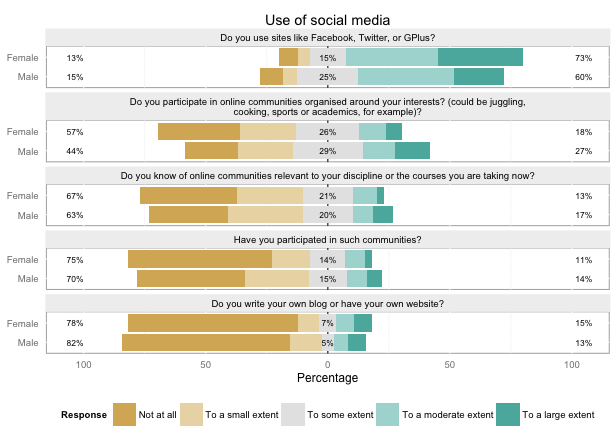
Problem = Visualize Likert type questions quickly likert
R graphics - Advanced

Problem = Visualizing statistical techniques

R graphics - Advanced

Problem = Plotting distributions next to scatterplots

R graphics - Advanced

Problem = Making graphical summaries

R graphics - Interactive graphs

Problem = Exploring your data visually in a fast way

## Run this in your console
library(openintro)
edaPlot(mtcars)

R graphics - Interactive graphs

Problem = Getting QUALITY visualizations with almost no work.

  • Let's go to the console to get to know ggvis

    Advantages of ggvis over other graph packages:

  • HTML and Javascript graphics are the ones actually doing the work behind ggvis.

For more graphs, go here

R graphics - Interactive graphs

Let's play around!

## Run this in your console
library(ggvis)
span <- waggle(0.2,1)
span <- left_right(0.2,1,step = 0.1)

mtcars %>%
    ggvis(~mpg, ~disp) %>%
    layer_lines() %>%
    layer_smooths(span=span)
  • First 'span' variable will adjust the smoothness automatically
  • Second 'span' variable will allow you to adjust smoothness with the left-right arrows

R graphics - Interactive graphs

Problem = Getting QUALITY visualizations exportable to websites

## Run this in your console
library(plotly)
set.seed(100)
d <- diamonds[sample(nrow(diamonds), 1000), ]
plot_ly(d, x = carat, y = price, text = paste("Clarity: ", clarity),
        mode = "markers", color = carat, size = carat)

For more, check out plotly

R graphics - Interactive graphs

R graphics - Interactive graphs

R graphics - Maps

plot of chunk unnamed-chunk-12

R graphics - Maps

R graphics - Maps

Crime density in Baltimore

R graphics - Maps

R graphics - Maps

R graphics - Maps

R facebook map

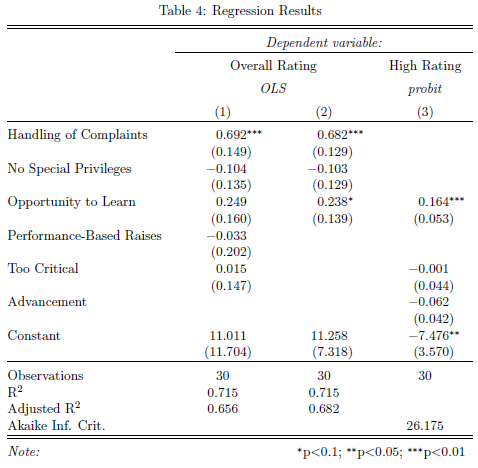
R statistics - Summary statistics ouput

You can get summary or regression statistics using the stargazer package
Where did you think this presentation was done?

R can also produce written reports, PDFs' and Powerpoint presentations.

Checkout the fantastic Rmarkdown here and here

But of course, it's not built to write research papers, it's more for:

  • Blog posts;
  • Materials for training workshops;
  • Short consulting reports;
  • Exploratory analyses as part of a larger project;

There's also Powerpoint presentations with slidify

Exercises for your students

With the swirl package you can program exercises and homeworks that students can do anywhere.
Try it out yourself:

## Run this in your console
library("swirl")
swirl()

Thank you!

Extra: R statistics - Regression output

Try it out yourself:

## Run this in your console
library(stargazer)
m1 <- lm(mpg ~ hp, data=mtcars)
m2 <- lm(mpg ~ hp + drat + am, data=mtcars)
stargazer(m1, m2, type="text",
 dep.var.labels=c("Miles/(US) gallon","Fast car (=1)"),
 covariate.labels=c("Gross horsepower","Rear axle ratio","Four foward gears"))