RonR! First seminar
Introduction to R and its strengths
Jorge Cimentada
5th of March of 2016

What is R?
Do you know what General Public License or GNU is?
How does R work?
Getting started
Let's go to R!

Downloading Rstudio

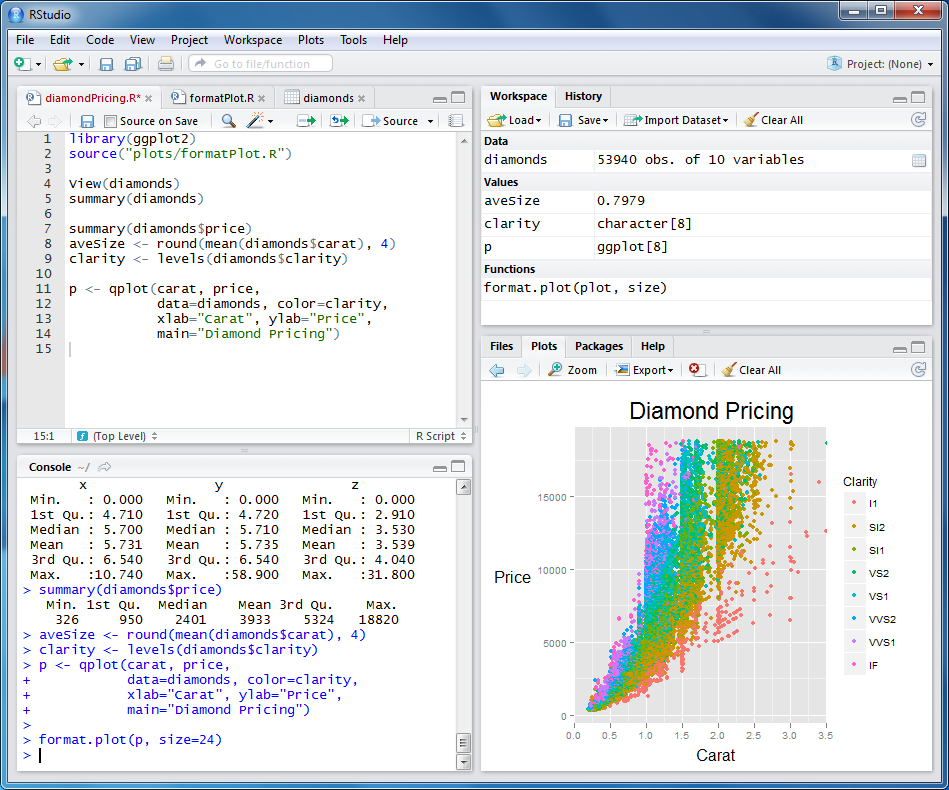
How does Rstudio look?
What are R's strengths?
R graphics
par(mfrow = c(1, 2))
plot(iris$Sepal.Length, iris$Petal.Length, col = iris$Species, main = "Sepal vs Petal Length in Iris")
plot(iris$Sepal.Length, iris$Sepal.Width, col = iris$Species, main = "Sepal Length vs Width in Iris")

R graphics
Problem = Explanatory graphs for teaching

R graphics
*Problem = Showing overlapping variation using Venn diagrams

R graphics
Problem = Showing relationships between data points
 This is among the most recognized graphs in R!
R graphics - ggplot2 package
Problem = Nicely formatted barplot with minimum code
library(ggplot2)
ggplot(diamonds, aes(clarity, fill=cut)) + geom_bar()

R graphics - ggplot2 package
Problem = Visualizing a bivariate relationship filtered by two variables
library(ggplot2)
qplot(wt, mpg, data=mtcars, size=qsec, color=factor(carb))

R graphics - ggplot2 package
Problem = Visualizing a bivariate relationship by a categorical variable
library(ggplot2)
qplot(mpg, wt, data = mtcars, facets = cyl ~ ., geom = c("point", "smooth")) +
    coord_flip()

R graphics - ggplot2 package
_Problem = Combine existing graphs in a nice format _* **Note: There's some other code going on in the back! Not that easy.
multiplot(p1, p2, p3, p4, cols = 2)

Multilevel PSM
_Problem = Visualizing complex statistical techniques
 http://jason.bryer.org/multilevelPSA/
Psychology Reproducibility
_Problem = Plotting distributions next to scatterplots

Country performance in PISA
Problem = Making nice graphical summaries

Likert package
Problem = Visualize Likert type questions quickly

Interactive graphs
Interactive graphs
Interactive graphs
Interactive graphs
Interactive graphs
R graphics
R maps

R maps

R maps
Crime density in Baltimore

R maps

R maps
