Grammar of Data Manipulation

Albert Y. Kim
Monday 2016/2/15

Data Manipulation

We now discuss a grammar for data manipulation. Other terms for “data manipulation” include:

  • data wrangling
  • data munging
  • The New York Times takes a rather pessimistic view.

Tidy Data

Deceptively powerful concept of tidy data, represented in R either as a data.frame or a tbl_df table data frame:
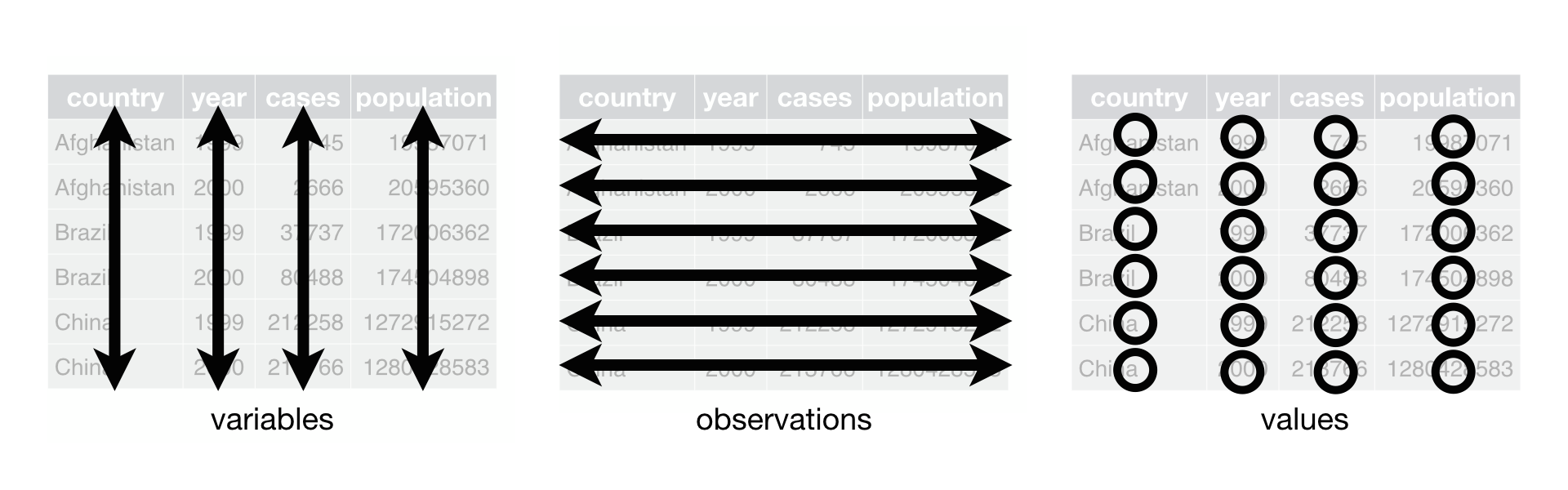
Example of Codd's 3rd Normal Form of database normalization:

Tidy Data

  1. Each variable forms a column.
  2. Each observation forms a row.
  3. Each type of observational unit forms a table.

We will revisit this concept later.

Grammar of Data Manipulation

~85% of data manipulations can be achieved by the following verbs on tidy data.

  1. filter(): subset rows matching criteria
  2. select(): subset columns chosen by name
  3. mutate(): add new variables by mutating existing ones
  4. arrange(): reorder rows
  5. summarise(): reduce variables to values

Each of these verbs is a command from the dplyr package.

Grammar of Data Manipulation

The beauty of this package is that it is built on principles that are programming language/software agnostic, specifically Database Normalization, which SQL is based on as well.

Even if later on your don't end up using R, the previous five verbs is still how you would think about manipulating your data.

Other Important Concepts

  • boolean algebra: statements that evaluate to TRUE or FALSE.
  • grouping: define groupings on a categorical variable via the group_by() command that is useful for summarise()'ations.
  • piping: sequences of commands.

Other Concepts: piping

piping originates from the magrittr package, which the dplyr package loads by default.

It allows you to take the output of one function and pipe it as the input of the next function, and build a sequence.

Other Concepts: piping

The %>% command, described as “then”. This saves you from nested parentheses.

For example ex: say you want to apply functions h() and g() and then f() on data x. You can do

  • f(g(h(x))) OR
  • h(x) %>% g() %>% f()

This allows for a sequential breaking down of tasks, allowing you and more importantly others to understand what you are doing!

Other Concepts: Boolean Algebra

  • == equals
    • Ex: 5 == 3 yields FALSE
  • != not equal to
    • Ex: 5 != 3 yields TRUE
  • | or
    • Ex: 5 < 3 | 5 < 10 yields TRUE
  • & and
    • Ex: 5 < 3 & 5 < 10 yields FALSE
  • %in% is x in y?
    • Ex: c(1, 3, 2) %in% c(1, 2) yields TRUE FALSE TRUE