Introduction to automatization and online application development using R
Online self-publication
Adrian Stanciu
Faculty of Humanities, Education and Social Sciences (FHSE), University of Luxembourg
Previously
A brief reminder.
Plain vs. enhanced text
Simple text. No editing, no hyperlinks, no enhanced fields.
Enhanced text integrates r-code.
This is an example of how automatization can be implemented in the work flow. My list of movies include `r nrow(dfmv)` entries. The title of those movies are `r dfmv$Movie`. Is there a movie that I actually dont like on that list, well, the answer is that I dislike exactly `r dfmv %>% filter(Like %in% c("No","no","NO")) %>% nrow()`movies on that list.
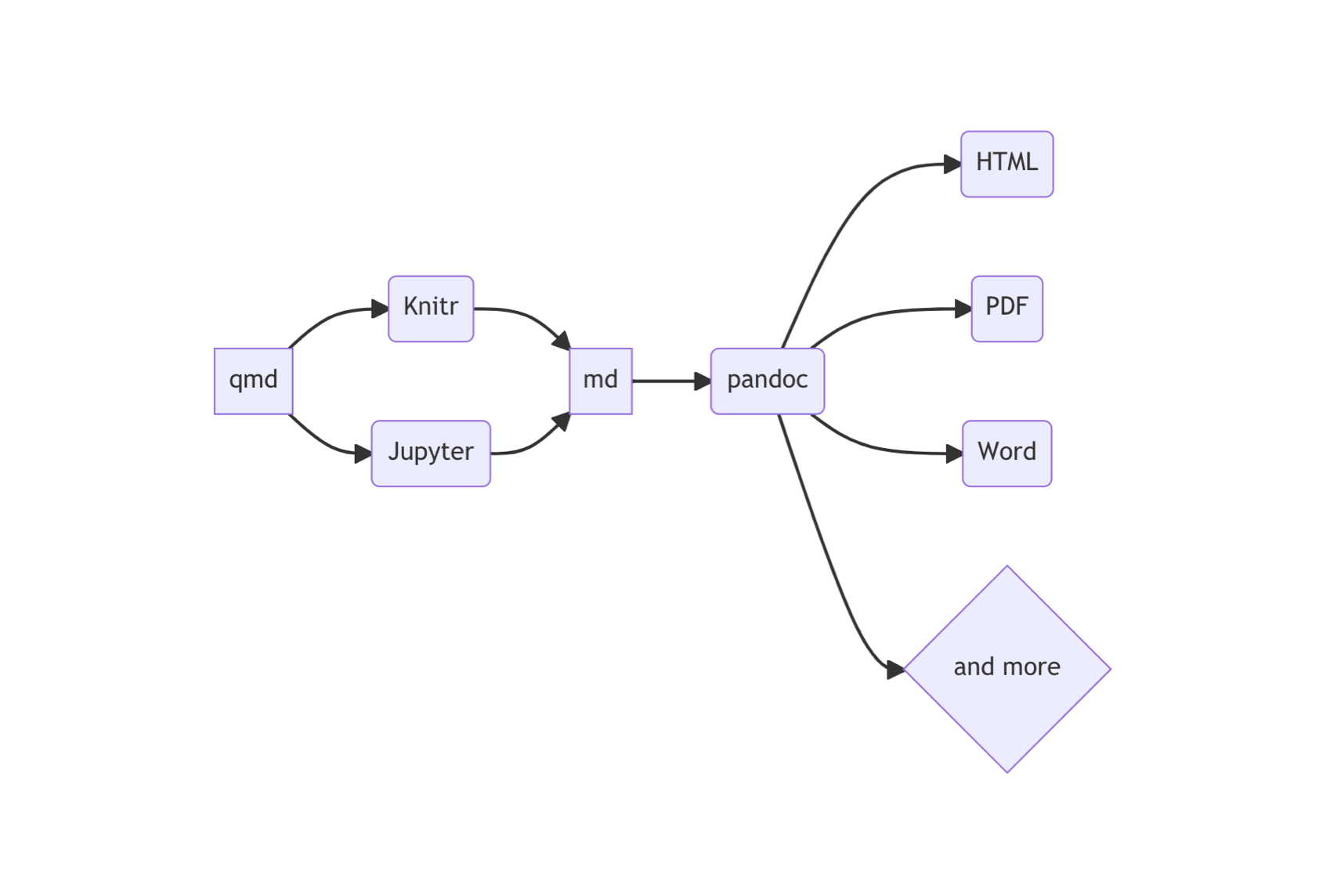
If we code in r then we use the knitr engine. If we code in python we use the Jupyter engine. Not of importance at this stage since .qmd can take care of that for us via RStudio.
After you’ve successfully installed r, RStudio, and quarto on your computer, we can start with creating websites and books.
Website
Self-publishing online using r is one way to integrate varying work-routines towards a greater goal – that of communicating own research, consultancy job involving data science, to name just a few examples.
Default quarto website
.qmd, .yml, .css as well as a folder “_site”.
Render
A quarto website must be rendered first. This creates .html files inside the _site subfolder.
The index.html indexes the website. Brings everything together.
Live preview by typing in the Terminal:
quarto preview
Render by typing in the Terminal:
quarto render
.qmd file
Virtually identical to .Rmd.
.yml file
.yml file is for the entire website.
yaml header inside .qmd is for that .qmd only!
Listing all the individual pages
Remember to list in the navbar all the individual pages you’d like to be rendered in the final website. Otherwise, the website will not contain them!
.css file
Called inside the .yaml file.
The default .css file is empty.
.css stands for Cascade Style Sheets and is a language used most typically for styling HTML files.
Custom css
One can create custom css styles for their website or use pre-defined templates from the Internet.
Always be careful what you download from the Internet.
Website content
Use the knowledge from previous sessions and create content for your website. Or, a basic structure that you could edit at a later stage.
Use data
Use data Stanciu et al. (2017) to integrate graphs and tables.
Use the Excel sheet movies.xlsx to integrate external source material.
Add pages
Create multiple pages that define a structure to the information you’d want to communicate.
For example: News, About, Education, Work experience.
Deploy website via quartopub.com
First, quarto preview the website locally and make sure all is good.
We can deploy directly from Terminal to quartopub.com using
quarto render
then
quarto publish quarto-pub
The website will open in your default browser once successfully deployed. Rendering may take some time.
Before we begin creating content, we create a new repository on GitHub that we’re planning to use for the website. We can call this repository personal website, or any other name.
Once created, we will clone this empty repository on our local machine which become the working directory (project folder) for the website. This solves the link between local machine and online server GitHub.
Open the <> Code panel, make sure the SSH tab is selected, and copy the repository address starting with git@github...
In your terminal (gitbash), decide where you’d like to deposit this repository – this must remain fixed otherwise the link to GitHub is lost.
You can use these commands to navigate until the desired folder
ls = lists everything in the folder cd = enters a folder
Then clone the website repository on your local machine.
On my local machine, inside the folder github, I am cloning the example GitHub repository
We can now use this folder to create our default website as shown previously.
We then create content for the website as shown previously.
When we’re ready, we render the website,
quarto render
then we push to the online repository.
git add .git commit -m "Push website"git push
We finally setup GitHub to “read” the website from the sub-folder docs.
You can publish your website (or book, as we will see in the next section) on a custom domain. For this you’d need to pay a monthly or yearly fee.
On quarto.com, a custom domain is not possible. The website domain will contain the root to your quarto account followed by the website name.
Via GitHub, a custom domain is possible against costs. The standard domain will contain the root to your GitHub account followed by the website name.
Book
For when you have particular expertise in a domain that you’d want to share publicly and freely.
Why an online book
It can be shared online.
It can be easily structured into sections and chapters.
It can integrate r (as well as other languages) code.
You maintain full control over content and formatting.
It can be downloaded as PDF or EPUB (for e-readers, not covered in this class).
From it, one can download material…
Default quarto book
.qmd, .yml, .bib as well as a folder “_book”.
Render
A quarto book, like a quarto website, must be rendered first. This creates .html files inside the “_book” subfolder.
The index.html indexes the book. Brings everything together.
Live preview by typing in the Terminal:
quarto preview
Render by typing in the Terminal:
quarto render
.qmd file
Identical with the .qmd for websites.
.yml file
Identical with the one for creating websites but contains different attributes.
.yml - tips
Output directory
We can specify the output directory where quarto should render the book files.
output-dir: docs
List all the chapters!
Remember to list under chapters: all the .qmd chapters you’d want to render to the final book. Otherwise these are not included. Note also that the order of chapters is defined here.
PDF of your book
You may inspect the PDF version of your book by navigating inside the “_book” (or “docs”, depending on the output-directory indicated in the .yml file) folder provided, of course, that you first rendered the book using, for example, the code line quarto render.
For nice(r) PDF book formatting, turn to latex formatting which can be integrated in the .yml file or yaml header.
.bib file
Citation file format that gets integrated in the output document through pandoc.
.bib - tips
.bib citation
Many journals offer the possibility to download a .bib citation of their articles.
Issues with data manipulation or analysis - check for r code/ packages.
Editing an .qmd or .Rmd – search for how to…in quarto/ Rmarkdown.
Formatting for HTML, search for .css or attributes of the .yml file or yaml header.
Render to PDF? Check for latex integration in the .yml file or yaml header.
Problem with citations? Check for .bib bibliography integration in quarto/ Rmarkdown.
Reference list
Conner, M., & Armitage, C. J. (1998). Extending the theory of planned behavior: A review and avenues for further research. Journal of Applied Social Psychology, 28(15), 1429–1464. https://doi.org/10.1111/j.1559-1816.1998.tb01685.x
Stanciu, A., Cohrs, C. J., Hanke, K., & Gavreliuc, A. (2017). Within-culture variation in the content of stereotypes: Application and development of the stereotype content model in an eastern european culture. The Journal of Social Psychology, 157(5), 611–628. https://doi.org/10.1080/00224545.2016.1262812
Workflow in quartoOn my local machine, inside the folder github, I am cloning the example GitHub repository