Spatial Analysis in R

Hannah Owens
05 March, 2024

The Plan

Agenda

  • Intro to GIS and Spatial Analysis
  • Case study: Sherman's Fox Squirrel

The Plan

Agenda

  • Intro to GIS and Spatial Analysis
  • Case study: Sherman's Fox Squirrel

Intended learning outcomes

  • Explain how R can be used for spatial analysis
  • Sketch out a workflow for analyzing and mapping spatial data in R

Intro to GIS and Spatial Analysis

What do you mean, GIS?

“a framework for gathering, managing, and analyzing spatial data”

GIS vs R

GIS

R

No programming knowledge needed

Repeatable and scaleable

Easy to create new spatial objects

Free and open-source

Spatial Data Types

Data types

Vector Data

  • Spreadsheets with a geometry column(s)
  • Vertices and paths

Vector Data: Points

  • X - Y coordinates in a spatial reference frame
    • Generally latitude and longitude
    • Careful! X = longitude, Y = latitude!
  • e.g. locality

Vector points

Vector Data: Lines

  • Links bewteen X - Y coordinates
  • Represent one-dimensional features
  • e.g. rivers, streets, movement paths

Vector points

Vector Data: Polygons

  • Connect X - Y coordinates and close the path
  • Represent two-dimensional features
  • e.g. conservation areas, country boundaries, distribution limits

Vector points

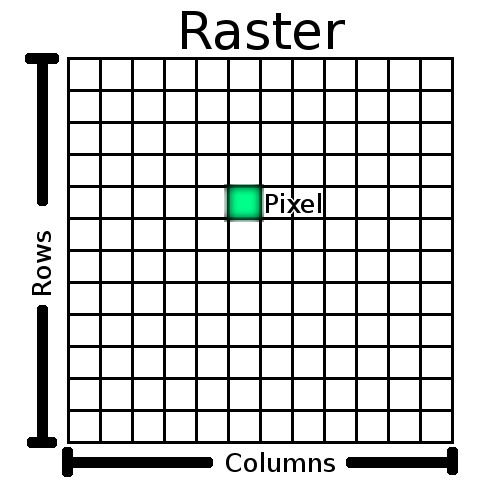
Raster Data

  • Made up of pixels
    • Each pixel has a value
    • Can be continuous or discrete
  • Many different file types
    • GeoTIFF
    • Ascii

Raster

Comparing Vectors and Rasters

Vector

Raster

High geographical accuracy

Very good for representing remote sensing data

Efficient representation of hierarchical data

Performs well with map algebra

Used for measurements of proximity

Works well with continuous data

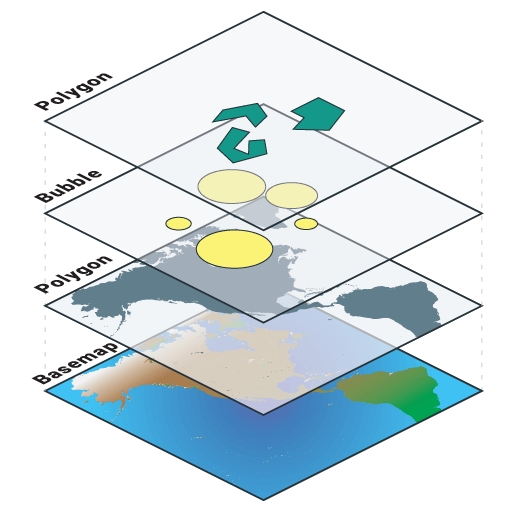
Mapping

  • Data visualization
  • Stack different data in layers

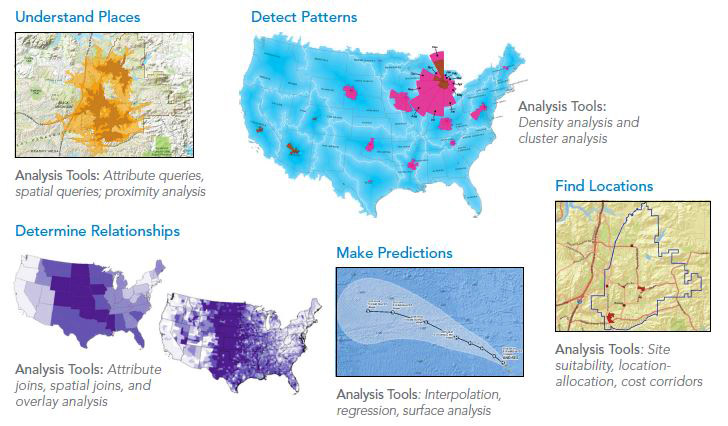
Simple Spatial Analysis

  • Overlay
    • Intersection
    • Data extraction
    • Raster algebra
  • Proximity
    • Distances (vectors)
    • Interpolation (rasters)

Simple Spatial Analysis

Case Study

Sherman's Fox Squirrels

Some background

  • Subspecies of Fox Squirrel, Sciurus niger
  • Native to southeastern United States
  • Threatened by deforestation

The Plan

  • Load data
  • Manipulate data
  • Visualize data
  • Analyze data

5 Minute Break

If you haven't done so already:

  • Download data from Absalon
  • Install necessary packages
install.packages("terra")

Setting up and loading data

terra Package

  • Vector data
    • Geometric operations (e.g. intersect and buffer)
  • Raster data
    • Local, focal, global, zonal and geometric operations
  • Predict and interpolate using regression models
  • Processing of very large files is supported
    • Using C++

terra

library(terra)
citation("terra")
To cite package 'terra' in publications use:

  Hijmans R (2024). _terra: Spatial Data Analysis_. R package version
  1.7-71, <https://CRAN.R-project.org/package=terra>.

A BibTeX entry for LaTeX users is

  @Manual{,
    title = {terra: Spatial Data Analysis},
    author = {Robert J. Hijmans},
    year = {2024},
    note = {R package version 1.7-71},
    url = {https://CRAN.R-project.org/package=terra},
  }

Basics of Loading Data: Vectors

Key function: vect()

vect()
 class       : SpatVector 
 geometry    : none 
 dimensions  : 0, 0  (geometries, attributes)
 extent      : 0, 0, 0, 0  (xmin, xmax, ymin, ymax)
 coord. ref. :  

Basics of Loading Data: Vectors

From .csv file

#Read points and turn into shapefile
shermanSquirrels <- read.csv(file = "data/ShermanSquirrels.csv", header = T)

class(shermanSquirrels)
[1] "data.frame"
head(shermanSquirrels, 3)
        Species Longitude Latitude
1 Sciurus niger -83.36905 31.40090
2 Sciurus niger -82.60067 28.46997
3 Sciurus niger -81.46268 28.71139

Basics of Loading Data: Vectors

Converting a data.frame to a SpatVector

shermanSquirrelsShp <- vect(shermanSquirrels, geom = c("Longitude", "Latitude"))
shermanSquirrelsShp
 class       : SpatVector 
 geometry    : points 
 dimensions  : 35, 1  (geometries, attributes)
 extent      : -87.04154, -80.0361, 26.7061, 34.82  (xmin, xmax, ymin, ymax)
 coord. ref. :  
 names       :       Species
 type        :         <chr>
 values      : Sciurus niger
               Sciurus niger
               Sciurus niger

Basics of Loading Data: Vectors

Polygons from .shp files

# Reading shapefiles
florida <- vect("data/FloridaBound1/FLORIDA.shp")
florida
 class       : SpatVector 
 geometry    : polygons 
 dimensions  : 1, 4  (geometries, attributes)
 extent      : -1110383, 1298633, 77020.92, 2466420  (xmin, xmax, ymin, ymax)
 source      : FLORIDA.shp
 coord. ref. : NAD83(HARN) / Florida West (ftUS) 
 names       : OBJECTID  DATESTAMP SHAPE_AREA SHAPE_LEN
 type        :    <int>      <chr>      <num>     <num>
 values      :        1 2000/05/16   1.57e+12 2.834e+07

Basics of Loading Data: Rasters

Key function: rast()

rast()
class       : SpatRaster 
dimensions  : 180, 360, 1  (nrow, ncol, nlyr)
resolution  : 1, 1  (x, y)
extent      : -180, 180, -90, 90  (xmin, xmax, ymin, ymax)
coord. ref. : lon/lat WGS 84 

Basics of Loading Data: Rasters

Raster from .tif files

# Read rasters
altitude <- rast("data/altitude.tif")

altitude
class       : SpatRaster 
dimensions  : 3000, 3000, 1  (nrow, ncol, nlyr)
resolution  : 0.01666667, 0.01666667  (x, y)
extent      : -100, -50, 0, 50  (xmin, xmax, ymin, ymax)
coord. ref. : lon/lat WGS 84 (EPSG:4326) 
source      : altitude.tif 
name        : ETOPO_2022_v1_60s_N90W180_bed 
min value   :                     -8461.562 
max value   :                      5424.277 
names(altitude)
[1] "ETOPO_2022_v1_60s_N90W180_bed"

Challenge 1: Load spatial data

Now it's your turn! Load the point .csv, shapefile, and raster.

  • Bonus challenge: How many points are in the squirrel data?

Challenge 1: Load spatial data

# Points from .csv
shermanSquirrels <- read.csv(file = "data/ShermanSquirrels.csv",
                      header = T)
shermanSquirrelsShp <- vect(shermanSquirrels, 
                            geom = c("Longitude",
                                     "Latitude"))
paste0("There are ", 
       length(shermanSquirrelsShp), 
       " squirrels in the dataset.")
[1] "There are 35 squirrels in the dataset."

Challenge 1: Load spatial data

# Polygon shapefile
florida <- vect("data/FloridaBound1/FLORIDA.shp")

# Raster
altitude <- rast("data/altitude.tif")

Visualizing Data

Working with `terra` classes

Lots of generic methods work for terra data classes

print(shermanSquirrelsShp)
 class       : SpatVector 
 geometry    : points 
 dimensions  : 35, 1  (geometries, attributes)
 extent      : -87.04154, -80.0361, 26.7061, 34.82  (xmin, xmax, ymin, ymax)
 coord. ref. :  
 names       :       Species
 type        :         <chr>
 values      : Sciurus niger
               Sciurus niger
               Sciurus niger
summary(shermanSquirrelsShp)
   Species         
 Length:35         
 Class :character  
 Mode  :character  

Working with `terra` classes

Lots of generic methods work for terra data classes

print(florida)
 class       : SpatVector 
 geometry    : polygons 
 dimensions  : 1, 4  (geometries, attributes)
 extent      : -1110383, 1298633, 77020.92, 2466420  (xmin, xmax, ymin, ymax)
 source      : FLORIDA.shp
 coord. ref. : NAD83(HARN) / Florida West (ftUS) 
 names       : OBJECTID  DATESTAMP SHAPE_AREA SHAPE_LEN
 type        :    <int>      <chr>      <num>     <num>
 values      :        1 2000/05/16   1.57e+12 2.834e+07

Working with `terra` classes

Lots of generic methods work for terra data classes

summary (florida)
    OBJECTID  DATESTAMP           SHAPE_AREA         SHAPE_LEN       
 Min.   :1   Length:1           Min.   :1.57e+12   Min.   :28344148  
 1st Qu.:1   Class :character   1st Qu.:1.57e+12   1st Qu.:28344148  
 Median :1   Mode  :character   Median :1.57e+12   Median :28344148  
 Mean   :1                      Mean   :1.57e+12   Mean   :28344148  
 3rd Qu.:1                      3rd Qu.:1.57e+12   3rd Qu.:28344148  
 Max.   :1                      Max.   :1.57e+12   Max.   :28344148  

Working with `terra` classes

Lots of generic methods work for terra data classes

print (altitude)
class       : SpatRaster 
dimensions  : 3000, 3000, 1  (nrow, ncol, nlyr)
resolution  : 0.01666667, 0.01666667  (x, y)
extent      : -100, -50, 0, 50  (xmin, xmax, ymin, ymax)
coord. ref. : lon/lat WGS 84 (EPSG:4326) 
source      : altitude.tif 
name        : ETOPO_2022_v1_60s_N90W180_bed 
min value   :                     -8461.562 
max value   :                      5424.277 

Working with `terra` classes

Lots of generic methods work for terra data classes

summary(altitude)
 ETOPO_2022_v1_60s_N90W180_bed
 Min.   :-8391.2              
 1st Qu.:-4335.3              
 Median : -793.8              
 Mean   :-1925.9              
 3rd Qu.:  141.7              
 Max.   : 4519.3              

Plotting `terra` data

Plotting looks very familiar

# Let's try plotting
plot(altitude, main="Altitude", xlim = c(-88.5,-79), ylim = c(24, 32))
plot(shermanSquirrelsShp, pch = 16, cex = 1.5, add = T)

plot of chunk first try plot

Plotting `terra` data

What if we add the Florida shapefile?

# Let's try plotting
plot(altitude, main="Altitude", xlim = c(-88.5,-79), ylim = c(24, 32))
plot(shermanSquirrelsShp, pch = 16, cex = 1.5, add = T)
plot(florida, add = T)

plot of chunk add florida

Where is Florida?!

Let's investigate

ext() gives you the spatial extent of a file

  • Minimum and maximum X and Y coordinates of the object
ext(shermanSquirrelsShp)
SpatExtent : -87.04154027, -80.0361, 26.7061, 34.82 (xmin, xmax, ymin, ymax)
ext(altitude)
SpatExtent : -100, -50, 0, 50 (xmin, xmax, ymin, ymax)
ext(florida)
SpatExtent : -1110382.95, 1298632.755, 77020.924, 2466419.852 (xmin, xmax, ymin, ymax)

Where is Florida?!

ext(florida)
SpatExtent : -1110382.95, 1298632.755, 77020.924, 2466419.852 (xmin, xmax, ymin, ymax)

Well, that's weird.

Where is Florida?!

The Florida extents look wild. Why?

  • Depends on projections for units
  • crs() provides a valuable clue.
crs(shermanSquirrelsShp)
[1] ""
crs(altitude)
[1] "COMPOUNDCRS[\"WGS 84 + EGM2008 height\",\n    GEOGCRS[\"WGS 84\",\n        DATUM[\"World Geodetic System 1984\",\n            ELLIPSOID[\"WGS 84\",6378137,298.257223563,\n                LENGTHUNIT[\"metre\",1]]],\n        PRIMEM[\"Greenwich\",0,\n            ANGLEUNIT[\"degree\",0.0174532925199433]],\n        CS[ellipsoidal,2],\n            AXIS[\"geodetic latitude (Lat)\",north,\n                ORDER[1],\n                ANGLEUNIT[\"degree\",0.0174532925199433]],\n            AXIS[\"geodetic longitude (Lon)\",east,\n                ORDER[2],\n                ANGLEUNIT[\"degree\",0.0174532925199433]],\n        ID[\"EPSG\",4326]],\n    VERTCRS[\"EGM2008 height\",\n        VDATUM[\"EGM2008 geoid\"],\n        CS[vertical,1],\n            AXIS[\"gravity-related height\",up,\n                LENGTHUNIT[\"metre\",1]],\n        ID[\"EPSG\",3855]]]"

Where is Florida?!

The Florida extents look wild. Why?

  • Depends on projections for units
  • crs() provides a valuable clue.
crs(florida)
[1] "PROJCRS[\"NAD83(HARN) / Florida West (ftUS)\",\n    BASEGEOGCRS[\"NAD83(HARN)\",\n        DATUM[\"NAD83 (High Accuracy Reference Network)\",\n            ELLIPSOID[\"GRS 1980\",6378137,298.257222101,\n                LENGTHUNIT[\"metre\",1]],\n            ID[\"EPSG\",6152]],\n        PRIMEM[\"Greenwich\",0,\n            ANGLEUNIT[\"Degree\",0.0174532925199433]]],\n    CONVERSION[\"unnamed\",\n        METHOD[\"Transverse Mercator\",\n            ID[\"EPSG\",9807]],\n        PARAMETER[\"Latitude of natural origin\",24.3333333333333,\n            ANGLEUNIT[\"Degree\",0.0174532925199433],\n            ID[\"EPSG\",8801]],\n        PARAMETER[\"Longitude of natural origin\",-82,\n            ANGLEUNIT[\"Degree\",0.0174532925199433],\n            ID[\"EPSG\",8802]],\n        PARAMETER[\"Scale factor at natural origin\",0.999941176470588,\n            SCALEUNIT[\"unity\",1],\n            ID[\"EPSG\",8805]],\n        PARAMETER[\"False easting\",656166.666666667,\n            LENGTHUNIT[\"US survey foot\",0.304800609601219],\n            ID[\"EPSG\",8806]],\n        PARAMETER[\"False northing\",0,\n            LENGTHUNIT[\"US survey foot\",0.304800609601219],\n            ID[\"EPSG\",8807]]],\n    CS[Cartesian,2],\n        AXIS[\"(E)\",east,\n            ORDER[1],\n            LENGTHUNIT[\"US survey foot\",0.304800609601219,\n                ID[\"EPSG\",9003]]],\n        AXIS[\"(N)\",north,\n            ORDER[2],\n            LENGTHUNIT[\"US survey foot\",0.304800609601219,\n                ID[\"EPSG\",9003]]]]"

Projections

One of the most important things to remember when dealing with spatial data!!

A projection is a mathematical transformation of coordinates from the surface of a sphere on a 2D plane.

Demo of projection

Types of projections

There are always tradeoffs

  • Conformal (preserves shape, distorts area)
  • Equal-area (preserves area, distorts shape)
  • Equidistant (preserves distance from some point or line)

Getting projections to agree

First, the points object, which was missing its projection.

  • Making projections explicit reduces headaches later
  • Allows for reprojection
# Defining coordinate reference system
crs(shermanSquirrelsShp) <- crs(altitude)

Getting projections to agree

Next, reprojecting squirrels and altitude so they match Florida.

# Reprojecting the shapefiles
shermanSquirrelsShp <- project(shermanSquirrelsShp,
                               crs(florida))
altitude_prj <- project(altitude, crs(florida))

Challenge 2: Project and plot

Now it's your turn.

  • Define the projection for the squirrel occurrence data.
  • Reproject data to Florida CRS.
  • Plot altitude, points, and Florida polygon together.

Challenge 2: Project and plot

# Defining coordinate reference system
crs(shermanSquirrelsShp) <- crs(altitude)

# Reprojecting the shapefiles
shermanSquirrelsShp <- project(shermanSquirrelsShp,
                               crs(florida))
altitude_prj <- project(altitude, crs(florida))

Challenge 2: Project and plot

plot(altitude_prj, main="Altitude", 
     xlim = c(-1500000, 1400000), 
     ylim = c(20000, 4000000))
plot(shermanSquirrelsShp, 
     pch = 16, cex = 1.5, 
     add = T)
plot(florida, 
     add = T)

plot of chunk Challenge 2 pt 2.1

5 Minute Break

Basic geospatial operations

Cropping

  • Changes the extent of a spatial object
  • Makes computation more efficient
  • Makes prettier maps

Cropping

ext(florida)
SpatExtent : -1110382.95, 1298632.755, 77020.924, 2466419.852 (xmin, xmax, ymin, ymax)
ext(altitude_prj)
SpatExtent : -6029079.69455232, 13007242.2260667, -8832918.89597141, 11015964.863511 (xmin, xmax, ymin, ymax)
altitudeCropped <- crop(altitude_prj, 
                        florida)

plot of chunk unnamed-chunk-2

Another Reason Extents Matter

Mismatching extents results in errors

altitude_prj - altitudeCropped
Error: [-] extents do not match

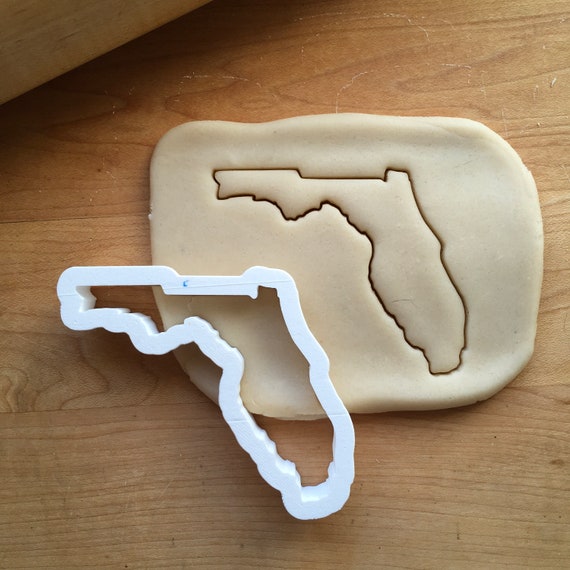
Masking

  • Like cropping, only more so
    • Instead of a box, a cookie cutter
  • Replaces values outside mask with NA values
    • BUT you can also do the inverse
    • mask(inverse=TRUE)

Masking

altitudeCM <- mask(altitudeCropped, 
                   mask = florida)
plot(altitudeCM, 
     main="Altitude", 
     buffer = TRUE)
plot(florida, add = TRUE)
plot(shermanSquirrelsShp, 
     add = TRUE)

plot of chunk masking

plot of chunk masking2

Writing raster files

  • Makes code more efficient
  • Makes analysis more repeatable
#Save result as a .tif file
writeRaster(altitudeCM, 
            filename = "AltitudeCroppedFlorida.tif",
            overwrite = TRUE)

Challenge 3: Crop and mask data

Now it's your turn! Try cropping and masking the altitude_prj object to the Florida shapefile.

  • Crop first, then mask
  • Map resulting raster and Florida shapefile
    • Bonus challenge: change colors used in the plot.

Challenge 3: Crop and mask data

#Cropping rasters to extent of shapefile
altitudeCropped <- crop(altitude_prj, florida)
altitudeCM <- mask(altitudeCropped, mask = florida)
plot(altitudeCM, col = viridis::mako(n = 11), 
     background = "gray")
plot(florida, border = "orange", lwd = 2, add = TRUE)

plot of chunk cropping challenge2

Spatial Relationships

Suppose we are only interested in the occurrence points for Sherman's Fox Squirrels in Florida.

plot of chunk unnamed-chunk-4

Spatial Relationships

is.related() returns a vector of logical states

Spatial Relationships

is.related() returns a vector of logical states

  • For each point in the squirrel shapefile, does it fall within Florida?
floridaSquirrelsInFL <- is.related(shermanSquirrelsShp, florida, relation = "within")

paste0("There are ", sum(!floridaSquirrelsInFL), " squirrels outside of Florida.")
[1] "There are 3 squirrels outside of Florida."

Spatial Relationships

plot(shermanSquirrelsShp, main = "Sherman Squirrels of Florida", 
     col = ifelse(floridaSquirrelsInFL, "red", "black"))
plot(florida, add = TRUE)

plot of chunk unnamed-chunk-6

Spatial Relationships: Data Cleaning

There are three points to remove.

  • Can do this with logical operations
flShermanSquirrelsShp <- shermanSquirrelsShp[floridaSquirrelsInFL]

Challenge 4: Cleaning data points

Now it's your turn! Try to remove all the points outside the Florida shapefile

  • Use is.related to find points within Florida
    • How many points are outside of Florida?
  • Remove points outside using logical operations.
  • Bonus challenge: Plot points within and outside of Florida as two different colors

Challenge 4: Cleaning data points

floridaSquirrelsInFL <- is.related(shermanSquirrelsShp, florida, relation = "within")
paste0("There are ", 
       sum(!floridaSquirrelsInFL), 
       " squirrels outside of Florida.")
[1] "There are 3 squirrels outside of Florida."
flShermanSquirrelsShp <- shermanSquirrelsShp[floridaSquirrelsInFL]

Challenge 4: Cleaning data points

plot(shermanSquirrelsShp, 
     main = "Sherman Squirrels of Florida", 
     col = ifelse(floridaSquirrelsInFL, 
                  "red", "black"))
plot(florida, add = TRUE)

plot of chunk unnamed-chunk-9

5 Minute Break

Spatial Relationships: Extraction

Data from rasters can be extracted using shapefiles

  • Measurements at points
flShermanSquirrelsShp$Elevation <- extract(x = altitudeCM, 
                                           y = flShermanSquirrelsShp, 
                                           ID = FALSE)
head(flShermanSquirrelsShp)
        Species Elevation
1 Sciurus niger  8.967775
2 Sciurus niger 16.983557
3 Sciurus niger 18.863676
4 Sciurus niger 18.863676
5 Sciurus niger 18.863676
6 Sciurus niger 48.562069

Saving data from a shapefile

Now let's create a new data.frame from the squirrel shapefile and save it as a .csv for futher use later.

flShermanSquirrels_Coords <- geom(flShermanSquirrelsShp)[,c("x", "y")] # Gets coordinates
flShermanSquirrels_Data <- data.frame(flShermanSquirrelsShp) # Gets shapefile data
flShermanSquirrels_Table <- cbind(flShermanSquirrels_Coords, flShermanSquirrels_Data)
colnames(flShermanSquirrels_Table)[1:2] <- c("Longitude", "Latitude")

head(flShermanSquirrels_Table)
  Longitude Latitude       Species Elevation
1  463183.1  1504052 Sciurus niger  8.967775
2  828404.8  1591736 Sciurus niger 16.983557
3  916739.2  1472025 Sciurus niger 18.863676
4  917076.2  1472125 Sciurus niger 18.863676
5  917166.3  1472115 Sciurus niger 18.863676
6  672360.8  1347055 Sciurus niger 48.562069
write.csv(flShermanSquirrels_Table, "shermanSquirrelsFlorida.csv", row.names = FALSE)

Spatial Relationships: Extraction

Data from rasters can be extracted using shapefiles

  • Summary statistics accross lines or within polygons
florida$ElevationMax <- extract(x = altitudeCM,
                                y = florida,
                                fun = max,
                                ID = FALSE)
head(florida)
  OBJECTID  DATESTAMP  SHAPE_AREA SHAPE_LEN ElevationMax
1        1 2000/05/16 1.56987e+12  28344148     92.96682

Spatial Relationships: Extraction

Data from rasters can be extracted using shapefiles

  • Summary statistics across lines or within polygons
  • Random sampling within polygon
# Generate 1000 random sampling points within Florida
floridaSample <- spatSample(florida, size = 1000)

# Extract elevation values
floridaSample$Elevation <- extract(x = altitude_prj, y = florida, ID = FALSE)

Challenge 5: Sampling and saving data

Now it's your turn! 1. Extract elevation to squirrel occurrence points 2. Sample 1000 random points from accross Florida and extract elevation. 3. Convert both to data.frame objects and save them.

Challenge 5: Sampling and saving data

Squirrels

flShermanSquirrelsShp$Elevation <- extract(x = altitudeCM, 
                                           y = flShermanSquirrelsShp, 
                                           ID = FALSE)
flShermanSquirrels_Coords <- geom(flShermanSquirrelsShp)[,c("x", "y")]
flShermanSquirrels_Data <- data.frame(flShermanSquirrelsShp)
flShermanSquirrels_Table <- cbind(flShermanSquirrels_Coords, flShermanSquirrels_Data)
colnames(flShermanSquirrels_Table)[1:2] <- c("Longitude", "Latitude")

Challenge 5: Sampling and saving data

Florida

floridaSample <- spatSample(florida, size = 1000)
floridaSample$Elevation <- extract(x = altitude_prj, y = florida, ID = FALSE)

floridaSample_Coords <- geom(floridaSample)[,c("x", "y")]
floridaSample_Data <- data.frame(floridaSample)
floridaSample_Table <- cbind(floridaSample_Coords, floridaSample_Data)
colnames(floridaSample_Table)[1:2] <- c("Longitude", "Latitude")

Challenge 5: Sampling and saving data

Save results.

write.csv(flShermanSquirrels_Table, "shermanSquirrelsFlorida.csv", row.names = FALSE)
write.csv(floridaSample_Table, "FloridaNull.csv", row.names = FALSE)

Back to the case study

Now we have data and can do some statistics.

  • Is there a significant difference between elevations where we have observed Sherman's Fox Squirrels in Florida and the overall distribution of elevation in Florida?

Case Study: Uniting Data

# Prepare data 
floridaSampleDataframe <- data.frame("Sample" = "Florida", 
                                     "Elevation" = floridaSample$Elevation)
squirrelSampleDataframe <- data.frame("Sample" = "Present", 
                                      "Elevation" = flShermanSquirrels_Table$Elevation)
comparisonData <- rbind(floridaSampleDataframe, squirrelSampleDataframe)

comparisonData <- comparisonData[complete.cases(comparisonData),]

Test for Elevation Preference

How do the data look?

# Plot data
boxplot(comparisonData$Elevation[comparisonData$Sample == "Florida"],
        comparisonData$Elevation[comparisonData$Sample == "Present"],
        names = c("Florida", "Present"),
        main = "Elevation at Sherman Fox Squirrel Observations")

plot of chunk unnamed-chunk-14

Test for Elevation Preference

How about a t-test?

statTest <- t.test(Elevation ~ Sample, data = comparisonData)
statTest

    Welch Two Sample t-test

data:  Elevation by Sample
t = 13.966, df = 31.099, p-value = 6.078e-15
alternative hypothesis: true difference in means between group Florida and group Present is not equal to 0
95 percent confidence interval:
 31.42083 42.16544
sample estimates:
mean in group Florida mean in group Present 
             53.45219              16.65905 

Challenge 6: Time to do some analysis!

Now it's your turn! 1. Make boxplots of elevation at Sherman's Fox Squirrel occurrence points and the null distribution you generated for Florida 2. Do a t-test of the results. 3. Bonus challenge: Can you think of other ways of visualizing or analyzing the data?

Challenge 6: Time to do some analysis!

# Plot data
boxplot(comparisonData$Elevation[comparisonData$Sample == "Florida"],
        comparisonData$Elevation[comparisonData$Sample == "Present"],
        names = c("Florida", "Present"),
        main = "Elevation at Sherman Fox Squirrel Observations")

plot of chunk unnamed-chunk-15

Challenge 6: Time to do some analysis!

statTest <- t.test(Elevation ~ Sample, data = comparisonData)
statTest

    Welch Two Sample t-test

data:  Elevation by Sample
t = 13.966, df = 31.099, p-value = 6.078e-15
alternative hypothesis: true difference in means between group Florida and group Present is not equal to 0
95 percent confidence interval:
 31.42083 42.16544
sample estimates:
mean in group Florida mean in group Present 
             53.45219              16.65905 

Take home messages

R cannot replace everything that GUI GIS software does, but…

  • R provides opportunities for powerful, repeatable spatial analysis in R
  • For FREE!

For more information

Hijmans R (2023). terra: Spatial Data Analysis. R package version 1.7-55, https://CRAN.R-project.org/package=terra.

Bonus Slides: Predicting Where to Find Squirrels

  1. Prepare data for modeling
  2. Binomial response
    • “Florida” is an absence (0)
    • “Present” is a presence (1)
  3. Environmental data names must match model factors
# Generate presence/absence data
comparisonData$Response <- ifelse(comparisonData$Sample == "Florida", 
                                         yes = 0, no = 1)

# Rename altitude response
names(altitudeCM) <- "Elevation"

Bonus Slides: Predicting Squirrels

  1. Generate model
  2. GLM
  3. Binomial response (0's and 1's)
squirrelGLM <- glm(Response ~ Elevation, 
                   data = comparisonData, family = binomial(),)
squirrelGLM

Call:  glm(formula = Response ~ Elevation, family = binomial(), data = comparisonData)

Coefficients:
(Intercept)    Elevation  
     1.7120      -0.1516  

Degrees of Freedom: 1029 Total (i.e. Null);  1028 Residual
Null Deviance:      271.3 
Residual Deviance: 133.3    AIC: 137.3

Bonus Slides: Predicting Squirrels

  1. Use model to make prediction
  2. predict takes environmental data (object) and a model (model)
squirrelGLM_prediction <- predict(object = altitudeCM, model = squirrelGLM)

plot(squirrelGLM_prediction)
plot(flShermanSquirrelsShp, pch = 16, add = T)

plot of chunk unnamed-chunk-19

Bonus Slides: Predicting Squirrels

  1. Threshold prediction to presences
  2. What is the lowest value that is correlated with a presence?
threshold <- min(extract(squirrelGLM_prediction, 
                         flShermanSquirrelsShp, 
                         ID = FALSE), 
                 na.rm = TRUE)

Bonus Slides: Predicting Squirrels

  1. Map prediction
  2. Where are we most likely to find Sherman Squirrels based on our model?

plot(squirrelGLM_prediction > threshold)
plot(flShermanSquirrelsShp, pch = 16, add = T)

plot of chunk unnamed-chunk-21