7 R Sins of Simulations
Code Optimisation
Aim
This presentation is lunchtime learning style take to provide an introduction to how to improve the computational run-time of an example R script. In this presentation we’ll cover:
Profiling a script.
Benchmarking solutions.
Implementing solutions to speed up the code.
You’ll come away how to carry out a review of your scripts, tips on how to improve the run-time of your code and signposting to additional material.
Why Optimise Code?
Optimising code:
Reduces the run time of the code.
Saving time (and money 💰).
Maximisng efficient use of limited resources (e.g. HPC).
It can also improve an understanding of how underlying functions works which improve your programming ability and reduces the risk of potential bugs.
Tip
Although make sure you’re being business driven (time-saved) than technology driven (this code runs faster), considering developer time vs computational time.
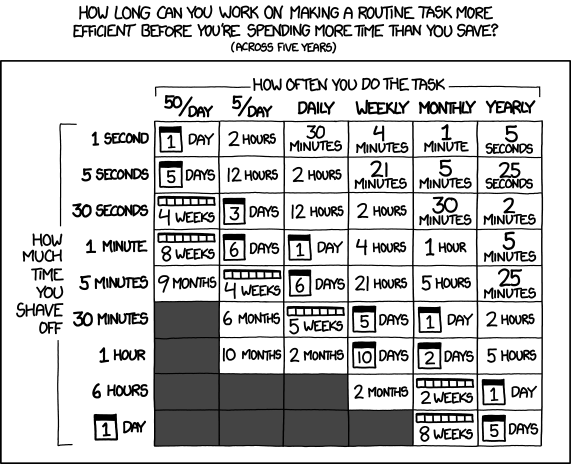
Source: https://imgs.xkcd.com/comics/is_it_worth_the_time.png
Background
A Shiny web app playing the classic Higher or Lower card game was created for the PSI Conference to act as a hook to encourage attendees to visit the Exploristics stand.
To stimulate further engagement and generate further social media collateral a Monte-Carlo simulation was developed to assess the probability of the daily winners achieving their score.
Code Scope
The code had to carry out the follow steps
Generate a deck of playing cards
Sample from deck
Update deck
Repeat until player loses
Record the score
Monte-Carlo Simulation to repeat process (100,000 times)
Inefficient Code Example
When initially writing code or scripts they can be more an exploratory exercise and an ad hoc endeavor to solve statistical or functional challenges, especially when computational time is relatively cheap and the larger constraint is your time to achieve an output.
In this example it’s easy to come up with the Higher or Lower game logic, which initially runs in the blink of an eye then simpy repeat it thousands of times over for the Monte-Carlo simulation.
Note
Profiling Code
Profiling code allows you to identify which areas you should target optimizing your code and also allows you to have a better understanding of how the code runs, reducing potential bugs.
| Function | Time (seconds) | Percent of run time |
|---|---|---|
| write.csv | 329.02 | 53.49 |
| read.csv | 184.04 | 29.92 |
| c | 7.2 | 1.17 |
7 Deadly Simulation Sins
Benchmarking

Sloth
Often there is information required for a function to achieve it’s expected output. As programmers we can often be lazy and let the code make the decision on our behalf, however this requires additional
DYK if you don’t supply the colClasses argument to the read.csv function it reads in all the data once to assign the column types then again knowing the column types, doubling the code time.
Tip
Read the function documetation so if you know information that is required by the function you can supply it to the arguments. Also don’t request information you’d don’t require.
Absolution
We’re reading in the results.csv read.csv without supplying which will read in the csv file twice - doubling the computation time of this function. By supplying the colClasses argument.
Alternatively we could have considered other functions or file formats.
Note
This resulted in a speed increase of 1.7 % from baseline
Gluttony
The ability to generate and consume data has become relatively cheap in recent times which means we often don’t consider it when developing scripts. From the summaryRprof output we can see the write.csv function takes up 53% of the run-time 👀.
Tip
Avoid read and write operations by working in memory within the script.
Always consider what data you need to save, in which format and for how long.
Absolution
Assigning an object within the script prior to the loop to contain the results avoids the need to writing out to hard-disk. Then we can assign the results to this object.
Note
This resulted in a speed increase of 67 % from baseline
Greed
When working on initial scripts we’ll often create and store more data then needed or in a format. This doesn’t scale well and can lead to data governance and retention issues.
Building the deck of cards as a data.frame has supplementary information which isn’t required and in a format that requires more memory. Only storing the a numeric vector of the card value and creation of the object once outside of the for loop
Where possible create all objects and do pre-computation outside of a for loop - do once, use many times.
Use the appropriate data structure - if all your values are of the same type, consider a matrix over a data.frame.
Absolution
Move the creation outside of the for loop and simpler data structure, in this case a numeric vector that only contains
Note
This results in code running 96 % quicker.
Wrath
When initially reading stackoverflow comments for loops tend to create an irrational response within responses. There’s nothing wrong with for loops but the tend to lead to inefficient processes, such as building a vector.
Tip
When creating objects using a loop, pre-allocate the storage object if possible. The apply family of functions can also be used.
Absolution
Rather than a for loop I’ve used an sapply which will return a numeric vector rather than a data.frame .
An alternative for those who prefer for loops is to pre-allocated the results
Note
This solution resulted in a 98 % speed increase.
Lust
We can often use functions because we’re familiar with them and not aware of alternatives. There may be an optimised version of a function we regular use or we could re-write the function in C++.
Note
Using separate if else conditions is faster than an ifelse statement. Efficient R Programming
Tip
Searching online resources such as Stackoverflow will often return a solution you can modify to meet your needs.
Absolution
Replacing the ifelse statement with separate if else conditions.
Note
This solution resulted in a 98.2 % speed increase from baseline.
Envy
R is a single threaded language by default which means it only uses a fraction of the CPI available. We could envy other programming languages or use parallel processing to access the computational resources we have available to us.
Monte-Carlo simulation is an example of an Embarrassingly_parallel problem, where we can assign each core to complete a simulation then have each move onto the next available simulation until all are complete. My laptop has 6 cores - so a maximum 6x speed increase and HPC can have potentially 100s of cores.
Absolution
Using the mclappy function of of the parallel 📦 in place of the lapply function allows us to quickly ulitise the available CPU cores.
This solution made the code run 98.3% faster.
Pride
Having too much pride in our solutions without checking can be our downfall. I was convinced parallel would Benchmarking is the process of assessing different ways and gathering information on the run time to aid in which method to adopt. Speed is only 1 factor but other factors such as ease of maintenance and dependency management may also be important factors.
Tip
The microbenchmark 📦 is useful for benchmarking and resources available: Chapter 2.7: Rodger Peng