ANLY 512 Problem Set 2
Introduction to Data Visualization
Mithil Kashyap Vyas
03/28/2023
Directions
In this chapter we discussed why well-designed data graphics are important and we described a taxonomy for understanding their composition.
The objective of this assignment is for you to understand what characteristics you can use to develop a great data graphic.
Each question is worth 5 points.
To submit this homework you will create the document in Rstudio, using the knitr package (button included in Rstudio) and then submit the document to your Rpubs account. Once uploaded you will submit the link to that document on Canvas. Please make sure that this link is hyper linked and that I can see the visualization and the code required to create it.
Question #1
Answer the following questions for this graphic Relationship between ages and psychosocial maturity

- Identify the visual cues, coordinate system, and scale(s)
- How many variables are depicted in the graph? Explicitly link each variable to a visual cue that you listed above.
- Critique this data graphic using the taxonomy described in the lecture.
knitr::include_graphics("http://ars.els-cdn.com/content/image/1-s2.0-S1043276005002602-gr2.jpg")
a: Visual cues are shape, color, positions and direction.
Coordinate system:The relationship between ages and psycho social maturity graph has Cartesian (x,y) coordinate system.
Scale:the graph’s scales are linear numeric for y axis, ranging from 0 to 20 years of age.The graph further has logarithmic backward numeric scale for the x-axis from 20,000 years ago to present.
b: Variables are menarche, psychosocial matureation, age and years.
shape: Shape/lengths of menarche and psychosocial maturation are different. color: Menarche and psychosocial maturation are differentiated by color. position: All variables are in different positions direction: 2 line in different directions
c: Visual cues such as position, color, shape and direction are abundantly clear. Cartesian Co-ordinate system describes the x and y axes and time is a variable on the axes. The graph is missing a title. The labels in pink and green aren’t properly visible. The graph is also missing a title. A legend would have been nice on the side of the graph.
Question #2
Answer the following questions for this graphic World’s top 10 best selling cigarette brands 2004-2007
- Identify the visual cues, coordinate system, and scale(s)
- How many variables are depicted in the graph? Explicitly link each variable to a visual cue that you listed above.
- Critique this data graphic using the taxonomy described in the lecture.
knitr::include_graphics("https://farm3.static.flickr.com/2695/4149541331_482fbb0aaf_o.png") a: Visual cues: Angle, position, color and length.
Coordinate system: Cartesian co-ordinate system. Scale(s): Linear(x) and
Categorical(y)
a: Visual cues: Angle, position, color and length.
Coordinate system: Cartesian co-ordinate system. Scale(s): Linear(x) and
Categorical(y)
b: There are two variables: Cigarette brands on the y-axis and sales(in billions) on the x-axis.
c: Marlbono’s sales is very large so the ranked bar chart’s length is based on its individual sales. We can apply a logarithmic transformation on the x-axis to make this chart better visually.
Question #3
Find two data graphics published in a newspaper on on the internet in the last two years.
- Identify a graphical display that you find compelling. What aspects of the display work well, and how do these relate to the principles that we have just gone over in lecture. Include a screenshot of the display along with your solution (Hint:use the following in a code chunk: knitr::include_graphics(“your_graphic”).
knitr::include_graphics("https://www.tapclicks.com/wp-content/uploads/How-to-Visualize-your-Data-with-Charts-and-Graphs.jpg")
#source: https://www.tapclicks.com/wp-content/uploads/How-to-Visualize-your-Data-with-Charts-and-Graphs.jpga: The image linked above is a visual guide to creating charts and graphs for data visualization. The image is divided into several sections, each of which demonstrates a different type of chart or graph.
Starting from the top-left corner of the image, the first section shows a bar graph with horizontal bars representing the data. The second section shows a line graph with points connected by lines to show trends over time. The third section shows a pie chart, where data is represented by slices of a pie, with each slice representing a percentage of the total.
The fourth section shows a scatter plot, where data points are plotted on a two-dimensional graph to show the relationship between two variables. The fifth section shows a bubble chart, where data points are represented by bubbles with sizes corresponding to the values of the data. The sixth section shows a heatmap, where color-coded squares are used to represent data values across two dimensions.
The final section shows a word cloud, where words are sized and positioned based on their frequency in the data. Overall, the image provides a useful reference for different types of charts and graphs that can be used for effective data visualization.
- Identify a graphical display that you find less compelling. What aspects of the display don’t work well? Are there ways that the display might be improved? Include a screenshot of the display along with your solution (Hint:use the following in a code chunk: knitr::include_graphics(“your_graphic”).
knitr::include_graphics("https://blogs.sap.com/wp-content/uploads/2018/03/messy-visualizations.png")
#source: https://blogs.sap.com/2018/03/21/cleaning-up-your-visualizations-with-sap-analytics-cloud/b: The image linked above shows a set of poorly designed visualizations, with several issues that make them difficult to understand and interpret. Some of the aspects of the display that don’t work well include:
Lack of clear labeling: The charts and graphs lack clear labeling, making it hard to understand what they represent.
Overuse of color: The visualizations use too many colors, which can be distracting and confusing.
Poor use of space: The charts and graphs are not well-organized and use space inefficiently, making it hard to focus on the data.
Inconsistent scales: The scales used in the visualizations are inconsistent, making it difficult to compare data across different charts and graphs.
To improve this display, we could consider redesigning the visualizations with the following changes:
Simplify the design: Use fewer colors and a more consistent design language across all charts and graphs.
Use clear labeling: Clearly label all visual elements to make it easier to understand what they represent.
Use space efficiently: Design the charts and graphs with a clear hierarchy of information and use space efficiently to highlight the most important data.
Use consistent scales: Ensure that all charts and graphs use consistent scales and axes to allow for easy comparison of data.
Question #4
Briefly (one paragraph) critique the designer’s choices. Would you have made different choices? Why or why not? Note: Link contains a collection of many data graphics, and I don’t expect (or want) you to write a full report on each individual graphic. But each collection shares some common stylistic elements. You should comment on a few things that you notice about the design of the collection.
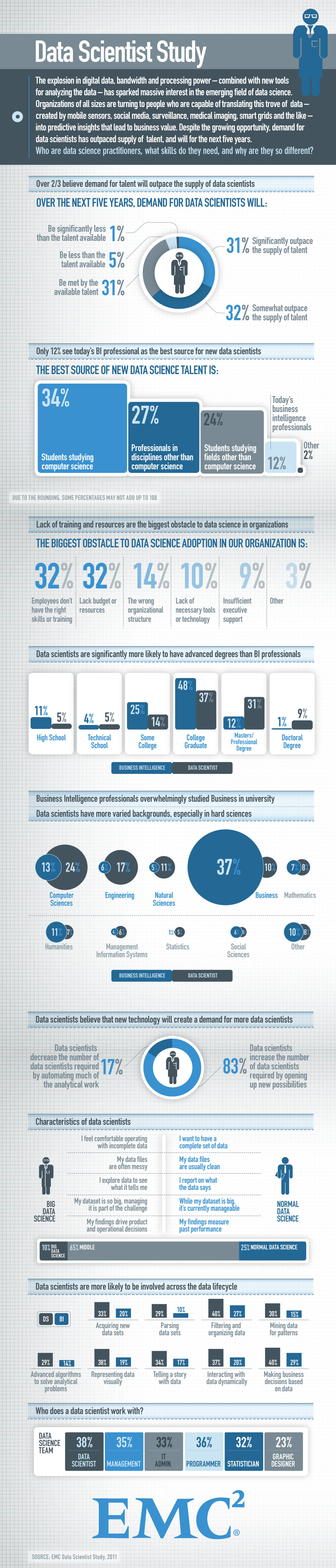
Answer: My initial observation of this collection of charts is that it appears to have an excessive amount of textual content, which makes it feel more like a report than a data visualization. For instance, in the final charts that display who a data scientist works with, there is no explanation provided for the percentage data above each group, and there is no differentiation between the groups other than the use of colors. To improve the chart’s effectiveness, I suggest creating a ranking bar chart.
While the consistent visual cue, particularly the color patterns, contributes to the collection’s design and gives it a professional appearance, the excessive text and data points make it difficult to discern the essential information. The presentation covers three separate questions in a confined space, including “Who are data science practitioners, what skills do they require, and why are they unique?” To make the presentation more effective, I would recommend breaking down each question and grouping the related graphs together.
Question #5
Briefly (one paragraph) critique the designer’s choices. Would you have made different choices? Why or why not? Note: Link contains a collection of many data graphics, and I don’t expect (or want) you to write a full report on each individual graphic. But each collection shares some common stylistic elements. You should comment on a few things that you notice about the design of the collection.
Charts that explain food in America
Answer: The collection of 40 maps effectively communicates a variety of stories, each capturing unique reasons, which is commendable because it prevents confusion. However, some charts are more challenging to interpret than others. For instance, the first chart depicting American agriculture in 1922 contains so much data that it becomes difficult to read, and the third chart on “losing farms” uses dots to show the increase and decrease in the number of farms, which can also be confusing. Additionally, most charts do not have a legend, making it hard to decipher the color scheme and understand what the chart represents. It is important to note that the large dataset used may be to blame for these shortcomings, and the author has made a sincere effort to use 40 distinct graphs to present the data.